Xiaomi Mi Notebook Ultra: A Comprehensive Review and Buyer’s Guide
Outline
- Introduction
- Design and Build Quality
- Display and Audio
- Performance and Specifications
- Keyboard and Trackpad
- Ports and Connectivity
- Battery Life
- Software and User Experience
- Best Xiaomi Mi Notebook Ultra Alternatives
- Pricing and Availability
- Pros and Cons
- Conclusion
- Frequently Asked Questions (FAQ)
Introduction
The Xiaomi Mi Notebook Ultra, a sleek and powerful laptop, entered the market aiming to deliver a premium experience at a competitive price. Positioned as a direct competitor to popular Ultrabooks, it attracted attention with its promise of high-end performance, a vibrant display, and a modern design. This review delves deep into the Mi Notebook Ultra, examining its features, performance, and overall value to help you decide if it’s the right laptop for you. We’ll explore its strengths, weaknesses, and how it stacks up against its rivals.
Design and Build Quality
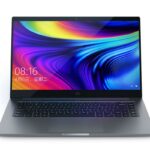
The Mi Notebook Ultra boasts a minimalist design with an aluminum unibody construction. The chassis feels solid and premium, exhibiting minimal flex. The finish is clean and elegant, with the only branding being the subtle Mi logo on the lid. Its slim profile and lightweight design contribute to its portability, making it easy to carry around. While the design is generally well-received, some users may find it somewhat generic compared to more distinctive designs from other brands. The overall build quality inspires confidence, suggesting the laptop can withstand everyday wear and tear.
Display and Audio
The laptop features a 15.6-inch display with a 3.2K resolution (3200 x 2000 pixels) and a 90Hz refresh rate. This combination provides sharp visuals and smooth animations. The display offers good color accuracy and brightness, making it suitable for content creation and media consumption. The thin bezels around the display contribute to an immersive viewing experience.
The audio system, while decent, isn’t the laptop’s strongest suit. The speakers are bottom-firing and deliver adequate sound quality for casual use, but they lack the depth and richness found in premium audio systems. External speakers or headphones are recommended for a more immersive audio experience.
Performance and Specifications
The Mi Notebook Ultra is available with various configurations, typically featuring Intel Core i5 or i7 processors from the 11th or 12th generation. It comes with integrated Intel Iris Xe Graphics, suitable for everyday tasks and some light gaming, but not for demanding AAA titles. The laptop usually packs 8GB or 16GB of LPDDR4x RAM and a fast NVMe PCIe SSD for storage, providing snappy performance for multitasking and quick application loading. Its performance aligns well with its Ultrabook classification, offering a smooth experience for productivity and multimedia tasks. Users should consider their intended usage as the integrated graphics will limit its gaming capabilities.
Keyboard and Trackpad
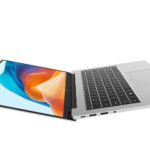
The keyboard on the Mi Notebook Ultra offers a comfortable typing experience with decent key travel and tactile feedback. The keys are well-spaced, contributing to typing accuracy. However, some users might find the keycaps a bit too flat.
The trackpad is large and responsive, offering smooth tracking and support for multi-finger gestures. The integrated click buttons provide a satisfactory click response. The trackpad’s size and responsiveness contribute to a positive user experience.
Ports and Connectivity
The Mi Notebook Ultra offers a decent selection of ports, including a Thunderbolt 4 port for fast data transfer, display output, and charging. It also features a USB-C port, USB-A ports, a 3.5mm headphone jack, and an HDMI port. The inclusion of a Thunderbolt 4 port is a significant advantage, providing versatile connectivity options. Wireless connectivity includes Wi-Fi 6 and Bluetooth 5.1 for fast and reliable connections.
Battery Life
The battery life on the Mi Notebook Ultra is generally good for its class. Users can expect around 7-9 hours of battery life with moderate usage, such as web browsing, document editing, and video streaming. Battery life may vary depending on the workload and display brightness. The fast charging capability allows for quick replenishment of the battery.
Software and User Experience
The Mi Notebook Ultra runs on Windows 10 or 11, offering a familiar and user-friendly experience. Xiaomi doesn’t heavily customize the Windows installation, meaning the user experience is relatively clean. The system boots up quickly, and the pre-installed software is minimal. Xiaomi sometimes adds its own software, but it is typically unobtrusive. The overall software experience is positive, providing a streamlined and efficient operating system.
Best Xiaomi Mi Notebook Ultra Alternatives
Choosing the right laptop depends on your specific needs and budget. Here are some of the best alternatives to the Xiaomi Mi Notebook Ultra:
Dell G15 Alternatives
| Feature | Xiaomi Mi Notebook Ultra | Dell G15 | Notes |
|---|---|---|---|
| Processor | Intel Core i5/i7 | AMD Ryzen/Intel Core | G15 offers more powerful processor options, especially for gaming. |
| Graphics | Intel Iris Xe | NVIDIA GeForce RTX | G15 offers dedicated graphics cards, making it significantly better for gaming and demanding applications. |
| Display | 3.2K, 90Hz | 120Hz/165Hz | G15’s displays prioritize higher refresh rates and, often, larger screen sizes. |
| Portability | Excellent | Good | The Mi Notebook Ultra is thinner and lighter, making it more portable. |
| Gaming Performance | Limited | Excellent | G15 is designed for gaming and provides a superior gaming experience. |
| Price | Competitive | Slightly Higher | G15 might be slightly more expensive, but offers more power. |
The Dell G15 is a strong contender for those looking for a gaming-focused laptop with more graphical horsepower. The Mi Notebook Ultra prioritizes portability and productivity.
Apple MacBook Air Alternatives
| Feature | Xiaomi Mi Notebook Ultra | Apple MacBook Air (M1/M2) | Notes |
|---|---|---|---|
| Processor | Intel Core i5/i7 | Apple M1/M2 | MacBook Air offers Apple’s own powerful and efficient silicon. |
| Operating System | Windows | macOS | The operating system difference leads to different ecosystems and user experiences. |
| Display | 3.2K, 90Hz | Retina Display | MacBook Air displays are known for their quality. |
| Portability | Excellent | Excellent | Both are very portable. |
| Ecosystem | Windows/Android | macOS/iOS | If you are invested in Apple’s ecosystem, the MacBook Air is a natural fit. |
| Price | Competitive | Higher | MacBook Air tends to be more expensive, especially for higher configurations. |
The Apple MacBook Air is a sleek and powerful alternative, especially if you’re already in the Apple ecosystem. It’s known for its excellent performance, battery life, and build quality.
Pricing and Availability
The Xiaomi Mi Notebook Ultra is generally available in select regions. The price typically falls in the mid-range category, offering good value for its features. Pricing will vary depending on the configuration and location. Availability may be limited compared to more mainstream brands.
Pros and Cons
Pros:
- Stylish and premium design.
- Sharp 3.2K display with a 90Hz refresh rate.
- Good performance for productivity and everyday tasks.
- Comfortable keyboard and trackpad.
- Relatively good battery life.
- Competitive pricing.
Cons:
- Integrated graphics limit gaming capabilities.
- Audio quality could be better.
- Availability may be limited in some regions.
- Design can be considered generic by some.
Conclusion
The Xiaomi Mi Notebook Ultra is a well-rounded laptop that delivers a premium experience at a reasonable price. It’s a strong contender for those seeking a stylish, portable, and capable laptop for productivity, content consumption, and light creative tasks. Its sharp display, comfortable keyboard, and solid build quality make it a compelling choice. While it may not be the best option for serious gamers or those seeking the absolute pinnacle of audio performance, it offers an excellent value proposition for the target audience.
Frequently Asked Questions (FAQ)
-
What is the battery life of the Xiaomi Mi Notebook Ultra?
You can expect around 7-9 hours of battery life with moderate usage, such as web browsing, document editing, and video streaming.
-
Is the Xiaomi Mi Notebook Ultra good for gaming?
While the Mi Notebook Ultra can handle some light gaming, its integrated Intel Iris Xe Graphics are not designed for demanding AAA titles. For serious gaming, consider a laptop with a dedicated graphics card.
-
What ports does the Xiaomi Mi Notebook Ultra have?
The laptop features a Thunderbolt 4 port, USB-C port, USB-A ports, a 3.5mm headphone jack, and an HDMI port.
-
What are the display specifications?
The Mi Notebook Ultra features a 15.6-inch display with a 3.2K resolution (3200 x 2000 pixels) and a 90Hz refresh rate.
-
Is the keyboard comfortable for typing?
Yes, the keyboard offers a comfortable typing experience with decent key travel and tactile feedback.