Tuxedo InfinityBook Pro 14: A Deep Dive Review
The Tuxedo InfinityBook Pro 14 offers a compelling blend of power, portability, and Linux-centric software support, making it a strong contender in the ultraportable laptop market. Designed with professionals and developers in mind, this notebook emphasizes performance and customization, appealing to users seeking a premium experience tailored to their specific needs. This review delves deep into the InfinityBook Pro 14, examining its design, performance, display, battery life, keyboard, and overall value proposition.
Outline
- Design and Build Quality
- Performance: Powering Through Tasks
- Display and Audio: Visual and Auditory Experience
- Keyboard and Trackpad: Typing and Navigation
- Battery Life: Staying Productive On-the-Go
- Connectivity and Ports
- Software and Linux Experience
- Best Tuxedo InfinityBook Pro 14 Alternatives
- Pricing and Configuration Options
- Conclusion: Is the InfinityBook Pro 14 Right for You?
- FAQ
Design and Build Quality
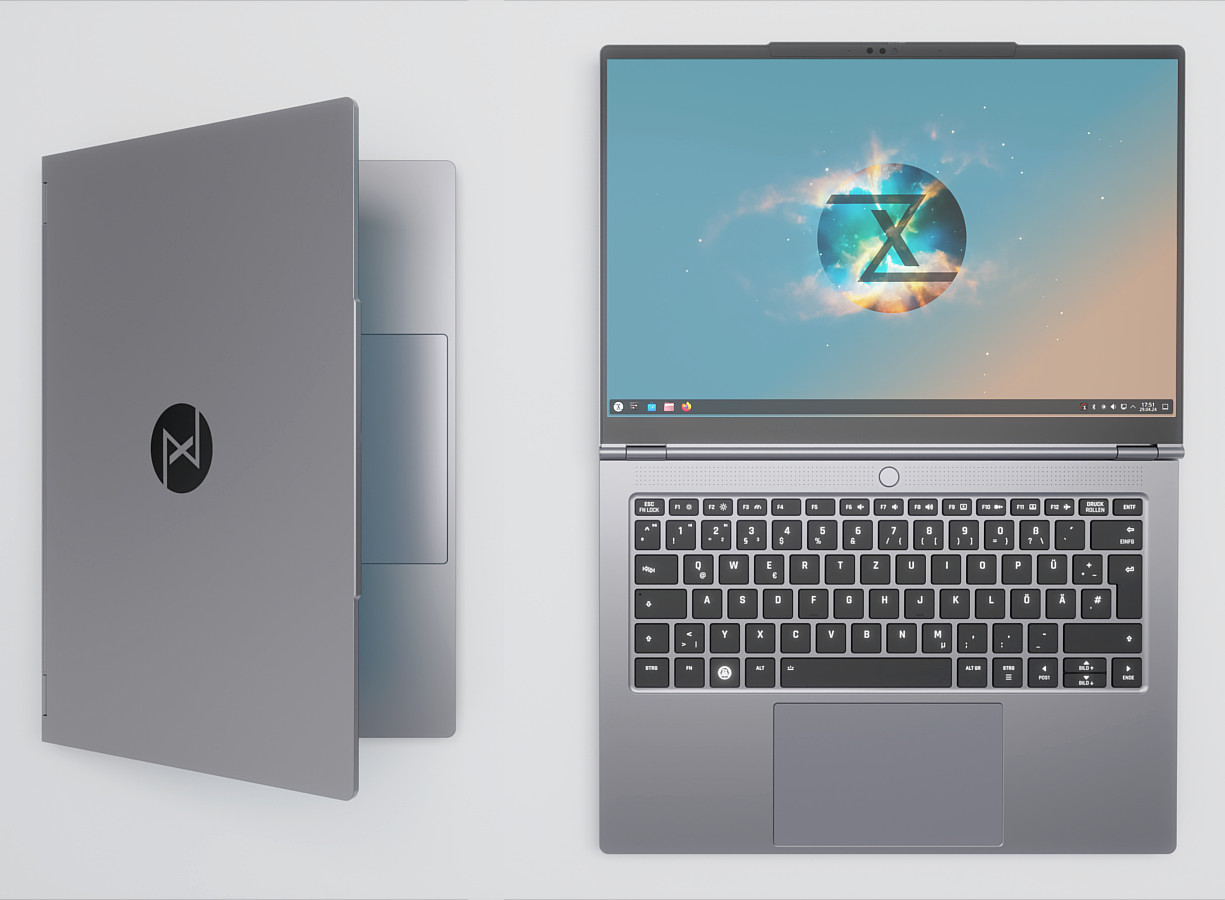
The InfinityBook Pro 14 showcases a sleek and minimalist design. Its chassis is constructed from high-quality aluminum, providing a robust feel and contributing to its lightweight nature. The matte finish resists fingerprints and smudges, maintaining a professional appearance. The overall aesthetic is understated and elegant, suitable for both office environments and mobile work settings. Build quality is exceptional, with no flex in the lid or keyboard deck. The hinges feel solid and offer smooth opening and closing action. The thin bezels around the display contribute to a modern look and maximize screen real estate.
Performance: Powering Through Tasks
Performance is a key strength of the InfinityBook Pro 14. Depending on the configuration, it can be equipped with powerful Intel Core i7 or i9 processors and up to 64GB of RAM, enabling it to handle demanding tasks such as video editing, software development, and multitasking with ease. The integrated Intel Iris Xe Graphics provides decent graphics performance for everyday tasks and some light gaming. The fast NVMe SSD storage options further enhance performance, ensuring quick boot times and rapid application loading. The included cooling system does a commendable job of managing heat, even under heavy loads, preventing thermal throttling and maintaining consistent performance. In benchmark tests, the InfinityBook Pro 14 consistently delivers impressive results, making it a reliable choice for power users.
Display and Audio: Visual and Auditory Experience
The InfinityBook Pro 14 features a vibrant 14-inch display with a high resolution (typically 1920×1080 or higher) offering sharp visuals and comfortable viewing. The display often boasts good color accuracy, making it suitable for content creators. The matte screen finish minimizes glare, enhancing usability in various lighting conditions. While the integrated speakers provide decent audio quality for everyday use, they may lack the depth and bass for a truly immersive listening experience. External speakers or headphones are recommended for audiophiles.
Keyboard and Trackpad: Typing and Navigation
The keyboard on the InfinityBook Pro 14 provides a comfortable and responsive typing experience. The keys offer a good amount of travel and tactile feedback, making it a pleasure to type on for extended periods. The layout is well-designed, and the backlighting allows for comfortable typing in low-light environments. The trackpad is smooth and accurate, supporting multi-touch gestures for effortless navigation. The trackpad’s size is adequate, providing ample space for cursor control.
Battery Life: Staying Productive On-the-Go
Battery life is a crucial factor for a portable laptop. The InfinityBook Pro 14 offers good battery life, allowing users to stay productive for several hours on a single charge. The specific battery life will vary depending on the configuration and usage patterns. Under light to moderate workloads, users can expect to get a full workday’s worth of use. The device also supports fast charging, minimizing downtime.
Connectivity and Ports
The InfinityBook Pro 14 provides a good selection of ports to cater to various connectivity needs. Common ports include USB-C (with Thunderbolt support), USB-A, HDMI, and a headphone jack. This ensures compatibility with a wide range of peripherals and accessories. The inclusion of Thunderbolt ports allows for fast data transfer and the connection of external displays and docking stations. Wi-Fi 6 and Bluetooth capabilities provide fast and reliable wireless connectivity.
Software and Linux Experience
One of the defining features of the InfinityBook Pro 14 is its strong support for Linux operating systems. Tuxedo offers pre-installed Linux distributions, such as Ubuntu, Kubuntu, and Tuxedo OS, guaranteeing seamless hardware compatibility and optimized performance. This makes the laptop an ideal choice for developers, programmers, and Linux enthusiasts. The pre-installed software includes the Tuxedo Control Center, providing users with fine-grained control over system settings and hardware customization. Tuxedo’s commitment to Linux support, including regular driver updates, ensures a smooth and reliable user experience.
Best Tuxedo InfinityBook Pro 14 Alternatives
Finding the right laptop depends on your needs. Here’s a comparison table highlighting some alternative options:
| Feature | Tuxedo InfinityBook Pro 14 | Dell XPS 13 | Apple MacBook Air M2 |
|---|---|---|---|
| Operating System | Linux (various distributions) | Windows 11 | macOS |
| Processor | Intel Core i7/i9 | Intel Core i5/i7 | Apple M2 |
| RAM | Up to 64GB | Up to 32GB | Up to 24GB |
| Graphics | Intel Iris Xe Graphics | Intel Iris Xe Graphics | Apple M2 Integrated |
| Display | 14-inch, High Resolution, Matte | 13.4-inch, High Resolution, Touchscreen (optional) | 13.6-inch, Retina |
| Portability | Excellent | Excellent | Excellent |
| Price | Configurable, starting price higher than base Dell and MacBook Air | Mid-range | Mid-range to High-end |
| Key Differentiator | Linux Support, Customization | Design, Windows Experience | Ecosystem, Performance |
Best Laptops for Developers
For developers, the Linux-focused approach of the InfinityBook Pro 14 makes it an excellent choice. The ability to customize the software environment and its native support for development tools makes the InfinityBook Pro 14 a top contender. The MacBook Air, while powerful, requires more adjustment to fully embrace the Linux ecosystem.
Best Laptops for Students
Students looking for a balance of performance and portability will find both the InfinityBook Pro 14 and the Dell XPS 13 appealing. Consider the software preference – students comfortable with Linux will enjoy the InfinityBook Pro 14, while those who prefer Windows may lean towards the Dell.
Best Laptops for Creative Professionals
Creative professionals who frequently edit video or photos will benefit from the raw power and display quality offered by the InfinityBook Pro 14. The ability to configure it with a high amount of RAM and the quality of its display are all beneficial.
Pricing and Configuration Options
The pricing of the InfinityBook Pro 14 varies based on the chosen configuration, including the processor, RAM, storage, and display options. Tuxedo offers a wide range of customization options, allowing users to tailor the laptop to their specific needs and budget. Starting prices are competitive considering the features and performance offered. Consider the additional costs of specific components when making your selection.
Conclusion: Is the InfinityBook Pro 14 Right for You?
The Tuxedo InfinityBook Pro 14 is an excellent choice for users who value performance, portability, and Linux compatibility. Its powerful components, sleek design, and customizable options make it a versatile laptop suitable for professionals, developers, and power users. While the starting price is on the higher end, the overall value proposition, especially for Linux enthusiasts, is compelling. If you are looking for a high-performance laptop with excellent build quality and a focus on Linux, the InfinityBook Pro 14 should be on your shortlist.
FAQ
-
Does the InfinityBook Pro 14 support dual boot?
Yes, you can install other operating systems like Windows on the InfinityBook Pro 14 alongside your chosen Linux distribution if you desire. -
What is the warranty period?
Tuxedo typically offers a standard warranty period, which varies depending on the region and the specific configuration chosen. Check their website for details. -
Can I upgrade the RAM or storage later?
The ability to upgrade the RAM and storage depends on the chosen configuration. Confirm the upgrade capabilities during the purchase process. -
Does the laptop support Thunderbolt?
Yes, the InfinityBook Pro 14 often includes Thunderbolt ports for fast data transfer and external display connectivity.