
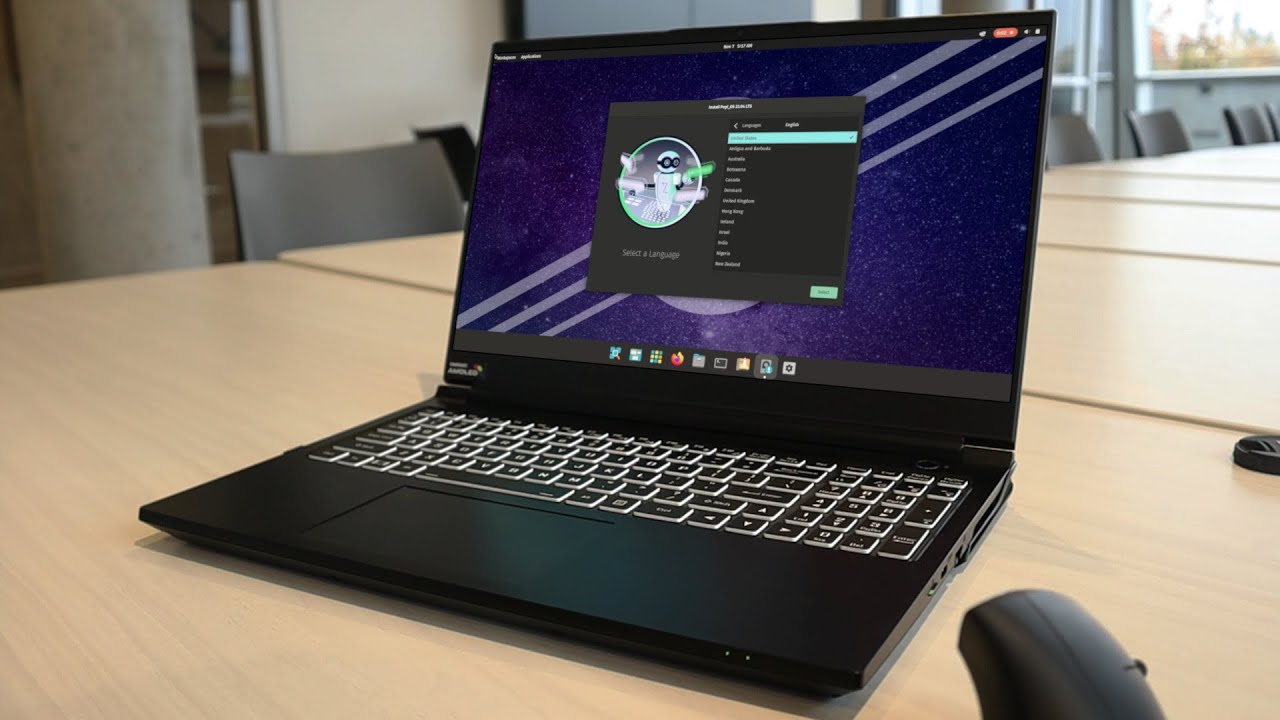

System76 Oryx Pro: A Deep Dive for Gamers and Professionals
The System76 Oryx Pro stands out as a powerful laptop, meticulously crafted for demanding users who require high performance for gaming, content creation, and professional applications. Unlike many mainstream brands, System76 offers a unique selling proposition: open-source firmware and a commitment to Linux, appealing to privacy-conscious individuals and developers. This in-depth review explores the Oryx Pro’s features, performance, and its suitability for various user profiles.
Outline
- Design and Build Quality
- Performance: Powerhouse for Gaming and Productivity
- Display and Audio Experience
- Keyboard, Trackpad, and Connectivity
- Battery Life and Portability
- Software and Linux Integration
- Best System76 Oryx Pro Alternatives for Gamers
- [Comparison Table: Dell G15 vs. System76 Oryx Pro vs. ASUS ROG Strix G15]
- [Comparison Table: Razer Blade 15 vs. System76 Oryx Pro]
- Pricing and Configuration Options
- Pros and Cons
- Final Verdict: Is the Oryx Pro Right for You?
- Frequently Asked Questions (FAQ)
Design and Build Quality
The Oryx Pro typically features a robust, matte-black aluminum chassis, offering a professional aesthetic. System76 laptops often prioritize function over flamboyant design. The build quality is generally excellent, providing a solid feel and minimizing flex. The design is clean and understated, lacking aggressive gaming aesthetics. While the design is modern, it doesn’t always showcase the same eye-catching flair as competitors. Ventilation is strategically placed to maximize airflow, a critical factor for maintaining performance during extended gaming sessions or resource-intensive tasks. The overall weight is a consideration, as it leans towards the heavier side, reflecting the premium components within.
Performance: Powerhouse for Gaming and Productivity
The Oryx Pro is a performance-focused machine, offering a range of high-end processors (typically Intel Core i7 or i9) and dedicated NVIDIA GeForce RTX series graphics cards. The specific configurations vary depending on the model year, but expect cutting-edge components. Memory configurations typically start with 16GB of RAM and can be upgraded to 64GB or more, catering to memory-hungry applications. Storage options include fast NVMe SSDs, ensuring rapid boot times and application loading. This combination allows the Oryx Pro to excel in both gaming and professional applications.
Gaming Performance Benchmarks
Performance in games is generally excellent. The RTX series graphics cards deliver high frame rates at both 1080p and 1440p resolutions, often capable of playing the latest AAA titles with high or ultra graphics settings. Actual performance will vary depending on the specific GPU configuration and the game being played.
Content Creation and Professional Workloads
Beyond gaming, the Oryx Pro is equally well-suited for content creation and professional tasks. The powerful processor, ample RAM, and fast storage make it ideal for video editing, 3D rendering, software development, and other demanding applications. The Linux operating system supported by System76 also provides a reliable development environment. The performance is competitive with, or exceeds, many desktop systems in similar price ranges.
Display and Audio Experience
The display quality is generally good to very good. Typically, the Oryx Pro features a high-refresh-rate display (144Hz or higher) with a resolution of 1080p or 1440p, offering smooth visuals and a responsive gaming experience. The display typically covers a high percentage of the sRGB color gamut and often offers good color accuracy, which benefits content creation workflows. The speakers are passable, offering adequate sound quality for general use. While the audio performance is acceptable, users may prefer external speakers or headphones for a more immersive audio experience.
Keyboard, Trackpad, and Connectivity
The keyboard typically offers a comfortable typing experience with decent key travel. System76 often uses a premium keyboard that provides a tactile feel. The trackpad is generally responsive and accurate, although many gamers prefer to use an external mouse. The Oryx Pro provides a comprehensive selection of ports, including USB-A, USB-C (with Thunderbolt support), HDMI, and an Ethernet port. This extensive connectivity allows users to connect various peripherals and external displays easily.
Battery Life and Portability
Battery life is generally not a strong point for high-performance gaming laptops, and the Oryx Pro is no exception. Expect battery life of a few hours during normal use, significantly less during gaming or other demanding tasks. While the Oryx Pro is portable, its weight and size make it less ideal for everyday commuting than ultraportable laptops. The weight and size are trade-offs for the performance offered.
Software and Linux Integration
One of the key selling points of the Oryx Pro is its tight integration with the Linux operating system. System76 pre-installs its own custom distribution, Pop!OS, based on Ubuntu. Pop!OS is known for its user-friendly interface, optimized performance, and excellent hardware support. System76 provides its own drivers and firmware updates, ensuring a smooth and optimized Linux experience. This commitment to Linux makes the Oryx Pro an excellent choice for users who prefer or require a Linux environment. The open-source nature of the firmware also offers security benefits and allows for customization.
Best System76 Oryx Pro Alternatives for Gamers
The gaming laptop market is competitive, and several alternatives offer similar performance and features. Here are some of the best:
Comparison Table: Dell G15 vs. System76 Oryx Pro vs. ASUS ROG Strix G15
| Feature | Dell G15 | System76 Oryx Pro | ASUS ROG Strix G15 |
|---|---|---|---|
| Processor | Intel/AMD (Varies by configuration) | Intel Core i7/i9 | AMD Ryzen 9 |
| GPU | NVIDIA GeForce RTX series | NVIDIA GeForce RTX series | NVIDIA GeForce RTX series |
| Display | 1080p/1440p, High Refresh Rate | 1080p/1440p, High Refresh Rate | 1080p/1440p, High Refresh Rate |
| OS | Windows 11 | Pop!_OS (Linux) | Windows 11 |
| Price | Starting from ~$800 (Varies by configuration) | Starting from ~$1,799 (Varies by configuration) | Starting from ~$1,500 (Varies by configuration) |
| Build Quality | Good | Excellent | Excellent |
| Linux Support | Limited | Excellent | Limited |
| Key Advantage | Price, Availability | Open-source, Linux integration | High performance, Feature-richness |
Comparison Table: Razer Blade 15 vs. System76 Oryx Pro
| Feature | Razer Blade 15 | System76 Oryx Pro |
|---|---|---|
| Processor | Intel Core i7/i9 | Intel Core i7/i9 |
| GPU | NVIDIA GeForce RTX series | NVIDIA GeForce RTX series |
| Display | 1080p/1440p, High Refresh Rate, OLED Options | 1080p/1440p, High Refresh Rate |
| OS | Windows 11 | Pop!_OS (Linux) |
| Price | Starting from ~$2,000 (Varies by configuration) | Starting from ~$1,799 (Varies by configuration) |
| Build Quality | Excellent | Excellent |
| Linux Support | Limited | Excellent |
| Key Advantage | Premium Design, Thin and Light | Open-source, Linux integration |
Pricing and Configuration Options
The System76 Oryx Pro is positioned in the premium gaming laptop segment. Prices typically start at around $1,799 and can increase significantly depending on the configuration. Customization options often include the processor, GPU, RAM, storage, and display resolution. System76 allows users to tailor the laptop to their specific needs, though this flexibility translates to a higher price tag compared to mainstream brands with locked configurations.
Pros and Cons
Pros:
- Excellent Performance: High-end processors and graphics cards deliver exceptional gaming and productivity performance.
- Superior Linux Integration: Pre-installed Pop!_OS with excellent hardware support and open-source firmware.
- Build Quality: Solid, durable construction with a premium feel.
- Customization Options: Configure the laptop to meet specific requirements.
- Privacy Focused: Open-source approach and Linux focus offer better privacy.
Cons:
- Price: Premium pricing compared to some competitors.
- Battery Life: Battery life is a weakness.
- Weight and Portability: Relatively heavy and bulky compared to ultraportables.
- Availability: May have longer lead times compared to mainstream brands.
- Aesthetics: Design is functional rather than flashy.
Final Verdict: Is the Oryx Pro Right for You?
The System76 Oryx Pro is an excellent choice for gamers and professionals who prioritize performance, Linux integration, and open-source principles. Its powerful components and optimized software experience make it a compelling option for those seeking a premium laptop tailored to their specific needs. It’s a particularly great option for developers and privacy-conscious users who appreciate the open-source nature of the system. However, the higher price tag, shorter battery life, and less mainstream availability should be considered. If you prioritize maximum performance, a strong Linux ecosystem, and value open-source principles, the Oryx Pro is a strong contender. If you need maximum portability, the lowest possible price, or primarily use Windows applications, other options may be more suitable.
Frequently Asked Questions (FAQ)
- Does the Oryx Pro come with Windows? No, the Oryx Pro ships with System76’s custom Linux distribution, Pop!_OS. You can choose a different Linux distribution during the configuration process if preferred. Windows is not pre-installed.
- Can I install Windows on the Oryx Pro? Yes, you can install Windows on the Oryx Pro. However, you will need to obtain a Windows license and install the drivers yourself.
- What is Pop!OS? Pop!OS is a Linux distribution based on Ubuntu, developed by System76. It’s designed to be user-friendly, with excellent hardware support, particularly for System76 laptops.
- How long is the warranty? System76 typically offers a one-year warranty on their laptops. Extended warranty options are often available.
- Are replacement parts readily available? System76 offers spare parts and components directly, though availability might be limited compared to mainstream brands.
- Is the Oryx Pro upgradeable? While RAM and storage are typically upgradeable, the CPU and GPU are generally soldered and not user-replaceable.









