Slimbook ProX: A Deep Dive for Professionals and Creatives
The Slimbook ProX represents a compelling offering in the premium ultrabook market, particularly for Linux users. Designed and built in Spain, the ProX focuses on delivering a sleek, powerful, and customizable computing experience with a strong emphasis on open-source compatibility and user privacy. Its target audience is professionals, creatives, and anyone seeking a high-performance laptop that runs seamlessly with Linux. This article delves into the ProX’s features, performance, and its place in a competitive landscape, helping potential buyers make an informed decision.
Outline
- Design and Build Quality
- Performance and Specs
- Operating System and Software
- Display and Audio
- Ports and Connectivity
- Battery Life
- Pros and Cons
- Best Slimbook ProX Alternatives for Professionals
- Slimbook ProX: Is it Worth Buying?
- Frequently Asked Questions (FAQ)
Design and Build Quality
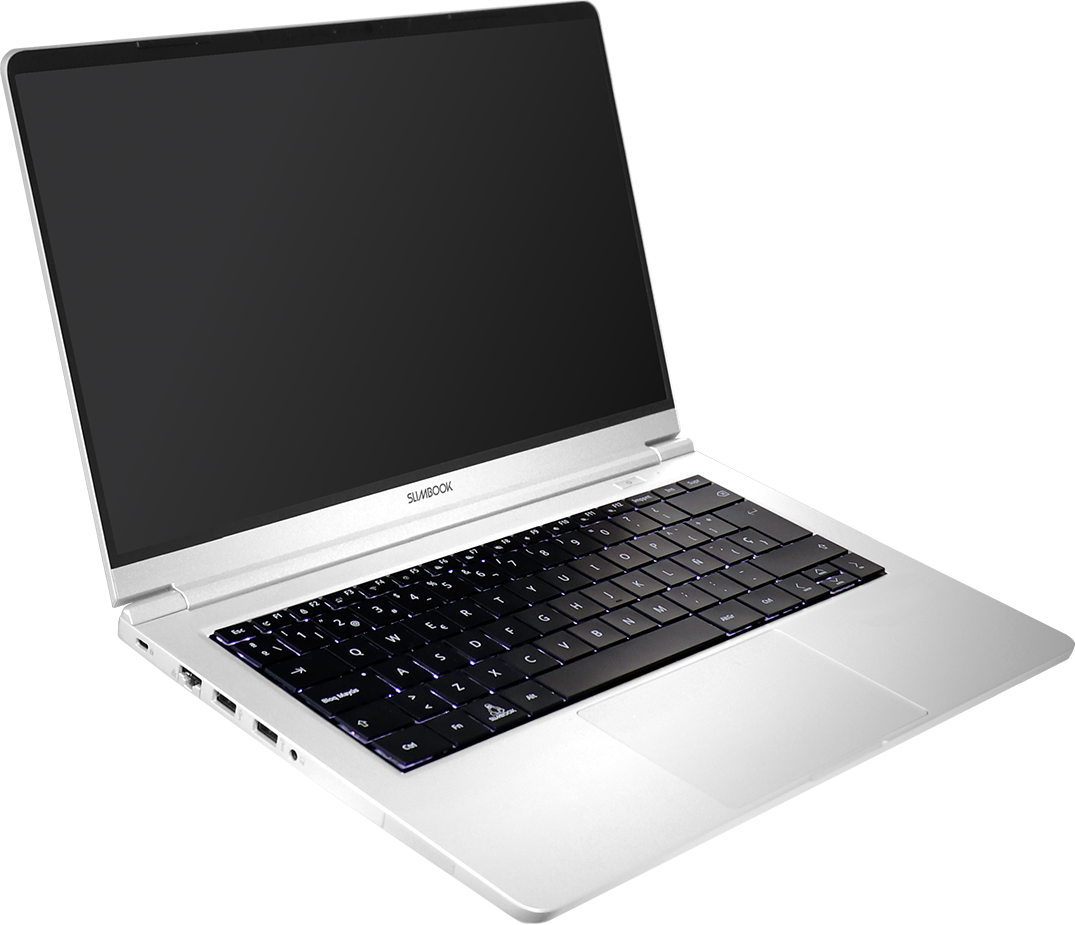
The Slimbook ProX boasts a minimalist and elegant design, typically constructed from high-quality aluminum. This gives the laptop a premium feel and contributes to its overall durability. The slim profile, as the name suggests, makes it highly portable, easily slipping into a backpack or messenger bag. The build quality is generally excellent, with a solid feel and minimal flex. The keyboard layout is well-considered, providing a comfortable typing experience, though individual preferences may vary. The trackpad is usually precise and responsive, enhancing the overall user experience. The color options are typically subtle and professional, complementing the laptop’s intended user base.
Performance and Specs
The Slimbook ProX’s performance is driven by a range of modern processors, typically from Intel’s Core i7 or i9 series, providing ample power for demanding tasks. The inclusion of high-speed RAM (16GB or 32GB) and fast SSD storage (512GB to 2TB) ensures smooth multitasking and rapid application loading. The discreet graphics options, such as NVIDIA’s GeForce series or AMD’s Radeon, offer respectable graphical performance for tasks such as video editing, and light gaming. The specific specs vary depending on the chosen configuration, offering buyers flexibility to tailor the laptop to their specific needs and budget. Slimbook emphasizes optimizing the ProX for Linux, ensuring smooth performance with various distributions.
Operating System and Software
One of the Slimbook ProX’s key selling points is its seamless Linux integration. Customers can choose their preferred distribution during the purchase process, with options typically including Ubuntu, Kubuntu, and Linux Mint. Slimbook meticulously configures the hardware and software to ensure optimal compatibility and performance with the selected distribution. This includes pre-installed drivers and optimized settings to avoid the often-encountered hurdles of installing Linux on other laptops. This commitment to Linux compatibility makes the ProX an excellent choice for users who prioritize open-source software or prefer a Linux-based operating system. Furthermore, Slimbook offers a wealth of helpful documentation and support for Linux users.
Display and Audio
The Slimbook ProX typically features a high-quality display with a focus on vibrant colors and sharp details. The screen resolution is generally high, offering a comfortable viewing experience for work and content consumption. The bezels are often slim, maximizing screen real estate. The audio quality, while often adequate, is generally not a standout feature. External speakers or headphones are recommended for audiophiles. The display’s brightness is usually sufficient for use in various lighting conditions.
Ports and Connectivity
The Slimbook ProX usually provides a comprehensive selection of ports and connectivity options. These often include USB-C ports with Thunderbolt 4 support (enabling high-speed data transfer and display output), USB-A ports, an HDMI port, and a headphone jack. The inclusion of an SD card reader is not guaranteed, so this is a factor to consider for photographers and videographers. For wireless connectivity, the laptop offers Wi-Fi 6 and Bluetooth 5.0, ensuring fast and reliable wireless networking. The specific port configuration may vary slightly depending on the chosen configuration.
Battery Life
Battery life is a crucial factor for a portable laptop. The Slimbook ProX typically delivers respectable battery life, suitable for a full workday of general use. The actual battery life varies depending on the usage pattern and the configuration of the laptop. Running demanding applications and resource-intensive tasks will drain the battery faster. The battery’s capacity is usually sufficient for users who primarily utilize the laptop for tasks such as web browsing, document editing, and light multimedia consumption.
Pros and Cons
Pros:
- Excellent build quality and design
- Optimized for Linux with pre-installed distributions
- Powerful performance with high-end processors and RAM
- Comprehensive port selection
- Comfortable keyboard and trackpad
- Good battery life
Cons:
- Audio quality could be improved
- Higher price point compared to some competitors
- Graphics card options are limited compared to dedicated gaming laptops
Best Slimbook ProX Alternatives for Professionals
Here’s how the Slimbook ProX stacks up against competitors, with a focus on professional and creative workflows:
Comparison Table: Slimbook ProX vs. Dell XPS 13 vs. Apple MacBook Air M2
| Feature | Slimbook ProX | Dell XPS 13 | Apple MacBook Air M2 |
|---|---|---|---|
| Operating System | Linux (Ubuntu, Kubuntu, Linux Mint pre-installed) | Windows 11 | macOS |
| Processor | Intel Core i7/i9 (Current Gen) | Intel Core i7/i9 (Current Gen) | Apple M2 |
| RAM | 16GB – 32GB | 16GB – 32GB | 8GB – 24GB |
| Storage | 512GB – 2TB SSD | 512GB – 2TB SSD | 256GB – 2TB SSD |
| Graphics | Intel Integrated Graphics, NVIDIA/AMD (Optional) | Intel Integrated Graphics | Apple Integrated Graphics |
| Display | 14-inch, High Resolution | 13.4-inch, High Resolution | 13.6-inch, High Resolution |
| Ports | USB-C (Thunderbolt 4), USB-A, HDMI, Headphone Jack | USB-C (Thunderbolt 4), microSD, Headphone Jack | USB-C (Thunderbolt 3), Headphone Jack |
| Battery Life | Good | Very Good | Excellent |
| Linux Support | Excellent, optimized | Good, but requires manual driver installation sometimes | Not Officially Supported |
| Price (Starting) | $$ | $$ | $$ |
The Dell XPS 13 offers a strong Windows alternative, renowned for its premium design and excellent display, but may require extra effort to customize for Linux. The Apple MacBook Air M2 provides exceptional performance and battery life within the macOS ecosystem, but lacks dedicated Linux support.
Slimbook ProX: Is it Worth Buying?
The Slimbook ProX is a worthwhile investment for users who value a high-performance laptop with a focus on Linux. It offers a premium build, powerful specs, and seamless Linux integration, making it ideal for professionals, developers, and creatives seeking a powerful and customizable computing experience. While the price point is on the higher end, the features and performance justify the investment for users who prioritize these aspects. The ProX excels in areas where other laptops often fall short, particularly regarding Linux compatibility and user customization options.
Frequently Asked Questions (FAQ)
Q: Can I install a different Linux distribution on the Slimbook ProX?
A: Yes, you can install any Linux distribution you prefer. However, the pre-installed options offered by Slimbook are optimized for hardware compatibility.
Q: Does the Slimbook ProX have a touchscreen?
A: No, the Slimbook ProX typically does not come with a touchscreen.
Q: What is the warranty on the Slimbook ProX?
A: Slimbook typically offers a standard warranty of 2 years, with extended warranty options available.
Q: Is the Slimbook ProX upgradeable?
A: The RAM is usually soldered, so upgrading it is not possible. The storage (SSD) is often upgradeable.
Q: Does the Slimbook ProX support Thunderbolt 4?
A: Yes, Thunderbolt 4 is typically supported on the Slimbook ProX models, providing high-speed data transfer and display output.