Realme Book Slim: A Comprehensive Review and Buying Guide
Outline
- Introduction
- Design and Build Quality
- Display and Audio
- Performance and Specs
- Battery Life
- Keyboard and Trackpad
- Ports and Connectivity
- Software and Features
- Realme Book Slim: Pricing and Availability
- Best Realme Book Slim Alternatives for Students
- Realme Book Slim: Pros and Cons
- FAQ
The Realme Book Slim, Realme’s foray into the laptop market, aimed to disrupt the budget-friendly segment with a sleek design and promising specifications. It positioned itself as a competitor to established brands like Dell, HP, and Apple, offering a compelling package for students, professionals, and everyday users. This review dives deep into the Realme Book Slim, examining its strengths, weaknesses, and overall value proposition.
Design and Build Quality
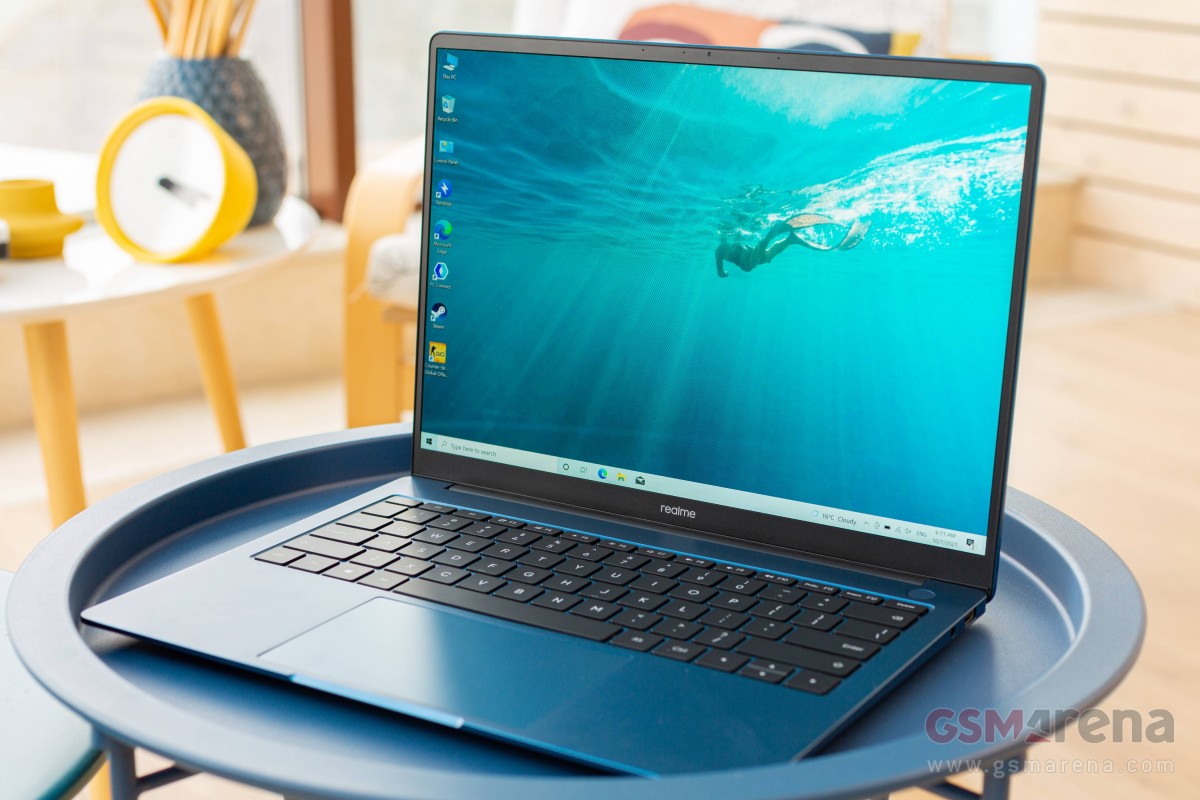
The Realme Book Slim immediately impresses with its minimalist design. Its aluminum alloy chassis feels premium, offering a solid and durable build. The slim profile and lightweight nature make it highly portable, a significant advantage for users constantly on the move. The clean lines and available color options contribute to a modern and stylish aesthetic. While the build quality is generally good, some users have reported minor flex in the display, especially when applying pressure. Overall, the Realme Book Slim punches above its weight in terms of design and build, rivaling laptops in higher price brackets.
Display and Audio
The 14-inch IPS display on the Realme Book Slim boasts a sharp resolution and vibrant colors, making it suitable for both work and media consumption. The screen-to-body ratio is quite high, thanks to the slim bezels, contributing to an immersive viewing experience. The display’s brightness is adequate for indoor use, although it may struggle in direct sunlight. Audio performance is handled by stereo speakers, which deliver decent sound quality with reasonable clarity. While the speakers are not the loudest, they are sufficient for listening to music, watching movies, and video calls.
Performance and Specs
The Realme Book Slim typically comes with Intel Core i3 or i5 processors, paired with integrated Intel Iris Xe graphics. Memory options usually range from 8GB to 16GB of RAM, and storage is typically provided by a fast NVMe SSD, offering quick boot-up times and application loading speeds. The performance is generally smooth for everyday tasks like web browsing, document editing, and video streaming. However, intensive tasks like video editing or gaming might push the laptop to its limits, especially with the i3 configuration. The integrated graphics are suitable for light gaming but not for demanding titles. The cooling system does a decent job of keeping the laptop cool during regular use, although it can become noticeable under heavy loads.
Battery Life
Battery life is a key consideration for any portable laptop. The Realme Book Slim generally offers a respectable battery life, capable of lasting a full workday for typical usage. Users can expect around 7-9 hours of battery life with moderate usage, including web browsing, document editing, and video streaming. The laptop also supports fast charging, allowing for quick top-ups when needed. The battery performance is competitive within its price range, making the Realme Book Slim a reliable companion for on-the-go productivity.
Keyboard and Trackpad
The keyboard on the Realme Book Slim offers a comfortable typing experience, with well-spaced keys and decent travel. The keycaps are well-sized and offer a tactile feel. While not the best keyboard in its class, it is more than adequate for extended typing sessions. The trackpad is smooth and responsive, with accurate cursor tracking and support for multi-touch gestures. The size of the trackpad is generous, providing ample space for navigation.
Ports and Connectivity
The Realme Book Slim is equipped with a reasonable selection of ports. It typically includes two USB-C ports (one of which is used for charging), a USB-A port, and a 3.5mm headphone jack. The inclusion of a USB-A port is a welcome addition, eliminating the need for a dongle for older peripherals. The laptop also supports Wi-Fi and Bluetooth for wireless connectivity. The port selection is adequate for most users but may require a dongle for those needing additional ports like an HDMI or an SD card reader.
Software and Features
The Realme Book Slim runs on Windows, providing a familiar and user-friendly operating system. Realme has also integrated some of its own software features, aimed at enhancing the user experience. These features include Realme PC Connect, which allows seamless integration with Realme smartphones, enabling file sharing and screen mirroring. The laptop also offers a fingerprint sensor for secure and convenient login.
Realme Book Slim: Pricing and Availability
The pricing of the Realme Book Slim is generally competitive, targeting the budget-friendly segment. The laptop offers good value for its features and performance, making it an attractive option for price-conscious consumers. Availability varies by region; prospective buyers should check with their local retailers or online stores for the latest pricing and availability information.
Best Realme Book Slim Alternatives for Students
For students seeking a reliable and affordable laptop, several alternatives to the Realme Book Slim are worth considering.
Here’s a comparison table:
| Feature | Realme Book Slim (Example) | Dell Inspiron 14 | Acer Swift 3 | Apple Macbook Air M1 (Used) |
|---|---|---|---|---|
| Processor | Intel i5 | Intel i5 | AMD Ryzen 5 | Apple M1 |
| RAM | 8GB/16GB | 8GB/16GB | 8GB | 8GB/16GB |
| Storage | 256GB/512GB SSD | 256GB/512GB SSD | 256GB/512GB SSD | 256GB/512GB/1TB SSD |
| Display | 14″ IPS | 14″ IPS | 14″ IPS | 13.3″ Retina |
| Battery Life | 7-9 hours | 6-8 hours | 8-10 hours | 10-15 hours |
| Price (Approx.) | $600-$800 | $600-$850 | $600-$900 | $700-$1000 |
| Strengths | Design, Price | Performance, Ports | Battery, Value | Performance, Battery, Ecosystem |
| Weaknesses | Limited GPU, Display Brightness | Display, Battery life | Trackpad, Speakers | Price (used or older model) |
Dell Inspiron 14: Offers a balance of performance and features at a competitive price.
Acer Swift 3: Provides excellent battery life and a lightweight design, ideal for students.
Apple Macbook Air M1 (Used): Though pricier, provides amazing performance, excellent battery life, and the benefits of the Apple ecosystem. Consider purchasing a used model.
Realme Book Slim: Pros and Cons
Pros:
- Sleek and premium design
- Lightweight and portable
- Sharp and vibrant display
- Comfortable keyboard and trackpad
- Good performance for everyday tasks
- Competitive pricing
- Fast charging support
Cons:
- Integrated graphics limitations
- Display brightness could be better
- Port selection is limited
- Build quality could be slightly improved (display flex)
FAQ
Q: Is the Realme Book Slim good for gaming?
A: The Realme Book Slim is not ideal for gaming. While it can run some less demanding games at lower settings, its integrated graphics are not powerful enough for most modern titles.
Q: Does the Realme Book Slim have a touchscreen?
A: The Realme Book Slim typically does not have a touchscreen.
Q: How long does the Realme Book Slim’s battery last?
A: The battery life is usually around 7-9 hours with moderate use.
Q: What ports does the Realme Book Slim have?
A: It typically features two USB-C ports (one for charging), one USB-A port, and a 3.5mm headphone jack.
Q: Can I upgrade the RAM or storage?
A: In most models, the RAM is not upgradeable. The storage (SSD) may be user-replaceable, but this varies based on the specific model and is not recommended unless you are comfortable with laptop disassembly.