
Razer Book 13: A Deep Dive into a Premium Productivity Powerhouse
Outline:
- Introduction
- Design and Build Quality
- Display and Audio
- Performance and Specs
- Keyboard and Trackpad
- Battery Life
- Ports and Connectivity
- Is the Razer Book 13 Good for Gaming?
- Best Razer Book 13 Alternatives for Professionals
- Razer Book 13: Price and Value
- Conclusion
- Frequently Asked Questions (FAQ)
Introduction
The Razer Book 13 is Razer’s entry into the premium productivity laptop market. Known primarily for its gaming laptops and peripherals, Razer aimed to create a sleek and powerful notebook designed for professionals and creatives who value performance, portability, and a premium aesthetic. This article provides a comprehensive review of the Razer Book 13, exploring its design, performance, features, and overall value proposition.
Design and Build Quality
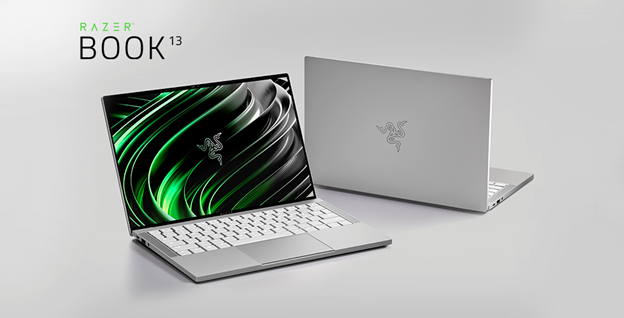
The Razer Book 13 immediately impresses with its minimalist design and premium build quality. The laptop is crafted from a single block of CNC-milled aluminum, giving it a solid and robust feel. The anodized finish is smooth to the touch and resistant to fingerprints. The overall design language is clean and modern, with sharp angles and subtle branding. Its compact form factor makes it incredibly portable, ideal for on-the-go professionals. The build quality feels top-tier, comparable to leading competitors in the premium laptop space.
Display and Audio
The Razer Book 13 features a beautiful 13.4-inch display, offered in either a Full HD+ (1920 x 1080) or a UHD+ (3840 x 2400) resolution option. Both configurations offer vibrant colors, excellent viewing angles, and impressive brightness. The display also boasts thin bezels, maximizing the screen real estate. The UHD+ model, in particular, offers a stunning visual experience with its sharp details. Audio is delivered through dual stereo speakers tuned with THX Spatial Audio. The speakers provide a surprisingly immersive sound experience for a laptop of its size, making it suitable for both media consumption and video conferencing.
Performance and Specs
The Razer Book 13 is powered by Intel’s 11th generation Core i5 or i7 processors, coupled with Intel Iris Xe Graphics. This combination provides excellent performance for everyday tasks, multitasking, and even light creative workloads. The laptop can handle web browsing, document editing, video conferencing, and running demanding applications with ease. Available RAM options range from 8GB to 16GB, and storage options include up to 512GB of fast NVMe SSD storage. This allows for quick boot times and fast application loading. While not designed for heavy-duty gaming, the Intel Iris Xe graphics are capable of running some less demanding games at playable frame rates.
Keyboard and Trackpad
The keyboard on the Razer Book 13 is a standout feature. The keys offer a comfortable and responsive typing experience, with well-defined key travel and a satisfying tactile feel. The keyboard also features per-key RGB backlighting, allowing users to customize the lighting effects and create a personalized aesthetic. The large glass trackpad is smooth, precise, and responsive. It supports Windows Precision drivers, ensuring accurate tracking and gesture support.
Battery Life
Battery life is a crucial consideration for any portable laptop. The Razer Book 13 delivers respectable battery life, typically lasting around 8-10 hours of general use. This varies depending on the usage scenario, with more demanding tasks like video editing or gaming consuming more power. The laptop supports fast charging via its USB-C port, allowing for quick top-ups when needed.
Ports and Connectivity
The Razer Book 13 offers a decent selection of ports for its size. It includes two Thunderbolt 4 (USB-C) ports, one USB-A 3.2 Gen 2 port, a microSD card slot, and a 3.5mm headphone/microphone combo jack. While the port selection is sufficient for most users, some might miss a dedicated HDMI port or a full-sized SD card reader. The laptop also supports Wi-Fi 6 and Bluetooth 5.1 for fast and reliable wireless connectivity.
Is the Razer Book 13 Good for Gaming?
While the Razer Book 13 is not primarily designed for gaming, the Intel Iris Xe graphics are capable of handling some less demanding games at playable frame rates. However, for serious gaming, it’s not the best choice. If you’re looking for a laptop specifically for gaming, you’ll want to consider Razer’s gaming laptops, which feature dedicated graphics cards from NVIDIA.
Best Razer Book 13 Alternatives for Professionals
Here’s a comparison table showcasing some of the best alternatives to the Razer Book 13 for professionals:
| Feature | Razer Book 13 | Dell XPS 13 | Apple MacBook Air (M2) | HP Spectre x360 14 |
|---|---|---|---|---|
| Processor | Intel Core i5/i7 (11th Gen) | Intel Core i5/i7 (12th/13th Gen) | Apple M2 Chip | Intel Core i5/i7 (12th/13th Gen) |
| Graphics | Intel Iris Xe | Intel Iris Xe | Integrated GPU (M2) | Intel Iris Xe |
| Display | 13.4″ FHD+ or UHD+ | 13.4″ FHD+ or OLED | 13.6″ Liquid Retina Display | 13.5″ OLED |
| RAM | 8GB/16GB | 8GB/16GB/32GB | 8GB/16GB/24GB | 8GB/16GB |
| Storage | 256GB/512GB NVMe SSD | 256GB/512GB/1TB/2TB NVMe SSD | 256GB/512GB/1TB/2TB SSD | 256GB/512GB/1TB/2TB NVMe SSD |
| Battery Life | 8-10 hours | 8-12 hours | Up to 18 hours | 8-12 hours |
| Ports | 2x Thunderbolt 4, 1x USB-A, microSD, 3.5mm | 2x Thunderbolt 4, 1x USB-C, microSD, 3.5mm | 2x Thunderbolt/USB 4, 3.5mm | 2x Thunderbolt 4, 1x USB-A, microSD, 3.5mm |
| Build Quality | Excellent | Excellent | Excellent | Excellent |
| Price (Starting) | \$1,199 | \$999 | \$1,199 | \$1,199 |
This table provides a glimpse at popular choices based on different parameters. The best choice is influenced by use cases, and needs.
Razer Book 13: Price and Value
The Razer Book 13 is positioned in the premium laptop market, and its price reflects its high-end components, build quality, and features. The starting price of the laptop is comparable to its competitors. The value proposition depends on the user’s needs. If you prioritize portability, performance, a premium design, and a comfortable typing experience, the Razer Book 13 offers good value. However, if you’re on a tight budget or need a laptop primarily for gaming, there may be more cost-effective options available.
Conclusion
The Razer Book 13 is a compelling entry into the premium productivity laptop market. It boasts a sleek design, excellent build quality, a beautiful display, a comfortable keyboard, and solid performance. While not ideal for heavy gaming, it excels in productivity tasks and offers a premium user experience. It’s a worthy contender for professionals who value portability, performance, and a touch of style.
Frequently Asked Questions (FAQ)
-
Does the Razer Book 13 support Thunderbolt 4?
Yes, the Razer Book 13 features two Thunderbolt 4 ports.
-
Can the Razer Book 13 be used for gaming?
While the Razer Book 13 can run some less demanding games, it’s not designed for gaming. It’s best suited for productivity and content creation.
-
What is the battery life of the Razer Book 13?
The Razer Book 13 typically gets around 8-10 hours of battery life on a single charge, depending on usage.
-
Does the Razer Book 13 have a touchscreen?
Some configurations of the Razer Book 13 have a touchscreen.
-
Does the Razer Book 13 have an SD card slot?
No, the Razer Book 13 has a microSD card slot instead.