
Razer Blade Pro 17: A Deep Dive into the Gaming Powerhouse
The Razer Blade Pro 17 has long been a benchmark for premium gaming laptops. Its sleek design, powerful components, and high-refresh-rate displays consistently attract gamers seeking top-tier performance and a premium experience. This article delves into the specifics of the Razer Blade Pro 17, examining its features, performance, and value proposition for both hardcore gamers and professionals needing a high-powered mobile workstation.
Outline
- Design and Build Quality
- Display and Audio Quality
- Performance and Hardware Specifications
- Best Razer Blade Pro 17 Alternatives for Gamers
- Keyboard and Touchpad Experience
- Battery Life and Portability
- Pricing and Configuration Options
- Is the Razer Blade Pro 17 Right for You?
- Frequently Asked Questions
Design and Build Quality
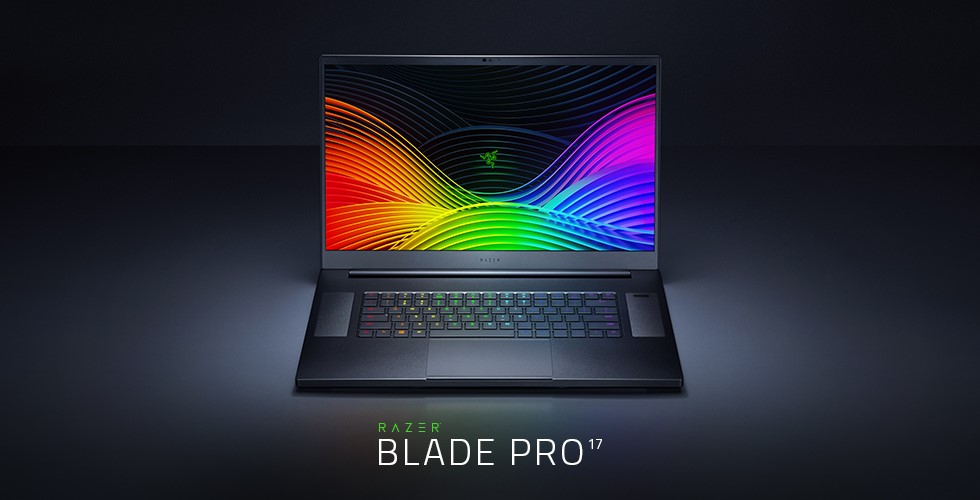
The Razer Blade Pro 17 immediately stands out with its minimalist design and CNC-milled aluminum chassis. The black anodized finish, accented by the iconic Razer green logo, exudes a premium feel. The build quality is exceptional; the chassis feels incredibly solid, with minimal flex, even under pressure. The overall design language emphasizes clean lines and a professional aesthetic, making it suitable for both gaming and professional environments. The hinges are robust, ensuring the display remains stable at any angle. The only potential downside is the laptop’s propensity to attract fingerprints, which can be easily cleaned with a microfiber cloth.
Display and Audio Quality
The Razer Blade Pro 17 often boasts stunning displays. Razer offers various display options, typically including high refresh rate panels, from 165Hz to 360Hz, providing incredibly smooth and responsive gaming experiences. Resolution options frequently include QHD (2560 x 1440) for a balance between visual fidelity and performance, or even 4K (3840 x 2160) for those prioritizing visual detail. Color accuracy is generally excellent, making the display suitable for content creation tasks as well. The thin bezels contribute to an immersive viewing experience.
Audio quality is also a strong point. The integrated speakers are often tuned for a balanced sound profile, offering clear highs, present mids, and a decent amount of bass. The speakers are loud enough to fill a medium-sized room, and the placement on either side of the keyboard allows for a wider soundstage. Headphone users benefit from a quality audio output, making external headphones an excellent option for immersive gaming.
Performance and Hardware Specifications
The Razer Blade Pro 17 is equipped with top-of-the-line components, resulting in impressive performance. The latest models typically feature Intel Core i7 or i9 processors, paired with high-end NVIDIA GeForce RTX 30-series or 40-series graphics cards. This combination allows the laptop to handle even the most demanding games at high settings, delivering smooth frame rates. The system also supports ample RAM, typically 16GB or 32GB of DDR5 or similar, ensuring smooth multitasking and ample memory for demanding applications. Storage is handled by fast NVMe SSDs, providing rapid boot times, quick game loading, and overall system responsiveness. The cooling system is designed to effectively manage the heat generated by these powerful components, crucial for maintaining sustained performance during extended gaming sessions.
Best Razer Blade Pro 17 Alternatives for Gamers
While the Razer Blade Pro 17 excels, several other gaming laptops provide compelling alternatives. Here’s a comparison of some popular options:
| Feature | Razer Blade Pro 17 (Example Configuration) | Dell Alienware m17 R5 | ASUS ROG Strix Scar 17 (2023) | MSI GE76 Raider |
|---|---|---|---|---|
| Processor | Intel Core i9-13900HX | AMD Ryzen 9 6900HX | Intel Core i9-13980HX | Intel Core i9-12900HX |
| GPU | NVIDIA GeForce RTX 4080 (Laptop) | NVIDIA GeForce RTX 3080 Ti (Laptop) | NVIDIA GeForce RTX 4090 (Laptop) | NVIDIA GeForce RTX 3080 Ti (Laptop) |
| RAM | 32GB DDR5 | 32GB DDR5 | 32GB DDR5 | 32GB DDR5 |
| Storage | 1TB NVMe SSD | 1TB NVMe SSD | 2TB NVMe SSD | 2TB NVMe SSD |
| Display | 17.3″ QHD 240Hz | 17.3″ QHD 165Hz | 17.3″ QHD 240Hz | 17.3″ QHD 360Hz |
| Starting Price | $3,499+ | $2,799+ | $3,999+ | $3,199+ |
| Pros | Premium design, powerful, excellent display | Powerful, Alienware features | Excellent performance, high refresh rates | Good Cooling, strong performance |
| Cons | Pricey, can get hot | Can be bulky, shorter battery life | High Price, bulky | Can be noisy, shorter battery life |
This table provides a generalized comparison. Specific configurations and prices will vary depending on the retailer and available options. The Alienware m17 R5 often focuses on raw power and Alienware features, while the ROG Strix Scar 17 often prioritizes high refresh rates and performance. The MSI GE76 Raider offers great value if you are looking for pure performance.
Keyboard and Touchpad Experience
The Razer Blade Pro 17 typically features a comfortable and responsive keyboard. The keys are well-spaced, with a satisfying amount of travel, providing a tactile typing experience. The per-key RGB lighting, powered by Razer Chroma, allows for extensive customization, creating a personalized aesthetic. The touchpad is generally accurate and smooth, supporting multi-touch gestures seamlessly. It’s often large and responsive. The placement of the touchpad is generally good, avoiding accidental palm touches during gaming.
Battery Life and Portability
Battery life is often a compromise with high-performance gaming laptops. The Razer Blade Pro 17 typically offers average battery life for its class. Users can expect around 4-6 hours of light use (web browsing, document editing), but significantly less during gaming. The large size and weight (around 6-7 lbs) make it less ideal for frequent portability compared to smaller gaming laptops. However, the slim profile compared to other 17-inch gaming laptops makes it relatively portable. The inclusion of a powerful charger is necessary.
Pricing and Configuration Options
The Razer Blade Pro 17 is positioned as a premium product, and its price reflects this. Pricing starts at a significant amount and can increase dramatically depending on the configuration. Users can often customize various components, including the processor, graphics card, RAM, storage, and display options. Upgrading to higher-end components will substantially impact the overall cost. Finding the right balance between performance and price is crucial. Regularly checking for sales and promotions can help mitigate the cost.
Is the Razer Blade Pro 17 Right for You?
The Razer Blade Pro 17 is a solid choice for gamers who prioritize performance, build quality, and a premium experience. It is best suited for:
- Gamers who want to play the latest titles at high settings with excellent frame rates.
- Users who value a premium design and build.
- Professionals who need a high-powered laptop for demanding tasks such as video editing, 3D rendering, or CAD software.
- Those who are willing to pay a premium for the best available components and features.
However, the Razer Blade Pro 17 may not be the best choice for:
- Gamers on a tight budget.
- Users who prioritize extreme portability and long battery life.
- Those who prefer a more aggressive or flashy gaming aesthetic.
Frequently Asked Questions
- What is the typical battery life of a Razer Blade Pro 17? Expect around 4-6 hours of light use and significantly less during gaming.
- What is the refresh rate of the display? The display refresh rate typically ranges from 165Hz to 360Hz.
- Does the Razer Blade Pro 17 get hot? Yes, due to its powerful components, the Razer Blade Pro 17 can generate a significant amount of heat, which is managed by a robust cooling system.
- Can the RAM and storage be upgraded? The RAM and storage are often upgradeable, but it is always recommended to check the specific model for compatibility.
- What ports are typically included? Expect to see USB-A and USB-C ports, HDMI, an SD card reader, and a Thunderbolt 4 port.
- Is the Razer Blade Pro 17 good for content creation? Yes, the powerful components, accurate display, and premium design make it well-suited for content creation tasks.