Razer Blade 14: The Ultimate Gaming Powerhouse in a Compact Frame
The Razer Blade 14 has carved a niche for itself as the premier gaming laptop that expertly blends performance, portability, and premium build quality. It represents a compelling option for gamers seeking a high-powered machine without the bulk and weight often associated with gaming laptops. This in-depth review will explore the Razer Blade 14’s design, performance, display, features, and overall value proposition, helping you determine if it’s the right choice for your gaming needs.
Outline
- Design and Build Quality
- Performance: Gaming and Productivity
- Display and Audio Quality
- Keyboard and Trackpad
- Ports and Connectivity
- Battery Life
- Best Razer Blade 14 Alternatives for Gamers
- Verdict: Is the Razer Blade 14 Worth It?
- FAQ
Design and Build Quality
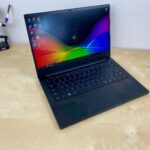
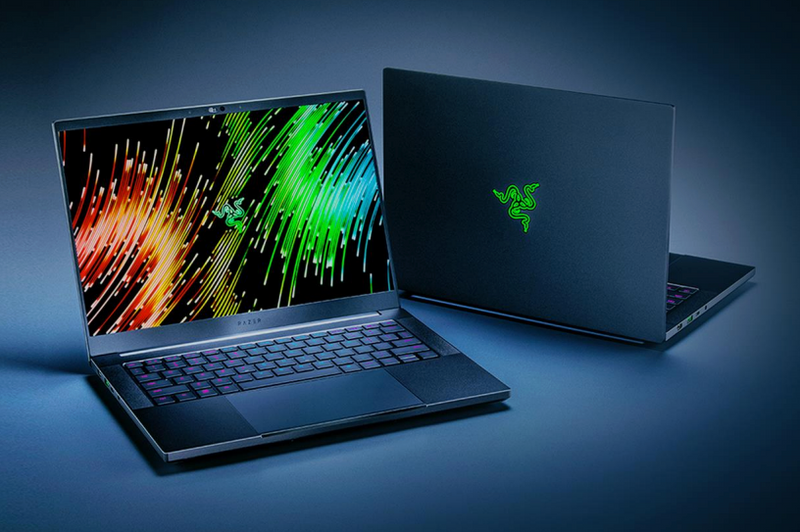
The Razer Blade 14 is instantly recognizable for its sleek, minimalist aesthetic. The chassis is crafted from a single block of CNC-milled aluminum, resulting in a premium feel and exceptional durability. The matte black finish resists fingerprints effectively, and the overall design is incredibly clean, with the iconic Razer logo subtly adorning the lid. The slim bezels surrounding the display contribute to the laptop’s modern appearance and maximize screen real estate. The compact form factor is a major selling point, making it exceptionally portable without sacrificing performance. It’s significantly smaller and lighter than many other high-performance gaming laptops, making it ideal for gamers on the go. The build quality is top-notch, with no flex or creaks, and the hinges feel robust and smooth.
Performance: Gaming and Productivity
The Razer Blade 14 is a performance powerhouse. Equipped with high-end AMD Ryzen processors and NVIDIA GeForce RTX graphics cards, it’s capable of handling the latest AAA games at high settings with impressive frame rates. The specific configuration varies depending on the model year and chosen options, but generally, you can expect top-tier performance for both gaming and demanding creative tasks like video editing and 3D rendering. The efficient cooling system, including vapor chamber technology, helps prevent thermal throttling, ensuring sustained performance even during extended gaming sessions. Coupled with ample RAM (often 16GB or 32GB) and fast NVMe SSD storage, the Blade 14 offers a responsive and seamless user experience. The included software, such as Razer Synapse, allows for easy customization of performance profiles, RGB lighting, and other settings.
Display and Audio Quality
The Razer Blade 14 typically features a high-refresh-rate display, often 165Hz or even 240Hz, providing a smooth and responsive gaming experience. The display quality is excellent, with vibrant colors, good contrast ratios, and wide viewing angles, making games look visually stunning. The display resolution usually ranges from 1080p to 1440p, offering a balance between image clarity and performance. The audio quality is also impressive, with built-in speakers that deliver clear and balanced sound. While not a replacement for a dedicated gaming headset, the speakers are more than adequate for casual gaming, media consumption, and video calls. The sound is often powered by THX Spatial Audio, further enhancing the immersion.
Keyboard and Trackpad
The keyboard on the Razer Blade 14 is a standout feature. It uses Razer’s own low-profile mechanical keyboard switches, providing a satisfying tactile feel, responsive feedback, and excellent typing experience. The keys are well-spaced, with a comfortable key travel distance. The per-key RGB lighting is fully customizable via Razer Synapse, allowing you to create stunning lighting effects and personalize your gaming setup. The trackpad is also a high-quality component, featuring a smooth glass surface and precise tracking. It’s responsive, with good gesture support, and feels premium to use.
Ports and Connectivity
The Razer Blade 14 offers a comprehensive selection of ports for a laptop of its size. It typically includes USB-C ports with Thunderbolt 4 support (depending on the AMD CPU generation), USB-A ports, an HDMI port, and a headphone jack. This provides ample connectivity for peripherals, external displays, and other accessories. The latest Wi-Fi standards (Wi-Fi 6E) and Bluetooth ensure fast and reliable wireless connectivity.
Battery Life
Battery life on the Razer Blade 14 is generally good for a gaming laptop, especially considering its high-performance components. While gaming will drain the battery quickly, users can expect several hours of use for everyday tasks like browsing, word processing, and light video streaming. The battery life can vary significantly depending on the usage and display brightness, but it’s typically better than many other gaming laptops in its class.
Best Razer Blade 14 Alternatives for Gamers
The gaming laptop market is competitive, and several alternatives offer compelling features and performance. Consider these options:
| Feature | Razer Blade 14 | Dell G15 (Ryzen Edition) | ASUS ROG Zephyrus G14 | Apple MacBook Pro 14″ (if gaming compatible) |
|---|---|---|---|---|
| CPU | AMD Ryzen | AMD Ryzen | AMD Ryzen | Apple Silicon (M1/M2 Pro/Max) |
| GPU | NVIDIA GeForce RTX | NVIDIA GeForce RTX | NVIDIA GeForce RTX | Apple Silicon Integrated GPU (limited game support) |
| Display | High Refresh Rate | High Refresh Rate | High Refresh Rate | High Refresh Rate ProMotion, Retina |
| Build Quality | Premium Aluminum | Plastic, Good | Aluminum | Premium Aluminum |
| Portability | Excellent | Good | Excellent | Excellent |
| Price | High | Mid-range | High | High to Very High |
| OS | Windows | Windows | Windows | macOS |
Dell G15: The Dell G15 is a more budget-friendly option offering strong performance. It can handle most games at high settings, but the build quality isn’t quite as premium as the Razer Blade 14.
ASUS ROG Zephyrus G14: The ROG Zephyrus G14 is another compact and powerful gaming laptop, offering similar performance to the Razer Blade 14. It’s known for its portability, strong AMD CPUs, and often features a customizable AniMe Matrix LED display on the lid.
Apple MacBook Pro 14″: While primarily a creator-focused laptop, the MacBook Pro 14″ (with M1/M2 Pro or Max chips) can handle some games, especially if you consider its performance when connected to an eGPU with a supported card through Thunderbolt. It boasts an excellent display, build quality, and excellent battery life, but gaming support is still limited compared to Windows-based laptops.
Verdict: Is the Razer Blade 14 Worth It?
The Razer Blade 14 is an exceptional gaming laptop that successfully balances performance, portability, and premium design. It offers top-tier gaming performance in a compact and stylish chassis, making it a great choice for gamers who prioritize both power and portability. The high-quality display, comfortable keyboard, and ample connectivity further enhance the overall user experience. However, the premium build and high-end components come at a price. The Razer Blade 14 is one of the more expensive gaming laptops on the market. If budget is a primary concern, you might find more affordable alternatives that still offer excellent gaming performance. But if you value a premium experience and demand the best in a compact form factor, the Razer Blade 14 is well worth the investment.
FAQ
-
What is the battery life like on the Razer Blade 14? Battery life varies depending on usage, but users can typically expect several hours of use for everyday tasks and shorter battery life during gaming sessions.
-
Does the Razer Blade 14 have good cooling? Yes, the Razer Blade 14 uses a sophisticated cooling system to help prevent thermal throttling and maintain optimal performance during gaming.
-
What kind of display does the Razer Blade 14 have? The Razer Blade 14 typically features a high-refresh-rate display (165Hz or higher) with excellent color accuracy and viewing angles.
-
Is the Razer Blade 14 upgradable? The RAM and storage are often user-upgradable. However, the CPU and GPU are integrated and cannot be upgraded.