Purism Librem 14: A Deep Dive into Privacy and Performance
The Purism Librem 14 stands as a testament to the pursuit of digital freedom and privacy. More than just a laptop, it’s a statement. Built for users who prioritize security and data protection, the Librem 14 offers a unique blend of open-source software, hardware kill switches, and a commitment to user autonomy, distinguishing itself from mainstream offerings. This article will provide a comprehensive overview, exploring its features, performance, and suitability for various user needs, helping you determine if it’s the right choice.
Outline
- Introduction
- Design and Build Quality
- Hardware Specifications and Performance
- Software and Privacy Features
- Librem 14 vs. Dell G15: Comparison
- Best Librem 14 Alternatives for Security-Conscious Users
- Pros and Cons
- Who Should Buy the Librem 14?
- FAQ
Design and Build Quality
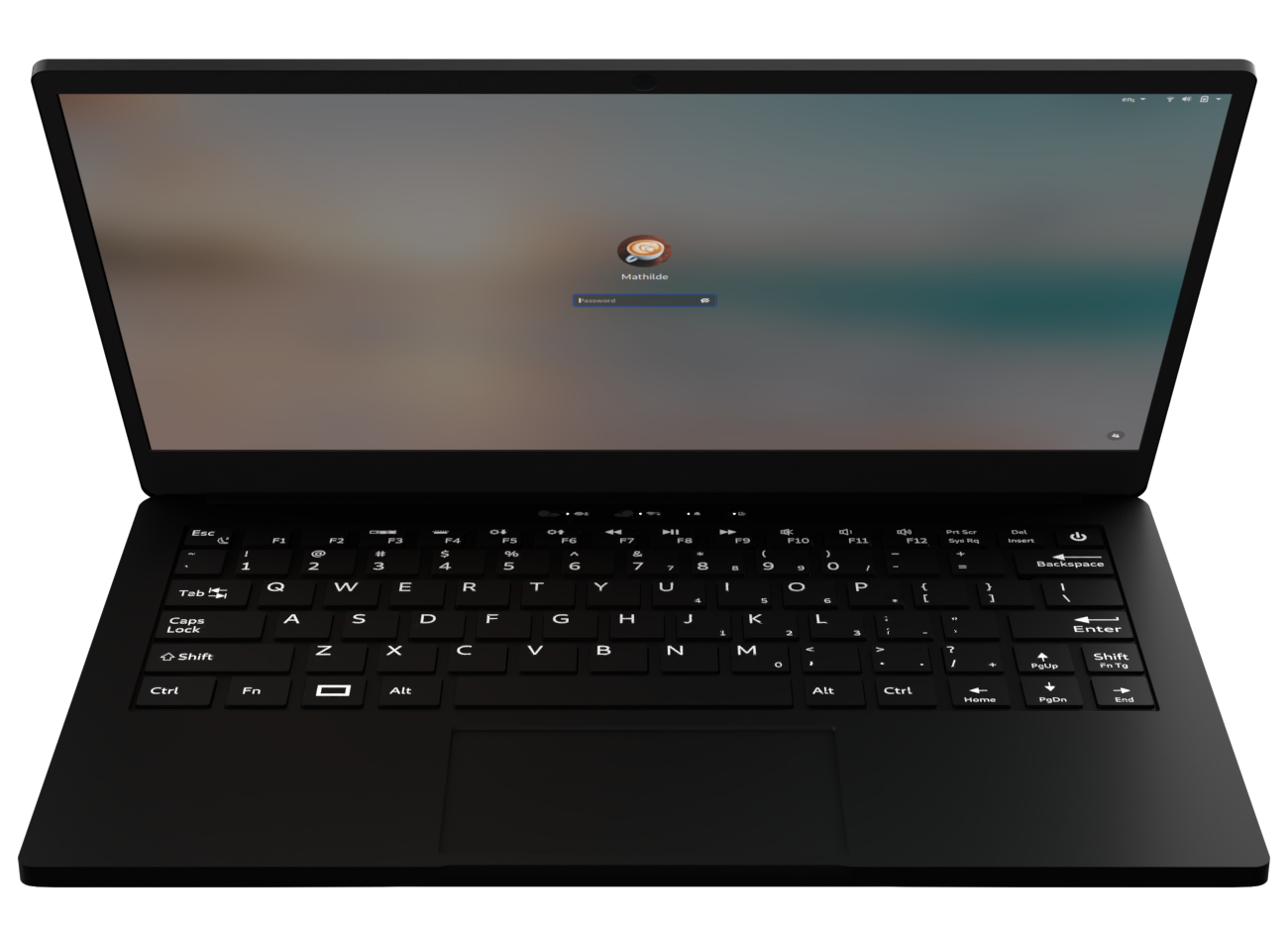
The Librem 14 boasts a sleek, minimalist design, emphasizing practicality over flash. Its chassis is constructed from high-quality aluminum, contributing to a robust and durable feel. The overall aesthetic is understated, reflecting the laptop’s focus on functionality and privacy. The build quality feels premium, with a sturdy hinge and a comfortable keyboard layout. One of the defining physical features are the hardware kill switches. These allow users to physically disconnect the webcam, microphone, and Wi-Fi/Bluetooth, providing unparalleled control over their privacy. This immediate hardware control eliminates the possibility of software-based snooping, offering peace of mind to the security-conscious user.
Hardware Specifications and Performance
The Librem 14 comes equipped with an Intel Core i7-10710U processor, offering decent performance for everyday tasks, web browsing, and light content creation. It typically includes 16GB of DDR4 RAM, ensuring smooth multitasking capabilities. Storage options typically start with a 500GB NVMe SSD, providing fast boot times and application loading. The 14-inch Full HD (1920×1080) display offers good visual clarity, suitable for work and entertainment. While not designed for gaming, the integrated Intel UHD Graphics handles basic graphics tasks adequately. It’s important to note that the Librem 14 prioritizes security and privacy over raw processing power, making it a good fit for specific needs.
Software and Privacy Features
The Librem 14 runs on PureOS, a Debian-based Linux distribution developed by Purism. PureOS is designed with privacy and security at its core, offering a fully open-source experience. This ensures that users have complete control over their operating system and can audit the code to ensure its integrity. The operating system includes end-to-end encrypted email clients, secure web browsers, and pre-installed privacy-focused applications. Regular software updates and security patches are provided to address vulnerabilities and maintain system integrity. The absence of proprietary drivers and bloatware further enhances the security and privacy posture. PureOS also promotes easy software updates and a streamlined user experience.
Librem 14 vs. Dell G15: Comparison
To understand where the Librem 14 fits in the market, let’s compare it to a mainstream option, the Dell G15, which is focused on gaming and performance.
| Feature | Purism Librem 14 | Dell G15 (Example Configuration) |
|---|---|---|
| Processor | Intel Core i7-10710U | Intel Core i7-12700H |
| RAM | 16GB DDR4 | 16GB DDR5 |
| Storage | 500GB NVMe SSD | 512GB NVMe SSD |
| Graphics | Intel UHD Graphics | NVIDIA GeForce RTX 3050 Ti |
| Display | 14″ 1920×1080 | 15.6″ 1920×1080 |
| OS | PureOS (Linux) | Windows 11 Home |
| Focus | Privacy, Security | Gaming, Performance |
| Kill Switches | Yes (Webcam, Mic, Wi-Fi/BT) | No |
| Price (approx.) | $1,999+ | $999+ |
This table highlights the fundamental differences. The Dell G15 is geared toward gaming and performance tasks, offering a more powerful processor and dedicated graphics card. The Librem 14 emphasizes privacy and security, with its hardware kill switches and privacy-focused operating system. The price point reflects these distinct priorities.
Best Librem 14 Alternatives for Security-Conscious Users
While the Librem 14 is a strong option, the landscape of privacy-focused laptops continues to evolve. Some good alternatives include:
- Framework Laptop: Offers a modular design, enabling users to upgrade components and repair the device themselves. Focuses on user repairability and sustainability.
- System76 Laptops: System76 offers laptops with open-source firmware and pre-installed Pop!_OS (a Linux distribution).
- Pine64 PineBook Pro: A more affordable option, running Linux, emphasizing open-source hardware.
These alternatives, like the Librem 14, prioritize user control and privacy, offering varying levels of performance, features, and price points. The best choice depends on individual needs and budget.
Pros and Cons
Pros:
- Hardware Kill Switches: Offers ultimate control over webcam, microphone, and wireless connectivity.
- Privacy-Focused Operating System: PureOS provides a secure and user-friendly Linux experience.
- Open-Source Software: Promotes transparency and allows for community audits.
- Durable Build Quality: Constructed from high-quality materials.
- Regular Security Updates: Ensures system integrity and protects against vulnerabilities.
Cons:
- Performance Limitations: Not ideal for demanding tasks like gaming or video editing.
- Price: More expensive than mainstream laptops.
- Learning Curve: Requires familiarity with Linux and open-source software.
- Availability: May have limited availability compared to larger brands.
Who Should Buy the Librem 14?
The Purism Librem 14 is ideal for individuals who:
- Prioritize privacy and security: Users concerned about data protection and surveillance.
- Value open-source software: Those who prefer transparency and user control.
- Need a secure platform for communication: Professionals requiring secure email and web browsing.
- Are comfortable with Linux: Users who are already familiar with or willing to learn a Linux-based operating system.
- Require hardware-level control: Individuals seeking physical disconnect switches for added security.
FAQ
-
Is the Librem 14 good for gaming?
No, the Librem 14 is not designed for gaming. Its integrated graphics and focus on privacy prioritize security and general use over gaming performance. -
Can I install Windows on the Librem 14?
Yes, it’s technically possible, but not recommended. Purism’s focus is on open-source software and PureOS. Installing Windows would negate many of the privacy and security advantages. -
How long is the battery life?
Battery life varies depending on usage, but users can expect moderate battery life for typical tasks, web browsing, etc. -
Does the Librem 14 support external monitors?
Yes, the Librem 14 has ports for connecting to external monitors. -
How does the hardware kill switch work?
The kill switches physically disconnect the webcam, microphone, and Wi-Fi/Bluetooth hardware. This prevents any software from accessing these components.