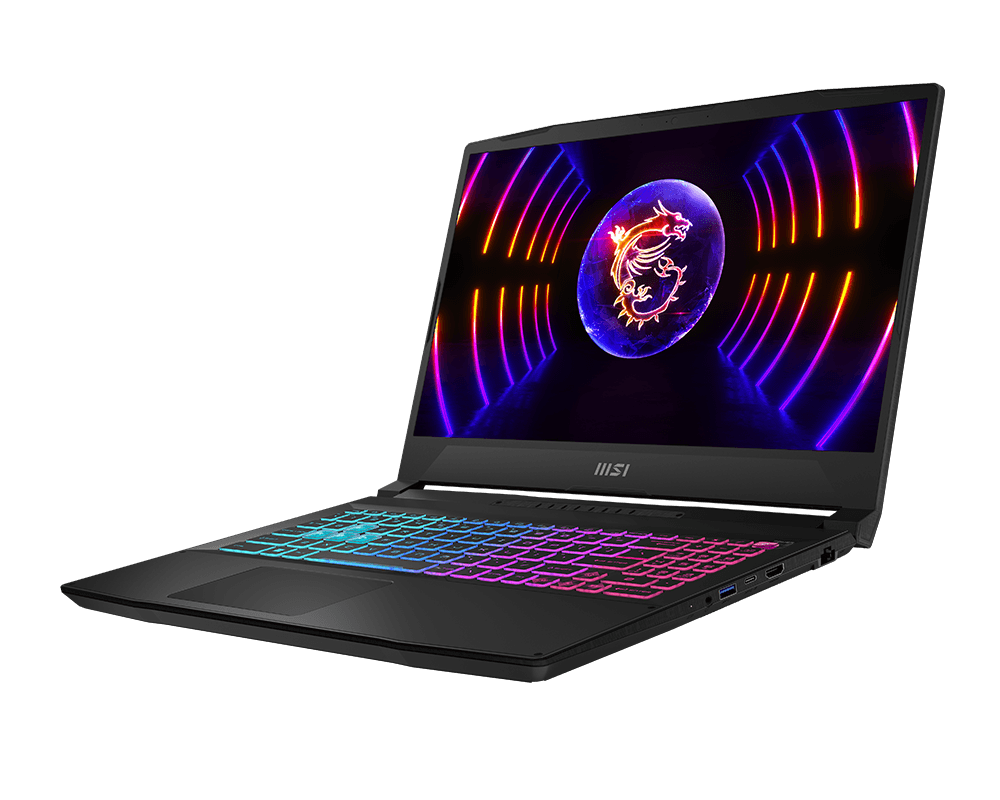

MSI Katana 15: A Comprehensive Review for Gamers
The MSI Katana 15 has established itself as a popular choice in the budget-friendly gaming laptop arena. Offering a blend of performance and affordability, it appeals to gamers looking for a machine that can handle modern titles without breaking the bank. This review dives deep into the Katana 15, examining its specifications, performance, features, and overall value proposition to help you decide if it’s the right gaming laptop for you.
Outline
- Introduction
- Design and Build Quality
- Display and Audio
- Performance and Gaming Experience
- Keyboard and Trackpad
- Ports and Connectivity
- Battery Life
- Best MSI Katana 15 Alternatives for Gaming
- Value for Money and Verdict
- FAQ
Design and Build Quality
The MSI Katana 15 features a minimalist aesthetic, with a primarily plastic chassis and subtle MSI branding. While the design isn’t particularly flashy, it’s understated and professional-looking, making it suitable for both gaming and everyday use. The build quality feels adequate for its price point. It’s not as robust as premium gaming laptops made with metal, but it should withstand general wear and tear with careful handling. The hinges feel reasonably sturdy, and the overall construction feels solid, minimizing flex in the chassis. However, the plastic build can be prone to fingerprints and smudges.
Display and Audio
The Katana 15 typically comes equipped with a 15.6-inch display, often boasting a Full HD (1920 x 1080) resolution and a fast refresh rate, typically 144Hz or higher. This high refresh rate is crucial for a smooth and responsive gaming experience, reducing motion blur and allowing for more fluid gameplay. The display’s color accuracy might not be the best, so it may not be ideal for professional photo or video editing. The bezels surrounding the screen are reasonably thin, contributing to a more immersive gaming experience. Audio performance is handled by built-in speakers, which can be sufficient for casual gaming and media consumption. However, the audio quality might lack depth and bass compared to more expensive gaming laptops. Using headphones or external speakers is recommended for a more immersive sound experience.
Performance and Gaming Experience
The heart of the Katana 15’s performance lies in its components. It typically features Intel Core i5 or i7 processors coupled with NVIDIA GeForce RTX 3050, 3060, or even 40 series GPUs, offering a range of performance options. The amount of RAM usually starts at 8GB or 16GB, and storage capacity, provided by an SSD, begins at 512GB, providing quick boot times and game loading speeds. This configuration delivers a solid gaming experience, allowing you to play most modern games at respectable frame rates with medium to high graphics settings at Full HD resolution. The Katana 15’s cooling system is crucial in maintaining performance during extended gaming sessions. While it’s generally effective, it can be slightly loud under heavy load. The system might also experience some thermal throttling if pushed to its limits for an extended period.
Keyboard and Trackpad
The keyboard on the Katana 15 typically features a responsive feel with decent key travel. The keys are well-spaced and comfortable for typing and gaming. MSI often includes customizable backlighting, allowing you to personalize the aesthetic of your keyboard. The trackpad is generally functional. Its size is suitable for navigating the operating system, although it isn’t the most precise or premium feel compared to other gaming laptops. The response is generally good, and multi-touch gestures work well. For serious gaming, an external mouse is always recommended for superior accuracy and control.
Ports and Connectivity
The Katana 15 provides a standard selection of ports. You’ll generally find USB-A ports, USB-C ports (which may or may not support Thunderbolt 4 depending on the specific configuration), an HDMI port, an Ethernet port, and a headphone/microphone combo jack. This selection is sufficient for connecting peripherals, external displays, and other devices. Connectivity options usually include Wi-Fi 6 or Wi-Fi 6E for fast wireless internet speeds and Bluetooth for connecting wireless accessories.
Battery Life
Battery life on the Katana 15 is generally not a strong suit. Its capacity is often relatively modest compared to laptops designed for productivity. Expect roughly 4-6 hours of battery life during general use, like web browsing or document editing, while gaming will drain the battery much faster, potentially resulting in just over an hour of play before needing to plug in. Battery life is typically not a priority for gaming laptops, and the Katana 15 is no exception. It is important to remember that heavy use, like gaming, will rapidly deplete battery life.
Best MSI Katana 15 Alternatives for Gaming
When considering the Katana 15, it’s wise to compare it to its competitors. Here’s a comparison of some popular alternatives:
Comparison Table: MSI Katana 15 vs. Dell G15
| Feature | MSI Katana 15 | Dell G15 |
|---|---|---|
| Processor | Intel Core i5/i7 | AMD Ryzen or Intel Core i5/i7 |
| GPU | NVIDIA GeForce RTX 3050/3060/40 Series | NVIDIA GeForce RTX 3050/3060/3070/40 Series |
| Display | 15.6″ 144Hz+ FHD | 15.6″ 120/165/240Hz FHD/QHD |
| Build Quality | Plastic | Plastic |
| Ports | Standard | More USB-C ports |
| Cooling System | Generally effective | Often considered better |
| Price | Budget-friendly | Slightly more expensive |
| Best For | Gaming on a budget, basic use | Gamers looking for more features and performance |
Comparison Table: MSI Katana 15 vs. Acer Nitro 5
| Feature | MSI Katana 15 | Acer Nitro 5 |
|---|---|---|
| Processor | Intel Core i5/i7 | AMD Ryzen or Intel Core i5/i7 |
| GPU | NVIDIA GeForce RTX 3050/3060/40 Series | NVIDIA GeForce RTX 3050/3060/3070/40 Series |
| Display | 15.6″ 144Hz+ FHD | 15.6″ 144/165/360Hz FHD/QHD |
| Build Quality | Plastic | Plastic |
| Price | Budget-friendly | Comparable or slightly more expensive |
| Cooling System | Generally effective | Slightly better cooling |
| Best For | Gaming on a budget | Gaming, balanced performance/features |
These tables highlight some key differences. The Dell G15 often offers slightly better cooling and build quality for a bit more money, and the Acer Nitro 5 offers comparable features. Ultimately, the best choice depends on your budget, your preferred processor/GPU vendor, and your specific gaming needs.
Value for Money and Verdict
The MSI Katana 15 provides good value for money, making it a compelling option for budget-conscious gamers. It offers a capable gaming experience at a price point that is competitive with rivals. Its performance is strong enough to play most games at comfortable frame rates at FHD. However, its build quality and display color accuracy are areas where improvements could be made. Despite its shortcomings, the Katana 15’s overall performance, features, and price make it a viable contender in the affordable gaming laptop market. It’s a solid choice for gamers who prioritize performance and affordability over premium features.
FAQ
-
Is the MSI Katana 15 a good laptop for beginners?
Yes, the Katana 15 is a great option for beginners due to its accessible price point and solid performance.
-
Does the MSI Katana 15 support ray tracing?
Yes, depending on the GPU configuration (typically the RTX series), the Katana 15 supports ray tracing.
-
Can I upgrade the RAM and storage on the MSI Katana 15?
Yes, the RAM and storage are typically upgradeable. Consult the specific model’s specifications.
-
How loud is the MSI Katana 15 during gaming?
The cooling system can get noisy under heavy load, but the noise level is generally within acceptable limits for a gaming laptop.
-
What is the battery life like on the MSI Katana 15?
Battery life is typically average, expecting around 4-6 hours with general use and significantly less with gaming.