MSI Crosshair 15: A Comprehensive Review for Gamers
The MSI Crosshair 15 is a gaming laptop designed to offer a balance of performance, features, and affordability, appealing to a wide range of gamers. With its distinctive design elements and a focus on high refresh rate displays, it aims to deliver a smooth and immersive gaming experience. This review will delve into its specifications, performance, design, and suitability for various gaming needs, providing a detailed assessment to help potential buyers make an informed decision.
Outline
- Design and Build Quality
- Display and Audio Quality
- Performance: Gaming and Productivity
- Ports and Connectivity
- Keyboard and Trackpad
- Battery Life
- Best MSI Crosshair 15 Alternatives for Gamers
- Pros and Cons
- Conclusion
- FAQ
Design and Build Quality
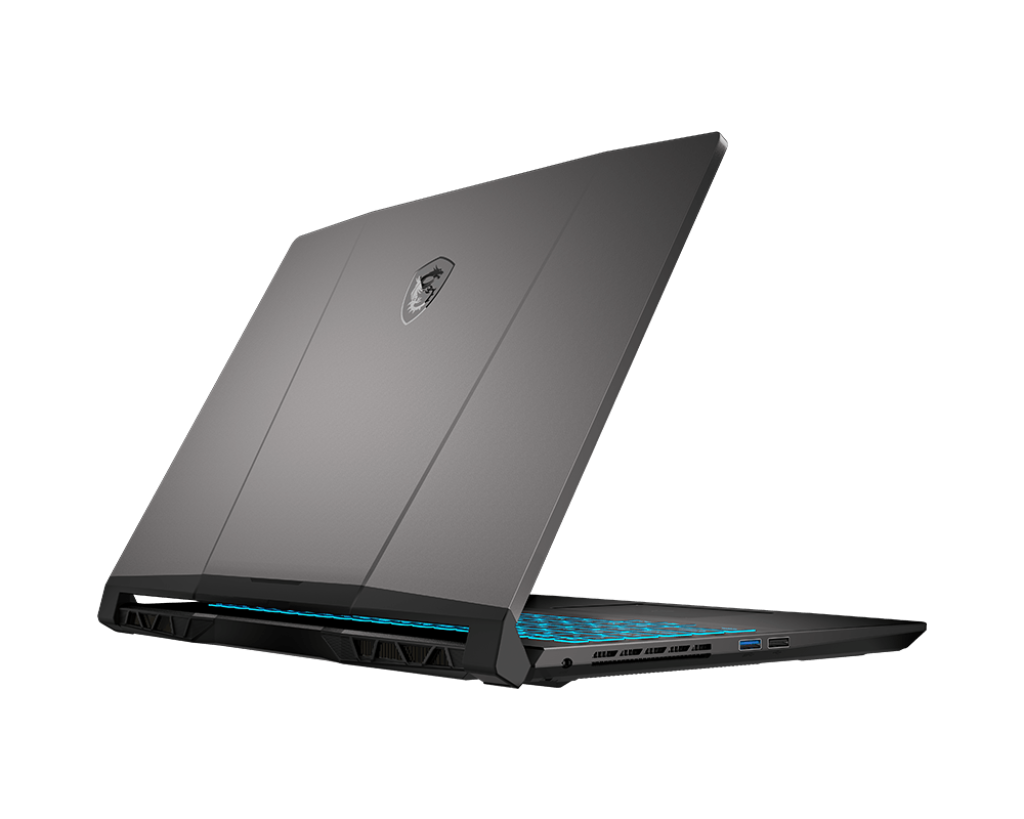
The MSI Crosshair 15 typically features a distinctive design often inspired by first-person shooter aesthetics, hence the “Crosshair” naming. This often includes sharp angles, contrasting color accents, and a robust build. The chassis is often made from plastic or a combination of plastic and metal, offering a reasonable balance between durability and portability. While the plastic build might not feel as premium as some higher-end gaming laptops, it contributes to keeping the price point more accessible. The overall build quality is generally solid, capable of withstanding the rigors of everyday use and travel. The keyboard deck might exhibit some flex under pressure, a common trait in laptops in this price range.
Display and Audio Quality
The Crosshair 15 is frequently equipped with high refresh rate displays, typically ranging from 144Hz to 240Hz, aimed at providing smooth visuals in fast-paced games. The screen resolution is usually Full HD (1920×1080) or QHD (2560×1440), offering a sharp and detailed image. Color accuracy and brightness levels are often adequate for gaming, although they may not be ideal for professional creative work that demands high color precision. The display’s viewing angles are generally good.
Audio performance varies depending on the specific configuration, but the Crosshair 15 usually includes stereo speakers. The sound quality is generally acceptable for gaming and media consumption, though it might not offer the same level of depth and clarity as dedicated external speakers or high-end laptop audio systems. The presence of a built-in headphone jack is a welcome feature for gamers who prefer using headphones for immersive audio.
Performance: Gaming and Productivity
The performance of the MSI Crosshair 15 is heavily dependent on the chosen configuration. It often comes equipped with a range of Intel Core i5 or i7 processors and NVIDIA GeForce RTX 30 Series or RTX 40 Series graphics cards. These components provide a significant boost in gaming performance, allowing users to play demanding titles at high frame rates.
For productivity tasks, such as video editing, photo manipulation, and software development, the Crosshair 15 delivers capable performance. The fast processors and ample RAM (typically 16GB or more) ensure smooth multitasking and quick application loading times. The inclusion of fast storage, such as NVMe SSDs, further enhances the overall responsiveness of the system.
Gaming Benchmarks (Examples, may vary depending on configuration):
| Game | Settings | Frame Rate (Average) |
|---|---|---|
| Cyberpunk 2077 | Ultra, Ray Tracing On | 45-60 FPS |
| Assassin’s Creed Valhalla | Ultra | 70-85 FPS |
| Fortnite | Epic | 120-150+ FPS |
Note: These are sample figures and may differ depending on the specific CPU, GPU, and other system specifications.
Ports and Connectivity
The Crosshair 15 typically offers a comprehensive selection of ports to cater to various connectivity needs. These usually include:
- USB-A ports (for peripherals)
- USB-C ports (with or without Thunderbolt 4 support, for data transfer, charging, and display output)
- HDMI port (for connecting to external displays)
- Ethernet port (for wired network connectivity)
- Headphone/microphone combo jack
- SD card reader (sometimes included)
The availability of a wide range of ports ensures that users can easily connect external devices, such as monitors, gaming mice, keyboards, and storage devices. Wi-Fi 6 or Wi-Fi 6E is generally supported for fast and reliable wireless network connections. Bluetooth connectivity enables users to connect wireless accessories.
Keyboard and Trackpad
The keyboard on the MSI Crosshair 15 usually features a comfortable typing experience with good key travel and responsiveness. The layout typically includes a numpad, making it convenient for numerical input. The keyboard often incorporates per-key RGB backlighting, allowing users to customize the lighting effects and create a personalized gaming setup.
The trackpad is generally smooth and accurate, supporting multi-finger gestures for easy navigation and control. However, most gamers prefer using an external mouse for more precise control during gameplay.
Battery Life
Battery life on the Crosshair 15 is typically average for a gaming laptop. Due to the high-performance components, it usually lasts for around 4-6 hours during everyday use, such as web browsing or light productivity tasks. During gaming, the battery life will be significantly shorter, often lasting for only 1-2 hours. Therefore, it’s recommended to keep the laptop plugged in while gaming for optimal performance.
Best MSI Crosshair 15 Alternatives for Gamers
When considering purchasing a gaming laptop, it’s essential to compare the MSI Crosshair 15 with its competitors. Here’s a comparison table highlighting some notable alternatives:
Comparison Table: MSI Crosshair 15 vs. Dell G15 & Others
| Feature | MSI Crosshair 15 | Dell G15 | ASUS ROG Strix G Series |
|---|---|---|---|
| CPU Options | Intel Core i5/i7 (varies by model) | Intel Core i5/i7 (varies by model) | AMD Ryzen 7/9, Intel Core i7/i9(varies by model) |
| GPU Options | NVIDIA GeForce RTX 30 Series/40 Series (varies by model) | NVIDIA GeForce RTX 30 Series/40 Series (varies by model) | NVIDIA GeForce RTX 30 Series/40 Series (varies by model) |
| Display | 15.6″ FHD/QHD, 144Hz/240Hz | 15.6″ FHD/QHD, 165Hz/240Hz | 15.6″/17.3″ FHD/QHD, 165Hz/240Hz |
| Build Quality | Plastic/Metal Hybrid | Plastic | Primarily Metal |
| Keyboard | Per-key RGB Backlighting, Comfortable | Backlit (RGB optional), Good for Gaming | Per-key RGB Backlighting, Premium Feel |
| Ports | Comprehensive | Comprehensive | Comprehensive |
| Pricing | Mid-Range, Competitive | Competitive, Often Budget-Friendly | Mid-High Range |
| Unique Features | FPS-inspired aesthetics, Powerful Cooling (varies) | Often Aggressive Design, Good Value | Advanced cooling, Wide range of CPU options |
| Best For | Mid-range gamers, users seeking a balance of price/performance | Budget-conscious gamers, entry-level gaming | High-end gamers, those who want top-tier performance |
This table provides a general overview and may vary based on specific configurations and model years.
Choosing the best alternative depends on your specific needs and budget. The Dell G15 often provides a strong value proposition, while the ASUS ROG Strix series offers higher-end performance and build quality.
Pros and Cons
Pros:
- Competitive Performance: Offers strong gaming performance due to its powerful processors and graphics cards.
- High Refresh Rate Display: Provides smooth visuals with its high refresh rate display options.
- Comprehensive Connectivity: Features a wide range of ports for connecting various peripherals.
- Comfortable Keyboard: Generally has a comfortable keyboard with customizable backlighting.
- Relatively Affordable: Offers a good balance of performance and price compared to some competitors.
Cons:
- Build Quality: Plastic chassis may not feel as premium as some higher-end gaming laptops.
- Battery Life: Battery life is average and may require frequent charging during gaming.
- Audio Quality: Speaker quality might not be as high-end compared to some competitors.
- Heat: Can get warm during extended gaming sessions, potentially affecting performance.
Conclusion
The MSI Crosshair 15 is a compelling option for gamers looking for a mid-range gaming laptop that provides a solid gaming experience without breaking the bank. It excels in delivering high frame rates, with high-refresh-rate display options, and features a user-friendly design. While some aspects like build material and audio quality might not reach the same level as some premium competitors, the Crosshair 15 provides an excellent balance of performance, features, and affordability, making it a viable choice for a wide range of gamers. Potential buyers should consider their specific needs, budget, and desired feature set, comparing it with alternatives like the Dell G15 and ASUS ROG Strix series to make the best decision.
FAQ
Q: What is the typical screen resolution and refresh rate of the Crosshair 15?
A: The Crosshair 15 often comes with either a Full HD (1920×1080) or QHD (2560×1440) resolution display and refresh rates ranging from 144Hz to 240Hz, aimed at providing smooth visuals in games.
Q: Does the MSI Crosshair 15 have good battery life?
A: Battery life is typically average, around 4-6 hours for general use and shorter (1-2 hours) during gaming, depending on the game settings and workload.
Q: What kind of ports does the Crosshair 15 usually offer?
A: It typically features a variety of ports, including USB-A, USB-C (with or without Thunderbolt), HDMI, an Ethernet port, a headphone/microphone combo jack, and sometimes an SD card reader.
Q: What is the build quality like?
A: The build quality is generally solid but often features a plastic chassis or a mix of plastic and metal to maintain a competitive price point.
Q: What is the target audience for the MSI Crosshair 15?
A: The Crosshair 15 is geared towards gamers who are looking for a mid-range gaming laptop with a balance of performance, features, and affordability.