Lenovo ThinkPad Z16: A Comprehensive Review for Professionals
The Lenovo ThinkPad Z16 represents a bold step forward for the iconic business laptop line. Designed with a focus on premium materials, a striking aesthetic, and enhanced performance, the Z16 aims to attract modern professionals who value both productivity and style. This review delves into the key aspects of the Z16, exploring its design, performance, display, keyboard, and overall user experience to help you determine if it’s the right choice for your needs.
Outline
- Design and Build Quality
- Display and Audio
- Performance and Specifications
- Keyboard, Touchpad, and Webcam
- Connectivity and Ports
- Battery Life and Charging
- Software and Features
- Pros and Cons
- Who Should Buy the Lenovo ThinkPad Z16?
- Lenovo ThinkPad Z16 vs. the Competition
- FAQ
Design and Build Quality
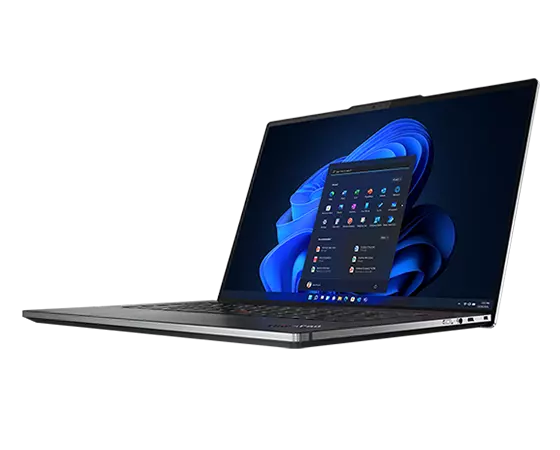
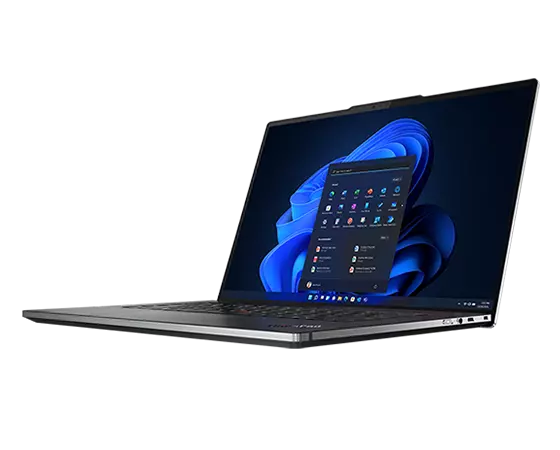
The Lenovo ThinkPad Z16 immediately distinguishes itself from its predecessors with a significantly redesigned chassis. Constructed primarily from recycled aluminum, the Z16 showcases a minimalist aesthetic with clean lines and a modern, professional look. Lenovo has moved away from the traditional black color scheme in favor of a more refined “Arctic Grey” or “Black” finish, enhancing its visual appeal. The materials feel premium to the touch, and the overall build quality is exceptional, adhering to the rigorous MIL-STD-810H standards for durability. The slim bezels around the display contribute to a more immersive viewing experience, and the integrated communications bar, housing the webcam, microphones, and fingerprint reader, is both functional and stylish. The use of sustainable materials is a significant step forward for Lenovo and a notable selling point for environmentally conscious users.
Display and Audio
The Z16 typically features a 16-inch display, offering a spacious work area. The display options range from a Full HD+ (1920 x 1200) IPS panel to a higher-resolution 4K UHD+ (3840 x 2400) OLED panel, providing vibrant colors and excellent clarity. The OLED panel particularly excels, with its perfect blacks and outstanding contrast ratio, making it ideal for content creation and media consumption. The display also boasts good color accuracy, making it suitable for professional tasks. The Z16’s display is often accompanied by a high refresh rate (typically 120Hz), contributing to smooth animations and a responsive feel.
Audio performance is also noteworthy. The Z16 is equipped with a dual-speaker system that delivers clear and balanced sound, with decent bass response. While it may not compete with dedicated audio systems, it is sufficient for video conferencing, media playback, and casual listening. The integrated microphones capture clear audio, ensuring effective communication during online meetings.
Performance and Specifications
The Lenovo ThinkPad Z16 is designed to handle demanding workloads. It comes equipped with AMD Ryzen 6000 or 7000 Series processors, delivering exceptional performance for both productivity and creative tasks. The integrated Radeon graphics handle graphics-intensive applications well, and the option for discrete AMD Radeon Pro graphics further boosts performance for professional workloads. The Z16 can be configured with up to 64GB of LPDDR5 RAM and up to 2TB of PCIe Gen4 NVMe SSD storage, ensuring seamless multitasking and fast data access. This combination of powerful components makes the Z16 a versatile machine, suitable for everything from everyday office tasks to complex video editing and software development. The Z16 handles heat well, maintaining a stable performance even under heavy loads.
Keyboard, Touchpad, and Webcam
The ThinkPad keyboard is legendary for its comfort and typing experience, and the Z16 upholds this tradition. The keys offer a comfortable travel distance, excellent feedback, and a satisfying tactile feel. The keyboard layout is well-organized, minimizing typos. The red TrackPoint pointing stick, a signature ThinkPad feature, remains present and functions seamlessly. The touchpad is generously sized and offers smooth, accurate tracking. The physical click buttons below the touchpad are responsive and easy to use.
The Z16’s webcam is a significant upgrade over previous generations. It features a Full HD resolution and a wide field of view, providing excellent video quality for video calls. The webcam is equipped with a physical privacy shutter, allowing users to easily disable the camera when not in use. Additionally, the integrated dual microphones provide clear and natural audio capture, making the Z16 an excellent choice for remote work and video conferencing.
Connectivity and Ports
The Lenovo ThinkPad Z16 offers a comprehensive selection of ports to meet the needs of modern professionals. It typically includes two or three USB4 ports (with Thunderbolt 4 support), which enable fast data transfer, external display connectivity, and charging. There is usually a USB-C port, a headphone/microphone combo jack, and an SD card reader, allowing for easy expansion of storage or media transfer. In some configurations, a Nano-SIM card slot may be available for cellular connectivity. The wireless connectivity options include Wi-Fi 6E and Bluetooth 5.2, providing fast and reliable connections to networks and accessories. The port selection is well-rounded, providing ample connectivity options for a variety of peripherals and accessories.
Battery Life and Charging
The battery life of the Lenovo ThinkPad Z16 varies depending on the display configuration, workload, and usage patterns. However, it generally provides a full day of use for typical productivity tasks, with the display brightness set at moderate levels. The OLED panel tends to consume more power, which may slightly reduce battery life. The Z16 supports fast charging, allowing the battery to be quickly replenished. The included power adapter is compact and lightweight, making it easy to carry around.
Software and Features
The Lenovo ThinkPad Z16 comes pre-loaded with Windows 11 Pro, offering a clean and user-friendly operating system. It also includes Lenovo’s software suite, such as Vantage, which allows users to monitor system performance, update drivers, and customize settings. The pre-installed software is generally non-intrusive and provides useful functionality. Security features, such as a fingerprint reader and facial recognition, enhance the security and data protection of the device.
Pros and Cons
Pros:
- Premium build quality with recycled materials
- Powerful performance with AMD Ryzen processors
- Excellent keyboard and touchpad
- High-quality display options (including OLED)
- Comprehensive port selection
- Excellent webcam and audio
- Good battery life
Cons:
- Can be expensive
- OLED panels are more power-hungry
- Discrete graphics option can be costly
Who Should Buy the Lenovo ThinkPad Z16?
The Lenovo ThinkPad Z16 is best suited for professionals and power users who need a premium laptop that can handle demanding workloads while offering a stylish design and a great user experience. It’s an excellent choice for:
- Business Professionals: Requiring a reliable and secure laptop for everyday work tasks, video conferencing, and presentations.
- Content Creators: Needing a high-performance laptop with a high-quality display and powerful graphics for video editing, photo editing, and other creative tasks.
- Developers: Requiring a laptop with sufficient processing power, RAM, and storage for software development, coding, and compiling.
- Anyone seeking a premium laptop: Appreciating the build quality, design, and overall performance.
Lenovo ThinkPad Z16 vs. the Competition
The Lenovo ThinkPad Z16 competes with other premium laptops in the market, such as the Dell XPS 15, HP Spectre x360 16, and Apple MacBook Pro 16-inch. Here’s a comparison table:
| Feature | Lenovo ThinkPad Z16 | Dell XPS 15 | HP Spectre x360 16 | Apple MacBook Pro 16-inch |
|---|---|---|---|---|
| Processor | AMD Ryzen 6000/7000 Series | Intel Core i7/i9 (12th/13th Gen) | Intel Core i7 (12th/13th Gen) | Apple M1 Pro/Max, M2 Pro/Max |
| Graphics | Integrated Radeon, Optional Radeon Pro | Integrated Intel, Optional NVIDIA GeForce | Integrated Intel, Optional NVIDIA GeForce | Integrated Apple Graphics |
| Display | 16″ FHD+/UHD+ OLED | 15.6″ FHD+/OLED/UHD+ | 16″ FHD+/OLED/UHD+ | 16.2″ Liquid Retina XDR |
| RAM | Up to 64GB LPDDR5 | Up to 64GB DDR5 | Up to 32GB LPDDR5 | Up to 64GB Unified Memory |
| Storage | Up to 2TB PCIe Gen4 NVMe SSD | Up to 8TB PCIe Gen4 NVMe SSD | Up to 2TB PCIe Gen4 NVMe SSD | Up to 8TB SSD |
| Ports | USB4, USB-C, Headphone Jack, SD Card Reader | Thunderbolt 4, USB-C, SD Card Reader, Headphone Jack | Thunderbolt 4, USB-A, Headphone Jack, SD Card Reader | Thunderbolt 4, Headphone Jack |
| Battery Life | Good, varies with display and usage | Good, varies with display and usage | Good, varies with display and usage | Excellent, varies with usage |
| Operating System | Windows 11 Pro | Windows 11 Pro | Windows 11 Pro | macOS Ventura |
| Price | Starting at ~$2,000 | Starting at ~$1,800 | Starting at ~$1,600 | Starting at ~$2,499 |
| Design | Professional, Recycled Materials | Premium, Minimalist | Premium, 2-in-1 convertible | Iconic, Aluminum |
Best Lenovo ThinkPad Z16 Alternatives for Professionals:
- Dell XPS 15: Offers similar performance and build quality but with Intel processors and NVIDIA graphics options, making it a strong competitor. The XPS 15 offers a great display and has sleek design.
- HP Spectre x360 16: A 2-in-1 convertible laptop, suitable for those who value versatility. Has great design features and is very powerful with strong performance.
- Apple MacBook Pro 16-inch: For users in the Apple ecosystem, offers incredible performance and battery life, especially with the M series chips.
FAQ
Q: Does the Lenovo ThinkPad Z16 have a touchscreen?
A: Touchscreen functionality is not a standard feature on all configurations, but some models may offer a touchscreen option. Be sure to check the specific model specifications before purchasing.
Q: Does the Lenovo ThinkPad Z16 support external monitors?
A: Yes, the Z16 supports external monitors via its USB4 (Thunderbolt 4) and USB-C ports, as well as the SD card reader.
Q: Can I upgrade the RAM and storage on the Lenovo ThinkPad Z16?
A: The RAM is soldered onto the motherboard and is not user-upgradeable. The SSD storage is user-upgradeable.
Q: What is the battery life of the Lenovo ThinkPad Z16?
A: Battery life varies based on usage and configuration. Users can expect approximately 8-10 hours of use for typical workloads. The OLED displays, however, may result in somewhat shorter battery life.
Q: Does the Lenovo ThinkPad Z16 have a warranty?
A: Yes, the Lenovo ThinkPad Z16 comes with a standard warranty, usually a 1-year limited warranty, but extended warranty options are available.