Lenovo ThinkPad Z13: A Deep Dive into the Business Ultrabook
The Lenovo ThinkPad Z13 represents a significant shift in the iconic ThinkPad lineup, blending the brand’s legendary durability and performance with a more modern and environmentally conscious design. This ultrabook aims to cater to the evolving needs of business professionals and power users, offering a compelling package of features in a sleek and portable form factor. From its sustainable materials to its powerful AMD Ryzen processing, the Z13 promises a premium experience for those who demand the best.
Outline:
- Design and Build Quality
- Performance and Specs
- Display and Audio
- Keyboard and Trackpad
- Ports and Connectivity
- Battery Life
- Who is the Lenovo ThinkPad Z13 for?
- Best Lenovo ThinkPad Z13 Alternatives for Professionals
- Lenovo ThinkPad Z13: Pros and Cons
- FAQ
Design and Build Quality
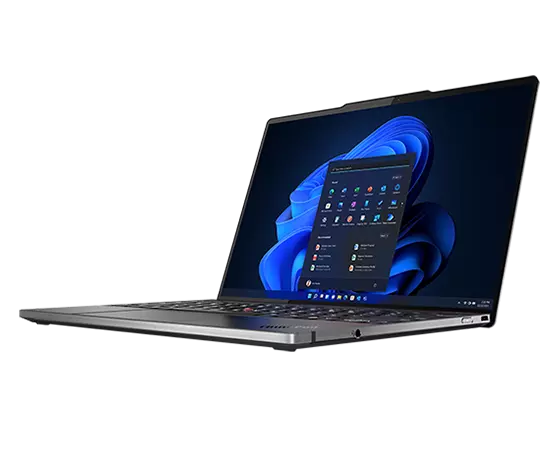
The Lenovo ThinkPad Z13 departs from the traditional ThinkPad aesthetic, embracing a more contemporary design. The chassis is crafted from recycled aluminum, contributing to Lenovo’s commitment to sustainability. The use of recycled materials extends to the packaging as well. The minimalist design is accentuated by clean lines and a subtle, debossed ThinkPad logo. The overall build quality feels premium and robust, typical of the ThinkPad brand. The hinge mechanism is smooth and sturdy, allowing for easy one-handed opening. The Z13 is thin and lightweight, making it highly portable and suitable for on-the-go professionals. Available in Arctic Grey or black, the Z13 exudes a professional and understated elegance.
Performance and Specs
The ThinkPad Z13 is powered by AMD Ryzen processors, offering excellent performance and efficiency. Configurations typically include the AMD Ryzen 5 or Ryzen 7 Pro series processors, providing ample power for demanding workloads such as multitasking, content creation, and running business applications. The integrated AMD Radeon graphics handle everyday graphics tasks with ease. RAM options often range from 8GB to 32GB LPDDR5X, ensuring smooth multitasking and responsiveness. Storage is provided by fast NVMe PCIe Gen4 SSDs, offering quick boot times and rapid data access. The Z13 supports Wi-Fi 6E for fast and reliable wireless connectivity.
Display and Audio
The Z13 boasts a vibrant and sharp display. Options usually include a 13.3-inch OLED panel with a 2.8K resolution, providing stunning visuals with rich colors and deep blacks. The display is also available in a more budget-friendly IPS options with lower resolutions (1920×1200), though both options usually support a 16:10 aspect ratio, providing more vertical screen real estate for productivity. The anti-glare coating helps to reduce reflections and improve visibility in various lighting conditions. The integrated speakers, tuned with Dolby Atmos, deliver a surprisingly clear and immersive audio experience, making it suitable for video conferencing and media consumption.
Keyboard and Trackpad
The ThinkPad keyboard is a defining feature of the brand, and the Z13 maintains this legacy. The keys offer excellent travel and tactile feedback, providing a comfortable and accurate typing experience. The TrackPoint (red pointing stick) is present, offering an alternative to the trackpad for cursor control. The trackpad is large, smooth, and responsive, with integrated physical buttons for improved usability. The keyboard layout is well-spaced, making it easy to type for extended periods without fatigue. The keyboard and trackpad are designed to withstand heavy use and provide a premium user experience.
Ports and Connectivity
The Lenovo ThinkPad Z13 prioritizes essential ports while maintaining its thin and lightweight profile. It features two USB4 Type-C ports, supporting charging, data transfer, and DisplayPort output. A 3.5mm headphone/microphone combo jack is also included. The Z13 lacks a traditional HDMI port and Ethernet port, so users may need to rely on dongles or adapters for these connections. Wi-Fi 6E and Bluetooth 5.2 provide reliable wireless connectivity.
Battery Life
The ThinkPad Z13 offers decent battery life, typically lasting through a full workday of moderate use. Battery life will vary depending on the display configuration, workload, and power settings. The efficient AMD Ryzen processors and optimized software contribute to the Z13’s ability to conserve power. The included charger supports fast charging, allowing users to quickly replenish the battery when needed.
Who is the Lenovo ThinkPad Z13 for?
The Lenovo ThinkPad Z13 is ideally suited for business professionals, executives, and power users who value portability, performance, and a premium user experience. It’s a great choice for those who frequently travel, work remotely, or need a reliable and powerful machine for everyday tasks, including document editing, presentations, web browsing, video conferencing, and content creation. The emphasis on sustainability and the sleek design make it particularly appealing to environmentally conscious consumers.
Best Lenovo ThinkPad Z13 Alternatives for Professionals
Here’s a comparison table showcasing some of the best alternatives to the Lenovo ThinkPad Z13:
| Feature | Lenovo ThinkPad Z13 | Apple MacBook Air M2 | Dell XPS 13 Plus | HP Spectre x360 13.5 |
|---|---|---|---|---|
| Processor | AMD Ryzen Pro | Apple M2 | Intel Core i7 | Intel Core i7 |
| Display | 13.3″ OLED/IPS | 13.6″ Liquid Retina | 13.4″ OLED | 13.5″ OLED/IPS |
| RAM | Up to 32GB | Up to 24GB | Up to 32GB | Up to 32GB |
| Storage | Up to 1TB SSD | Up to 2TB SSD | Up to 2TB SSD | Up to 2TB SSD |
| Ports | 2x USB4, Audio | 2x Thunderbolt/USB4 | 2x Thunderbolt/USB4, Audio | 2x Thunderbolt/USB4, Audio, microSD |
| Battery Life | Up to 10 hours | Up to 18 hours | Up to 8 hours | Up to 12 hours |
| Operating System | Windows 11 Pro | macOS | Windows 11 Pro | Windows 11 Pro |
| Price (Starting) | $1,500 | $1,199 | $1,299 | $1,399 |
Considerations when Choosing an Alternative:
- MacBook Air M2: Excellent battery life and performance in the Apple ecosystem.
- Dell XPS 13 Plus: Stylish design with a borderless display and powerful performance.
- HP Spectre x360 13.5: Versatile 2-in-1 design with a premium build and a great display.
Lenovo ThinkPad Z13: Pros and Cons
Pros:
- Premium Build Quality: Robust design with recycled materials.
- Excellent Performance: AMD Ryzen processors provide strong performance.
- Comfortable Keyboard: The iconic ThinkPad keyboard offers a great typing experience.
- Vibrant Display: Stunning OLED display option available.
- Portability: Thin and lightweight design.
- Sustainability: Focus on recycled materials and eco-friendly packaging.
Cons:
- Limited Ports: Requires dongles for certain connections (e.g., HDMI).
- Price: Can be expensive, particularly with OLED configuration.
- Battery life: Battery life isn’t class leading
- Some might miss the traditional ThinkPad aesthetic.
FAQ
Q: Does the Lenovo ThinkPad Z13 come with a touchscreen?
A: No, the standard configurations of the Z13 do not include a touchscreen.
Q: Does the Lenovo ThinkPad Z13 support Thunderbolt?
A: Yes, the USB-C ports on the Lenovo ThinkPad Z13 support USB4, which is Thunderbolt-compatible.
Q: What operating system does the Lenovo ThinkPad Z13 use?
A: The Lenovo ThinkPad Z13 typically comes with Windows 11 Pro pre-installed.
Q: Is the Lenovo ThinkPad Z13 good for gaming?
A: While the Z13 can handle some light gaming due to the integrated AMD Radeon graphics, it’s not designed as a gaming laptop.
Q: What is the warranty on the Lenovo ThinkPad Z13?
A: The Lenovo ThinkPad Z13 typically comes with a standard one-year warranty. Extended warranty options are usually available.