Lenovo ThinkPad T14 Gen 3: A Comprehensive Review for Professionals
The Lenovo ThinkPad T14 Gen 3 is a business-focused laptop designed for professionals who demand performance, durability, and security. Building upon the legacy of the ThinkPad line, the T14 Gen 3 offers a blend of power and portability, making it suitable for both office environments and on-the-go productivity. This review delves into its key features, specifications, performance, and overall value proposition to help you determine if it’s the right laptop for your needs.
Outline
- Design and Build Quality
- Performance and Specs
- Display and Audio
- Keyboard and Trackpad
- Ports and Connectivity
- Battery Life
- Security Features
- Price and Value
- Best Lenovo ThinkPad T14 Gen 3 Alternatives
- FAQ
Design and Build Quality
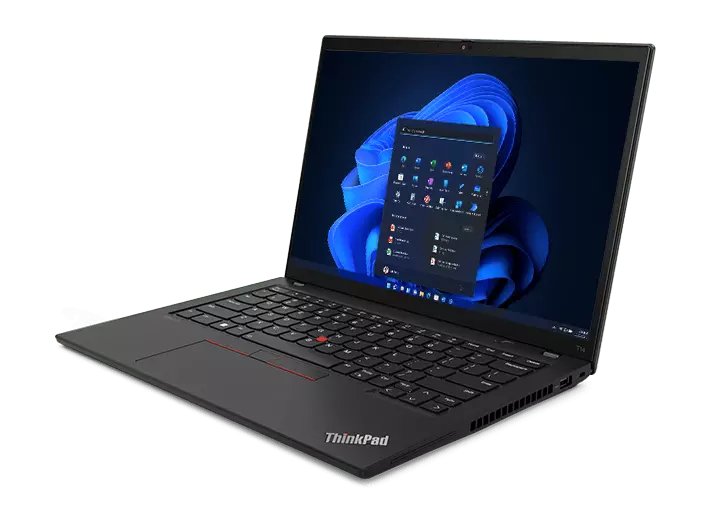
The ThinkPad T14 Gen 3 maintains the classic ThinkPad aesthetic: a matte black chassis, a simple and professional design, and the iconic red TrackPoint. The build quality is exceptional, featuring a robust construction that meets MIL-STD-810H standards for durability. This means the laptop can withstand extreme temperatures, vibrations, shocks, and other environmental hazards. The materials used, primarily a combination of carbon fiber and reinforced plastics, contribute to its lightweight yet sturdy feel. It’s a laptop built to last, making it a reliable companion for business travelers and users who frequently work in diverse environments. The overall design prioritizes functionality and practicality, offering a professional appearance that fits seamlessly into any workplace.
Performance and Specs
The ThinkPad T14 Gen 3 offers a range of configuration options, allowing users to customize the laptop to their specific performance needs. It is typically available with Intel Core i5 or i7 processors (12th Gen or later), along with integrated Intel Iris Xe Graphics or optional NVIDIA GeForce MX550 discrete graphics. This provides ample power for demanding productivity tasks, such as running multiple applications, handling large spreadsheets, and video conferencing. RAM options typically range from 8GB to 64GB DDR4 or DDR5, and storage options include fast NVMe PCIe SSDs with capacities up to 2TB. The selection of processors and RAM configurations contribute significantly to the laptop’s speed and responsiveness, enabling smooth multitasking and quick application loading times.
Display and Audio
The T14 Gen 3 features a variety of display options, including Full HD (1920×1080), WQXGA (2560×1600), and even a higher resolution with various brightness options. The display offers good color accuracy, which, paired with the anti-glare coating, makes it suitable for extended work sessions. The built-in speakers provide acceptable audio quality for video conferencing and general use, but they might not be ideal for audio-intensive tasks. The display quality contributes significantly to the overall user experience, ensuring clear visuals, and good readability under diverse lighting conditions.
Keyboard and Trackpad
The ThinkPad T14 Gen 3’s keyboard is a highlight, as ThinkPads are famous for their excellent keyboards. It offers a comfortable typing experience with good key travel, tactile feedback, and a well-spaced layout. The keyboard is spill-resistant, providing added protection against accidental liquid damage. The TrackPoint, a signature feature of ThinkPads, offers an alternative pointing device, allowing users to control the cursor without lifting their hands from the keyboard. The trackpad is also responsive and accurate, with smooth tracking and support for multi-touch gestures.
Ports and Connectivity
The T14 Gen 3 offers a comprehensive selection of ports and connectivity options, ensuring seamless integration with various peripherals and external displays. These include:
- USB-A ports (USB 3.2 Gen 1)
- USB-C ports (Thunderbolt 4)
- HDMI port
- Ethernet port
- Headphone/microphone combo jack
- SD card reader (optional)
Connectivity options typically include Wi-Fi 6E and Bluetooth 5.2, providing fast and reliable wireless connections. The availability of multiple USB-C ports with Thunderbolt 4 support is particularly beneficial, enabling fast data transfer, external display connectivity, and power delivery through a single cable.
Battery Life
Battery life on the ThinkPad T14 Gen 3 varies depending on the configuration and usage patterns. However, it typically offers all-day battery life, especially with lower-powered display options and efficient processors. The laptop supports fast charging, allowing you to quickly replenish the battery when needed. This is a crucial factor for professionals who need a reliable device that can last throughout the workday without frequent charging. Battery life is a strong suit for the T14 Gen 3.
Security Features
Lenovo ThinkPads are renowned for their robust security features, and the T14 Gen 3 is no exception. It includes a variety of security measures to protect your data and privacy:
- Discrete Trusted Platform Module (dTPM): Provides hardware-based security for encryption and password protection.
- Fingerprint reader: Offers biometric authentication for secure login.
- Webcam privacy shutter: Allows you to physically cover the webcam when not in use.
- Optional features: Smart card reader, and Lenovo’s ThinkShield security suite.
- Kensington lock slot: Physically secure the laptop from theft.
These security features make the T14 Gen 3 an excellent choice for businesses and individuals who prioritize data protection and privacy.
Price and Value
The price of the ThinkPad T14 Gen 3 varies depending on the configuration, but it typically falls in the premium business laptop category. It offers good value for its price, considering its performance, durability, security features, and excellent keyboard. While it may be more expensive than some consumer laptops, its build quality, reliability, and long-term usability make it a worthwhile investment for professionals.
Best Lenovo ThinkPad T14 Gen 3 Alternatives
Here are some alternative laptops that compete with the ThinkPad T14 Gen 3:
| Feature | Lenovo ThinkPad T14 Gen 3 | Dell Latitude 7430 | HP EliteBook 845 G9 | Apple MacBook Air M2 |
|---|---|---|---|---|
| Processor | Intel Core i5/i7 (12th/13th Gen) | Intel Core i5/i7 (12th Gen) | AMD Ryzen 5/7 (6th Gen) | Apple M2 |
| RAM | Up to 64GB DDR4/DDR5 | Up to 32GB LPDDR5 | Up to 64GB DDR5 | Up to 24GB Unified |
| Display | 14-inch, Various Resolutions | 14-inch, Various Resolutions | 14-inch, Various Resolutions | 13.6-inch, Retina |
| Ports | Comprehensive | Good | Good | Limited |
| Keyboard | Excellent | Good | Good | Excellent |
| Battery Life | All-day | All-day | All-day | All-day |
| Build Quality | Excellent | Excellent | Excellent | Excellent |
| Price (Approx.) | $$ | $$ | $$ | $$ |
| Best For | Business Professionals | Business Professionals | Business Professionals | General Use, Portability |
FAQ
-
Is the Lenovo ThinkPad T14 Gen 3 a good laptop for business users?
Yes, it is designed specifically for business users, offering robust performance, security features, and durability. -
Does the T14 Gen 3 have a good keyboard?
Yes, the ThinkPad keyboard is renowned for its excellent typing experience. -
What are the main advantages of the ThinkPad T14 Gen 3?
Its main advantages include its durability, security features, excellent keyboard, and powerful performance. -
Does the T14 Gen 3 support Thunderbolt?
Yes, it includes Thunderbolt 4 ports. -
Is the T14 Gen 3 suitable for gaming?
While it can handle some light gaming, it’s primarily designed for professional use. The optional NVIDIA GeForce MX550 can enhance gaming performance compared to integrated graphics but does not make it a gaming laptop. -
How long does the battery last?
Battery life varies depending on usage, but it typically offers all-day battery life.