

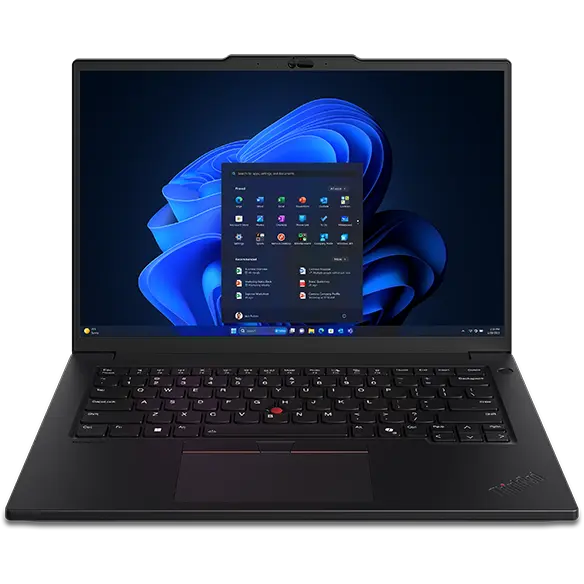
Lenovo ThinkPad P14s: A Comprehensive Review for Professionals
The Lenovo ThinkPad P14s is a mobile workstation designed for professionals who need powerful performance in a portable package. It’s a member of Lenovo’s prestigious ThinkPad lineup, known for its robust build quality, excellent keyboards, and focus on productivity. This review delves into the P14s, examining its features, performance, and suitability for various user profiles, helping potential buyers determine if it’s the right choice for their needs.
Outline
- Introduction
- Design and Build Quality
- Display and Audio
- Performance and Specs
- Keyboard and Touchpad
- Ports and Connectivity
- Battery Life
- Who is the Lenovo ThinkPad P14s For?
- Best Lenovo ThinkPad P14s Alternatives
- Lenovo ThinkPad P14s: Pros and Cons
- Frequently Asked Questions (FAQ)
Design and Build Quality
The ThinkPad P14s adheres to the classic ThinkPad design language. It features a matte black finish, a durable chassis, and the iconic ThinkPad logo. The build quality is exceptional, thanks to its carbon fiber reinforced chassis (on some models) and MIL-STD-810H testing. This means it’s built to withstand harsh conditions, including extreme temperatures, humidity, vibrations, and drops. The design is understated and professional, making it suitable for any work environment. The compact and lightweight design, typical of the “s” series, enhances its portability, making it ideal for professionals on the move.
Display and Audio
The P14s offers various display options, including Full HD (1920×1080) and 4K (3840×2160) resolutions. The higher-end models often feature displays with excellent color accuracy, making them suitable for creative professionals. Touchscreen options are also available. The display typically provides good brightness and viewing angles. The audio quality is adequate, with the built-in speakers delivering clear sound but lacking significant bass. For serious audio work or entertainment, external speakers or headphones are recommended.
Performance and Specs
The ThinkPad P14s is powered by Intel Core i5 or i7 processors from the latest generation, often paired with NVIDIA T550 or T500 professional-grade graphics cards (depending on the configuration). This combination delivers strong performance for demanding tasks such as CAD, video editing, and data analysis. Memory options range from 8GB to 64GB of RAM, and storage is provided by fast NVMe SSDs, offering plenty of room for applications and files. The workstation designation also means that the P14s is optimized for ISV-certified applications, ensuring reliable performance and compatibility with professional software.
Keyboard and Touchpad
ThinkPads are renowned for their exceptional keyboards, and the P14s lives up to the reputation. The keys offer a comfortable typing experience with good travel and tactile feedback. The key layout is well-spaced and ergonomically designed, promoting comfortable and efficient typing. The signature red TrackPoint pointing stick is also present, allowing users to navigate the cursor without lifting their hands from the keyboard. The touchpad is smooth and responsive, with accurate tracking and support for multi-touch gestures.
Ports and Connectivity
The P14s offers a comprehensive selection of ports, including:
- Two Thunderbolt 4 ports
- Two USB 3.2 Gen 1 ports
- HDMI 2.0
- MicroSD card reader
- Ethernet port (via adapter, depending on the model)
- Headphone/microphone combo jack
This array of ports ensures that users can connect to a wide range of peripherals and accessories. Connectivity options include Wi-Fi 6E and Bluetooth 5.2 for fast wireless connections.
Battery Life
Battery life on the ThinkPad P14s is generally good, often providing a full day of use for typical workloads. The exact battery life will vary depending on the configuration and usage patterns. Models with lower-resolution displays and integrated graphics will typically offer longer battery life compared to models with 4K displays and dedicated graphics cards.
Who is the Lenovo ThinkPad P14s For?
The Lenovo ThinkPad P14s is ideal for:
- Professionals: Engineers, architects, designers, and other professionals who require a powerful and portable workstation.
- Students: Students studying engineering, architecture, or related fields who need a reliable machine for CAD, rendering, and other demanding applications.
- Business Travelers: Users who need a durable and lightweight laptop that can handle demanding workloads on the go.
- Users who prioritize security: ThinkPads come with features like a fingerprint reader, a webcam privacy shutter, and robust security software.
Best Lenovo ThinkPad P14s Alternatives
Here are some of the best alternatives to the Lenovo ThinkPad P14s:
Dell Precision 5570
The Dell Precision 5570 offers similar performance and features to the P14s but typically comes with a slightly more premium design and a larger display. It’s an excellent choice for users who prioritize a sleek aesthetic and a larger screen.
HP ZBook Firefly 14 G9
The HP ZBook Firefly 14 G9 is another direct competitor, offering a similar level of performance and features in a compact and lightweight design. It’s a strong contender with excellent build quality.
Apple MacBook Pro 14-inch
For users already integrated into the Apple ecosystem, the MacBook Pro 14-inch provides exceptional performance, a stunning display, and a user-friendly operating system. However, it runs macOS and lacks some of the Windows-specific features that are common on ThinkPads.
Lenovo ThinkPad P14s: Pros and Cons
Pros:
- Excellent Build Quality: Durable and robust design that can withstand harsh conditions.
- Outstanding Keyboard: Comfortable and efficient typing experience.
- Powerful Performance: Capable of handling demanding professional applications.
- Good Battery Life: Provides a full day of use for typical workloads.
- Comprehensive Port Selection: Includes Thunderbolt 4 and other essential ports.
- ISV Certification: Ensures reliable performance with professional software.
- Strong Security Features: Includes a fingerprint reader, webcam privacy shutter, and robust security software.
Cons:
- Can be Expensive: Higher-end configurations can be costly.
- Audio Quality is Average: Built-in speakers could be improved.
- Design is Understated: The classic ThinkPad design may not appeal to everyone.
Frequently Asked Questions (FAQ)
Q: Is the Lenovo ThinkPad P14s a good laptop for gaming?
A: While the P14s can handle some gaming, it’s primarily designed as a workstation. The professional-grade graphics cards are optimized for professional applications, not necessarily for the best gaming performance. If gaming is a priority, consider a dedicated gaming laptop.
Q: Does the Lenovo ThinkPad P14s have a touchscreen?
A: Yes, touchscreen options are available on some configurations of the P14s.
Q: What is the warranty on the Lenovo ThinkPad P14s?
A: The standard warranty on the ThinkPad P14s is typically one year, but extended warranties and on-site service options are available.
Q: What operating system does the Lenovo ThinkPad P14s come with?
A: The Lenovo ThinkPad P14s typically comes with Windows 11 Pro.
Q: Can I upgrade the RAM and storage on the Lenovo ThinkPad P14s?
A: In most cases, the RAM is not user-upgradable. The storage (SSD) is usually user-upgradable, but you should check the specific model specifications.










