Lenovo ThinkBook 16p: A Deep Dive for Professionals and Creators
The Lenovo ThinkBook 16p aims to bridge the gap between business-focused laptops and high-performance creative workstations. It packs a punch with powerful processors, dedicated graphics, and a vibrant display, making it a compelling choice for professionals involved in content creation, video editing, and demanding workloads. This article provides a comprehensive overview of the ThinkBook 16p, exploring its features, performance, and target audience, helping you determine if it’s the right laptop for you.
Outline
- Introduction
- Design and Build Quality
- Display and Audio
- Performance and Specs
- Keyboard, Trackpad, and Ports
- Battery Life
- Software and Features
- Who is the Lenovo ThinkBook 16p For?
- Best Lenovo ThinkBook 16p Alternatives
- Conclusion
- FAQ
Design and Build Quality
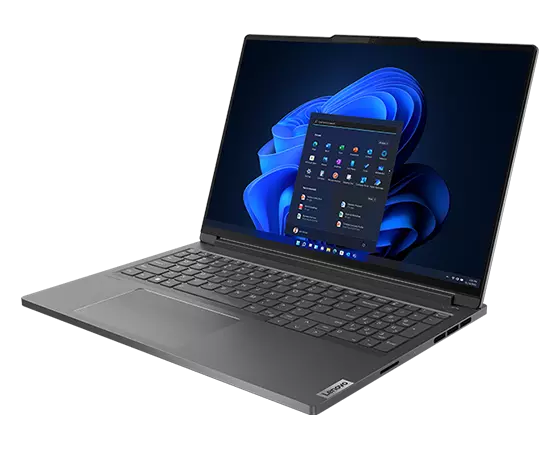
The ThinkBook 16p boasts a sleek and professional design. It typically features an aluminum chassis, providing a premium feel and enhanced durability. The build quality is solid, with minimal flex in the chassis and a sturdy hinge. While it might not be as overtly flashy as some gaming laptops, its understated elegance is a key selling point, making it suitable for both office environments and creative studios. The laptop’s design prioritizes functionality, offering a clean aesthetic that doesn’t distract from the user experience. The color options are often reserved, with variations of gray or silver being the norm.
Display and Audio
A standout feature of the ThinkBook 16p is its high-quality display. It typically features a 16-inch display with a high resolution, often offering 2.5K or even 4K options. The display aims for color accuracy, covering a significant portion of the sRGB and Adobe RGB color gamuts, crucial for content creation workflows. The display is bright and vibrant, making it well-suited for photo and video editing. Audio quality is generally good, with speakers that provide clear sound and decent bass, although external speakers or headphones are still recommended for professional audio work.
Performance and Specs
The ThinkBook 16p is powered by high-performance components. It’s often equipped with powerful AMD Ryzen or Intel Core processors, capable of handling demanding tasks. Dedicated NVIDIA GeForce RTX graphics cards, typically ranging from mid-range to high-end options, further enhance performance, allowing for smooth gaming experiences and efficient rendering in creative applications. The laptop offers ample RAM (often up to 32GB or more) and fast NVMe SSD storage, ensuring responsive performance and quick loading times. The cooling system is designed to manage the heat generated by these powerful components, preventing thermal throttling and maintaining optimal performance during intensive workloads.
Keyboard, Trackpad, and Ports
The keyboard on the ThinkBook 16p is generally well-regarded, offering a comfortable typing experience with good key travel and responsiveness. The trackpad is typically large and smooth, providing accurate cursor control and supporting multi-touch gestures. Lenovo often includes a fingerprint reader for secure login. The port selection is comprehensive, including USB-C ports with Thunderbolt support (depending on the configuration), USB-A ports, HDMI, an SD card reader, and a headphone jack. This wide array of ports allows for easy connectivity with various peripherals and external displays.
Battery Life
Battery life on the ThinkBook 16p is decent, but not exceptional, particularly when considering the power-hungry components. Users can expect around 5-7 hours of real-world use for general tasks, and significantly less when performing processor-intensive tasks or gaming. Battery life can vary depending on the display brightness, power settings, and the specific workload. The laptop supports fast charging, which allows for a quick top-up when needed.
Software and Features
The ThinkBook 16p typically comes with Windows 11 pre-installed. Lenovo often includes its own software utilities for managing system settings, updating drivers, and optimizing performance. These utilities may offer features such as power management profiles and display color calibration options. The laptop may also include features aimed at enhancing the user experience, such as a webcam privacy shutter and a robust security suite.
Who is the Lenovo ThinkBook 16p For?
The Lenovo ThinkBook 16p is designed for professionals and creators who need a powerful and versatile laptop for demanding workloads. Here’s a breakdown of its ideal users:
- Content Creators: Video editors, graphic designers, photographers, and other creative professionals who require a high-performance laptop with a color-accurate display and a powerful GPU.
- Engineers and Architects: Users working with CAD software and other design applications benefit from the laptop’s processing power and dedicated graphics.
- Business Professionals: Individuals who need a laptop that can handle demanding business applications, such as data analysis and financial modeling, while also offering a professional design aesthetic.
- Gamers: While primarily aimed at professionals, the ThinkBook 16p’s powerful components make it suitable for gaming, especially for those who need a machine capable of dual-duty workloads.
Best Lenovo ThinkBook 16p Alternatives
If the Lenovo ThinkBook 16p doesn’t perfectly fit your needs, here are some alternative options to consider:
Dell G15 vs. Lenovo ThinkBook 16p: Head-to-Head
| Feature | Lenovo ThinkBook 16p | Dell G15 | Notes |
|---|---|---|---|
| Target Audience | Professionals, Content Creators | Gamers, Students | The ThinkBook 16p is for productivity, G15 is for gaming. |
| Design | Sleek, Professional, Aluminum Chassis | Gaming-centric, Plastic Chassis | ThinkBook has a cleaner aesthetic; G15 is more bold. |
| Display | High Resolution, Color Accurate (good sRGB/Adobe RGB) | Often good, but might lack color accuracy in some configurations | ThinkBook prioritizes display quality for creatives. |
| Performance | Powerful Processor & GPU (typically RTX) | Powerful Processor & GPU (typically RTX) | Both are high-performing; the choice depends on specific specs and workloads. |
| Price | Varies, generally higher | More Affordable | Dell G15 usually has a lower price point. |
| Portability | Relatively Portable | Less Portable due to bulkier design | The ThinkBook 16p is slightly easier to carry around. |
| Keyboard | Good typing experience | Good for gaming | The ThinkBook 16p is focused on general use; G15 optimized for gaming. |
| Build Quality | High (Aluminum Chassis) | Generally Good | ThinkBook feels more premium. |
| Battery Life | Decent, but not exceptional | Usually less than ThinkBook in gaming configurations | ThinkBook 16p provides slightly better battery life in normal use cases. |
Other Alternatives to Consider
- Apple MacBook Pro (16-inch): A strong competitor, especially for those in the Apple ecosystem. Offers excellent performance, a stunning display, and a premium design.
- ASUS ROG Zephyrus Series: Offers a balance of portability and performance with powerful components and a sleek design, suitable for both gaming and creative work.
- HP Spectre x360 16: A versatile 2-in-1 laptop with a beautiful display and solid performance, ideal for users who value flexibility.
- Dell XPS 15/17: Known for their premium build quality, excellent displays, and powerful components, designed for both creative professionals and general users.
- MSI Creator Series: Focused on content creation, these laptops offer powerful components, color-accurate displays, and innovative features, tailored for creators.
Conclusion
The Lenovo ThinkBook 16p is a powerful and versatile laptop that successfully bridges the gap between professional and creative needs. Its combination of a high-quality display, powerful components, and a sleek design makes it an excellent choice for content creators, business professionals, and anyone who demands high performance from their laptop. While battery life could be better, the overall package makes it a compelling option in its class. Weigh your needs against the alternatives to make the best purchasing decision.
FAQ
-
Is the ThinkBook 16p good for gaming? Yes, the ThinkBook 16p offers powerful components capable of handling modern games at respectable frame rates, although it’s not primarily marketed as a gaming laptop.
-
Does the ThinkBook 16p have a good display? Yes, the ThinkBook 16p typically boasts a high-resolution, color-accurate display, making it ideal for creative tasks.
-
What is the battery life like on the ThinkBook 16p? Battery life is decent, usually around 5-7 hours in real-world use, but less with intensive workloads.
-
Does the ThinkBook 16p have Thunderbolt ports? It often does, but the availability depends on the specific configuration.
-
Who should buy the Lenovo ThinkBook 16p? Content creators, professionals requiring high performance, and anyone wanting a powerful and versatile laptop with a premium feel.