
Jumper EZbook S5: A Comprehensive Review
The Jumper EZbook S5, a compact and budget-friendly laptop, has carved a niche for itself in the crowded market of ultraportable notebooks. Released with the aim of providing an affordable solution for basic computing tasks, it presents a compelling option for students, casual users, and those seeking a lightweight travel companion. This review delves into the EZbook S5’s features, performance, and overall value proposition, helping potential buyers determine if it’s the right fit for their needs.
Outline
- Design and Build Quality
- Display and Audio
- Performance and Specs
- Battery Life
- Keyboard and Trackpad
- Connectivity and Ports
- Software and User Experience
- Price and Value
- Best Jumper EZbook S5 Alternatives
- Final Verdict
- Frequently Asked Questions (FAQ)
Design and Build Quality
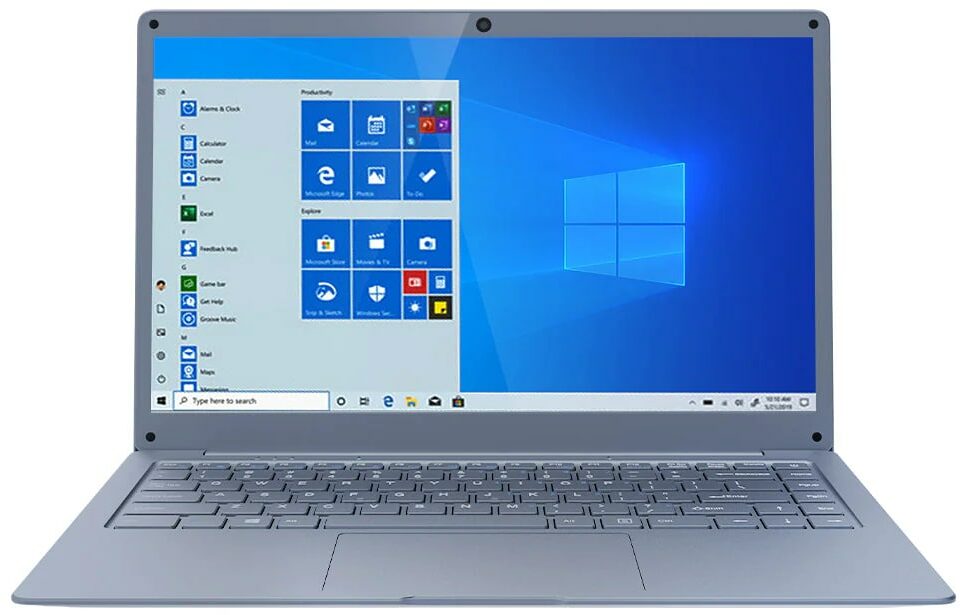
The Jumper EZbook S5 boasts a sleek and minimalist design, characterized by its thin profile and lightweight construction. The chassis is typically crafted from aluminum or a high-quality plastic, contributing to its portability and aesthetic appeal. While not necessarily the most premium feel in its class, the build quality is generally considered adequate for its price point. The lid is prone to fingerprints, but the overall design provides a clean and modern look. The compact size makes it easily transportable, fitting comfortably into a backpack or messenger bag.
Display and Audio
The EZbook S5 usually features a 14.1-inch display with a Full HD (1920 x 1080) resolution. This resolution offers a decent level of detail for everyday tasks like browsing, document editing, and video streaming. Color accuracy and brightness are generally acceptable, though not outstanding. The display is often coated with an anti-glare finish, which helps reduce reflections and improves visibility in various lighting conditions.
Audio quality, as expected for a budget laptop, is decent but not exceptional. The built-in speakers provide sufficient volume for casual listening but lack the depth and richness of higher-end laptops. External speakers or headphones are recommended for a more immersive audio experience.
Performance and Specs
The performance of the Jumper EZbook S5 varies depending on the specific configuration. However, it generally relies on Intel processors, often including the Celeron or Pentium series, paired with 8GB of RAM. The internal storage typically uses an SSD, usually a capacity of 256GB, providing a good combination of speed and efficiency.
The EZbook S5 is best suited for basic computing tasks. These tasks include web browsing, email, word processing, and multimedia consumption. It struggles with demanding applications and resource-intensive activities such as video editing or gaming. The integrated graphics are suitable for light gaming but won’t be able to handle modern AAA titles.
Battery Life
Battery life is a key selling point for the EZbook S5. It typically offers a solid battery performance, allowing users to get through a full day of work or study on a single charge. The exact battery life will vary depending on usage patterns, but users can generally expect around 6-8 hours of use. The efficiency of the low-power processors and the lower display brightness contribute to its impressive endurance.
Keyboard and Trackpad
The keyboard on the EZbook S5 is generally considered satisfactory for its size. The keys are well-spaced, providing a comfortable typing experience. The key travel is moderate, and the keyboard is relatively quiet. However, the build is not the most premium feel on the market.
The trackpad is also functional, offering responsive cursor control. It supports multi-touch gestures, such as two-finger scrolling, which enhances the user experience. Its size is generally adequate for most tasks, however, it’s not the most precise or accurate trackpad available.
Connectivity and Ports
The EZbook S5 offers a decent selection of ports for connectivity. These include USB ports (USB 3.0), a Mini-HDMI port for external displays, a microSD card reader for expandable storage, and a headphone jack. The presence of these ports provides ample connectivity for peripherals and external devices.
Software and User Experience
The EZbook S5 typically runs on the Windows operating system. The user experience is generally smooth, especially with the use of an SSD. However, the performance is limited by the processor and graphics capability. Overall, the software experience is clean and relatively free of bloatware.
Price and Value
The Jumper EZbook S5 is positioned as a budget-friendly laptop. Its price point typically places it within the range of affordable laptops, making it an attractive option for students, casual users, and those seeking a second device. The value proposition is strong considering its portability, battery life, and decent performance for everyday tasks.
Best Jumper EZbook S5 Alternatives
Several other laptops compete with the Jumper EZbook S5 in the budget and ultraportable category. Here’s a comparison table showcasing some of the best alternatives and some of their pros and cons.
| Feature | Jumper EZbook S5 | Acer Aspire 5 (14-inch) | Lenovo IdeaPad 3 (14-inch) |
|---|---|---|---|
| Processor | Intel Celeron/Pentium | Intel Core i3/i5/i7 | AMD Ryzen 3/5/7 |
| RAM | 8GB | 8GB – 16GB | 8GB – 16GB |
| Storage | 256GB SSD | 256GB – 1TB SSD | 256GB – 1TB SSD |
| Display | 14.1″ FHD | 14″ FHD | 14″ FHD |
| Battery Life | 6-8 hours | 8-10 hours | 6-8 hours |
| Price (Approx.) | $250 – $350 | $400 – $700 | $350 – $600 |
| Pros | Lightweight, affordable, good battery life | Better performance, wider processor options | Good value, variety of configurations |
| Cons | Limited performance, basic build quality | Can be more expensive, potentially shorter battery life depending on configuration | Build quality can vary |
Final Verdict
The Jumper EZbook S5 is a solid choice for those seeking an affordable, ultraportable laptop for basic computing tasks. It excels in portability, battery life, and value. However, users should be aware of its limitations in terms of performance. If your usage primarily involves web browsing, document editing, email, and multimedia consumption, the EZbook S5 is a viable option. For more demanding tasks, consider exploring the alternatives mentioned above or other laptops with more powerful processors and graphics capabilities.
Frequently Asked Questions (FAQ)
- Is the Jumper EZbook S5 good for students? Yes, it is a great choice for students, offering a balance of affordability, portability, and adequate performance for note-taking, research, and light productivity tasks.
- Can the EZbook S5 play games? It can handle light, older games, but it struggles with modern AAA titles due to its integrated graphics.
- What operating system does the EZbook S5 use? It typically runs on the Windows operating system.
- Does the EZbook S5 have a touchscreen? No, the EZbook S5 does not have a touchscreen.
- Is the storage upgradable? Generally, the storage (SSD) is upgradable, but it depends on the specific model. Check the specifications before purchasing.
- Where can I buy the Jumper EZbook S5? It is typically available on online marketplaces such as Amazon, AliExpress, and other online retailers that specialize in budget electronics.
- What is the warranty on the Jumper EZbook S5? Warranty periods can vary. Always check the retailer’s warranty information before making a purchase.