
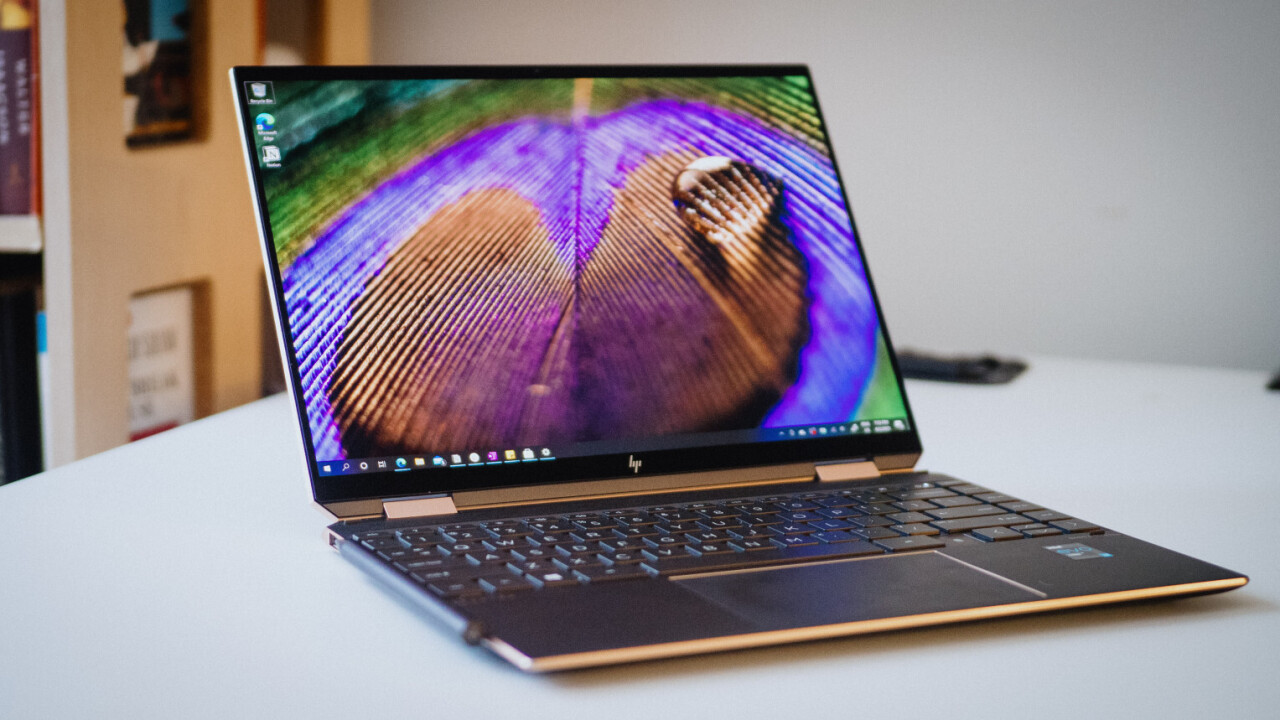
HP Spectre x360 14: A Deep Dive for Discerning Users
The HP Spectre x360 14 has consistently garnered praise as a premium 2-in-1 convertible laptop. Its sleek design, vibrant display, powerful performance options, and versatile functionality make it a compelling choice for users seeking a blend of elegance and productivity. This article provides a comprehensive overview of the Spectre x360 14, exploring its key features, performance, suitability for different user needs, and competitive landscape.
Outline
- Design and Build Quality
- Display and Audio Experience
- Performance and Specs
- Battery Life and Portability
- Keyboard, Trackpad, and Stylus
- Who is the HP Spectre x360 14 For?
- Best HP Spectre x360 14 Alternatives
- HP Spectre x360 14: Pricing and Availability
- Frequently Asked Questions (FAQ)
Design and Build Quality
The HP Spectre x360 14 immediately impresses with its premium aesthetic. Its chassis is typically crafted from CNC-machined aluminum, resulting in a robust yet refined feel. The gem-cut design on the corners, a signature of the Spectre line, adds a touch of elegance and visual interest. The slim bezels surrounding the display further enhance the modern look and feel, maximizing the screen real estate. Available in various color options, including Poseidon Blue, Nightfall Black, and Natural Silver, the Spectre x360 14 caters to diverse personal preferences. The 2-in-1 convertible design allows for flexible usage modes, including laptop, tent, stand, and tablet, making it adaptable to various scenarios. Overall, the build quality is top-notch, conveying a sense of durability and premium craftsmanship.
Display and Audio Experience
The display is a standout feature of the HP Spectre x360 14. It typically features a vibrant OLED panel that delivers stunning colors, deep blacks, and excellent contrast ratios. The high resolution, often offering options like 3K2K or higher, ensures sharp and detailed visuals. The display is also typically touchscreen-enabled and supports stylus input, enhancing the usability for creative tasks and note-taking. Viewing angles are excellent, ensuring a consistently great picture regardless of the viewing position.
The audio experience is equally impressive. The Spectre x360 14 often incorporates Bang & Olufsen-tuned speakers, delivering clear and balanced sound with decent bass response. The placement of the speakers, often along the keyboard deck or sides, contributes to an immersive audio experience. The audio quality is well-suited for both media consumption and video conferencing.
Performance and Specs
The HP Spectre x360 14 offers a range of performance configurations to cater to different user needs. It typically features Intel Core i5 or i7 processors from the latest generations, providing ample power for everyday tasks, multitasking, and even some demanding applications. The inclusion of Intel Iris Xe Graphics handles integrated graphics well, suitable for content creation tasks and some light gaming. Users can configure the device with up to 16GB of LPDDR4x or LPDDR5 RAM and up to 2TB of NVMe PCIe SSD storage, allowing for fast boot times and efficient file access.
The performance is generally smooth and responsive, with fast application loading times and fluid multitasking capabilities. The thermal management system is typically well-designed, preventing the device from overheating, even during sustained workloads.
Battery Life and Portability
Battery life is a strong point of the HP Spectre x360 14. Depending on the usage scenario and configuration, users can expect all-day battery life, making it a reliable companion for work, travel, and entertainment. The combination of efficient components, such as low-power processors and optimized software, contributes to its impressive battery endurance.
The Spectre x360 14 is designed with portability in mind. Its slim profile and lightweight design make it easy to carry around. The overall weight is typically around 2.95 pounds, and its compact dimensions allow it to easily slip into a backpack or bag.
Keyboard, Trackpad, and Stylus
The keyboard on the HP Spectre x360 14 provides a comfortable typing experience. The keys offer a good amount of travel and feedback, making it pleasant to type for extended periods. The keyboard is also typically backlit, allowing for easy use in low-light environments.
The trackpad is large, smooth, and responsive. It supports multi-touch gestures, allowing for precise cursor control and intuitive navigation.
The device often includes a stylus, which enhances the versatility of the 2-in-1 design. The stylus allows users to take notes, draw, and interact with the touchscreen display more precisely.
Who is the HP Spectre x360 14 For?
The HP Spectre x360 14 is an excellent choice for a wide range of users:
- Professionals: Its sleek design, powerful performance, and long battery life make it ideal for professionals who need a reliable and stylish laptop for work on the go.
- Students: The 2-in-1 design, stylus support, and portability make it a great option for students who need a versatile device for note-taking, research, and creative projects.
- Creative Professionals: The vibrant OLED display, stylus support, and powerful performance make it suitable for creative tasks like photo editing and video editing.
- General Users: For those who want a premium and versatile laptop for everyday use, the Spectre x360 14 offers a great blend of performance, features, and style.
Best HP Spectre x360 14 Alternatives
While the HP Spectre x360 14 excels in many areas, it’s essential to consider alternatives that might better suit specific needs or preferences.
Comparison Table: HP Spectre x360 14 vs. Dell XPS 13 2-in-1
| Feature | HP Spectre x360 14 | Dell XPS 13 2-in-1 |
|---|---|---|
| Design | Premium, gem-cut edges | Sleek, minimalist design |
| Display | OLED option, vibrant colors | Excellent display options |
| Performance | Powerful, Intel Core i5/i7, Intel Iris Xe Graphics | Powerful, Intel Core i5/i7, Intel Iris Xe Graphics |
| Battery Life | Excellent | Very Good |
| Ports | Limited, USB-C, Thunderbolt, microSD | Limited, USB-C, Thunderbolt, microSD |
| Keyboard | Comfortable | Comfortable, but may have less key travel |
| Price | Premium | Premium |
| Ideal For | Professionals, Creative Users, General Use | Professionals, Those Prioritizing Portability |
Comparison Table: HP Spectre x360 14 vs. Apple MacBook Air (M2)
| Feature | HP Spectre x360 14 | Apple MacBook Air (M2) |
|---|---|---|
| Operating System | Windows 11 | macOS |
| Performance | Intel Core i5/i7 | Apple M2 Chip |
| Display | OLED option, Touchscreen, Convertible | Liquid Retina Display |
| Portability | Excellent | Excellent |
| Battery Life | Excellent | Excellent |
| Price | Premium | Premium |
| Ideal For | Versatile users, Touchscreen Preference | Apple Ecosystem users, Excellent Battery Life |
HP Spectre x360 14: Pricing and Availability
The HP Spectre x360 14 is typically priced in the premium laptop segment. The specific price will vary depending on the configuration, including the processor, RAM, storage, and display options. It is generally available through HP’s official website, major electronics retailers, and online marketplaces. Availability may vary depending on the region and the specific configuration.
Frequently Asked Questions (FAQ)
Q: Does the HP Spectre x360 14 have a touchscreen?
A: Yes, the HP Spectre x360 14 typically features a touchscreen display.
Q: Does it come with a stylus?
A: Yes, many configurations of the HP Spectre x360 14 include a stylus.
Q: What ports does it have?
A: It usually has a limited selection of ports, including USB-C with Thunderbolt support, USB-A, and a microSD card reader.
Q: Is it good for gaming?
A: While not specifically designed for gaming, the Spectre x360 14 can handle some light gaming due to the integrated Intel Iris Xe Graphics. For serious gaming, a dedicated gaming laptop is a better choice.
Q: What is the battery life like?
A: The battery life is generally excellent, often providing all-day performance for typical usage scenarios.









