
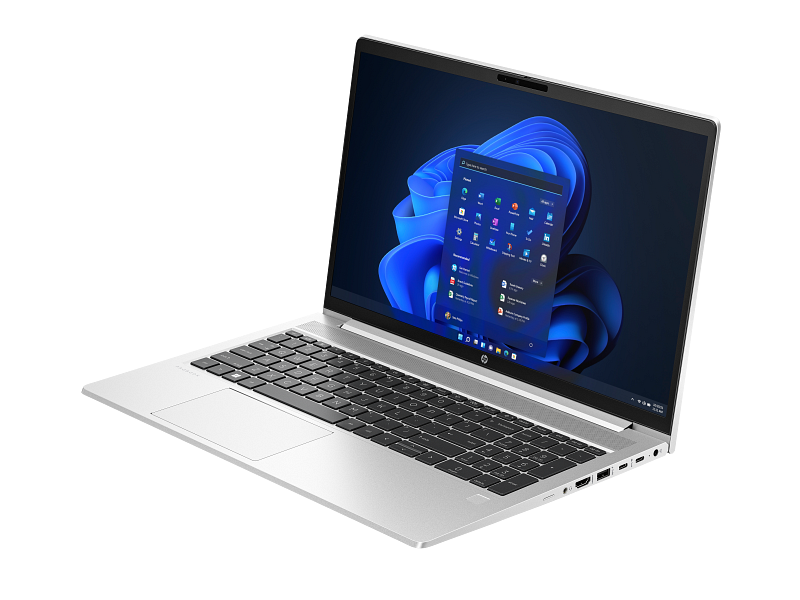
HP ProBook 450: A Comprehensive Guide for Professionals
The HP ProBook 450 series is a line of business-oriented laptops designed to offer a balance of performance, security, and portability for professionals and small to medium-sized businesses. It occupies a space between entry-level consumer laptops and high-end enterprise devices, providing a robust solution for everyday tasks, content creation, and light gaming. This article will delve into the various aspects of the HP ProBook 450, offering insights into its features, performance, and suitability for different users.
Outline
- Overview and Key Features
- Performance and Specs Analysis
- Design and Build Quality
- Display and Audio Quality
- Connectivity and Ports
- Security Features
- Battery Life and Portability
- Who is the HP ProBook 450 For?
- Best HP ProBook 450 Alternatives for Professionals
- Comparison: Dell G15 vs HP ProBook 450 (with other)
- Frequently Asked Questions (FAQ)
Overview and Key Features
The HP ProBook 450 typically comes in a 15.6-inch form factor, making it a good compromise between screen size and portability. Key features generally include: a durable build designed for the rigors of daily use, a focus on security features like TPM chips and fingerprint readers (depending on the configuration), a range of processor options from Intel Core i3 to i7, and a selection of ports for various peripherals. Recent iterations often include features like a backlit keyboard, a webcam, and a trackpad with multi-touch gestures. HP often updates the ProBook 450 with the latest generation of Intel processors, ensuring relatively current performance for its target audience. The ProBook series aims to provide a reliable and secure work experience, often prioritizing stability and ease of management for IT departments.
Performance and Specs Analysis
The performance of the HP ProBook 450 varies significantly depending on the configuration chosen. Users should carefully consider their needs and budget when selecting specifications.
Processor Options
The CPU is a crucial component that dictates the laptop’s speed and capabilities. HP ProBook 450 models are typically available with a range of Intel Core processors. Common options include:
- Intel Core i3: Suitable for basic tasks like web browsing, email, and document editing.
- Intel Core i5: Offers a better balance of performance and price, ideal for general productivity, multitasking, and light content creation.
- Intel Core i7: Provides the highest performance, enabling demanding applications like video editing, running virtual machines, and handling complex spreadsheets.
The generation of the Intel processor (e.g., 12th gen, 13th gen) also impacts performance, with newer generations typically offering improved performance per watt and more efficient processing capabilities.
Graphics Performance
Graphics processing is handled either by integrated Intel Iris Xe Graphics (built into the CPU) or, in some configurations, dedicated NVIDIA GeForce MX or RTX graphics cards.
- Integrated Intel Iris Xe Graphics: Suitable for everyday tasks, content consumption, and light gaming at lower settings.
- NVIDIA GeForce MX Series: Provides a significant boost in graphical performance, allowing for more demanding applications like light gaming, photo editing, and video editing.
- NVIDIA GeForce RTX Series: Offers the most powerful graphics performance, catering to professional workloads such as 3D rendering, video editing, and gaming at higher settings.
The choice of graphics card will significantly impact the laptop’s suitability for specific tasks.
RAM and Storage
- RAM (Random Access Memory): Impacts multitasking and overall system responsiveness. 8GB of RAM is generally the minimum for modern use, with 16GB or more recommended for demanding applications and multitasking.
- Storage: Typically utilizes Solid State Drives (SSDs) for faster boot times, application loading, and overall system performance. SSD capacities typically range from 256GB to 1TB or more. While some configurations might still offer a hard disk drive (HDD) as a storage option, SSDs are strongly recommended for a better user experience.
Design and Build Quality
The HP ProBook 450 typically features a sturdy build, often constructed from a combination of aluminum and plastic materials. While it’s not a premium, high-end design, it generally feels durable and capable of withstanding the wear and tear of daily use. Design elements include a professional aesthetic with a focus on functionality. The build quality contributes to the laptop’s longevity and suitability for a business environment. The keyboard layout typically provides comfortable typing experience.
Display and Audio Quality
The 15.6-inch displays on the ProBook 450 usually offer a Full HD (1920×1080) resolution, providing a sharp and detailed image. Higher-end configurations may offer higher resolutions. The display quality is generally adequate for everyday use, with decent color accuracy and brightness. The audio quality, delivered through integrated speakers, is generally sufficient for video conferencing and general media consumption, but external speakers or headphones are recommended for a richer audio experience.
Connectivity and Ports
The HP ProBook 450 is typically equipped with a comprehensive selection of ports, including:
- USB Type-A ports (various generations)
- USB Type-C port(s) (with support for Thunderbolt on some models)
- HDMI port
- Ethernet port (RJ45)
- Headphone/microphone combo jack
- SD card reader
This range of ports ensures compatibility with a wide variety of peripherals and accessories. Wireless connectivity generally includes Wi-Fi and Bluetooth.
Security Features
The ProBook 450 is designed with security in mind. Common security features include:
- TPM (Trusted Platform Module): A hardware-based security chip that provides secure boot and stores encryption keys.
- Fingerprint Reader: For secure login and authentication.
- Kensington Lock Slot: For physical security.
- BIOS Protection: Features to protect the BIOS from unauthorized access.
- Webcam Privacy Shutter: (may vary by configuration)
These security features help protect sensitive data and ensure a secure work environment.
Battery Life and Portability
The battery life of the HP ProBook 450 varies depending on the configuration and usage patterns. Typically, users can expect to get several hours of battery life with moderate use. The laptop’s 15.6-inch size makes it relatively portable, although it’s not as compact or lightweight as some ultraportable laptops. The weight is manageable for carrying in a backpack or carrying case.
Who is the HP ProBook 450 For?
The HP ProBook 450 is ideally suited for:
- Professionals: Business users who need a reliable and secure laptop for everyday work tasks, including document editing, presentations, and email.
- Small to Medium-Sized Businesses (SMBs): Organizations looking for a cost-effective laptop solution that offers a balance of performance, security, and manageability.
- Students: Students who need a capable laptop for coursework, research, and general use.
- Remote Workers: Individuals who work remotely and require a portable and secure device.
Best HP ProBook 450 Alternatives for Professionals
Here are some alternative laptops that may be suitable for professionals, depending on their specific needs:
- Dell Latitude Series: Known for its robust security features, enterprise-class manageability, and excellent build quality. Often a direct competitor to the ProBook.
- Lenovo ThinkPad Series: Renowned for its durability, keyboard ergonomics, and enterprise-focused features.
- Apple MacBook Air/Pro: Offers excellent performance, a premium build, and a user-friendly operating system. Suitable for professionals who are comfortable with macOS.
- Acer TravelMate Series: Provides good value for money and a range of configurations to suit various needs.
Comparison: Dell G15 vs HP ProBook 450 (with other)
| Feature | Dell G15 (Gaming) | HP ProBook 450 (Business) | Lenovo ThinkPad T14 (Business) | Apple MacBook Air (General Use) |
|---|---|---|---|---|
| Target User | Gamers, Content Creators | Professionals, SMBs | Professionals, Enterprise | General users, Professionals (macOS) |
| Processor | Intel Core i5/i7/i9 (High-Performance) | Intel Core i3/i5/i7 | Intel Core i5/i7 (vPro options available) | Apple M1/M2/M3 Chip |
| Graphics | NVIDIA GeForce RTX Series | Integrated Iris Xe, NVIDIA MX/RTX (optional) | Integrated Intel Iris Xe | Integrated Apple GPU |
| RAM | 8GB – 32GB+ | 8GB – 32GB | 8GB – 64GB | 8GB – 24GB |
| Storage | 256GB – 2TB+ SSD | 256GB – 1TB+ SSD | 256GB – 2TB+ SSD | 256GB – 2TB+ SSD |
| Display | 15.6″ (High Refresh Rate, Gaming-Focused) | 15.6″ FHD (typically) | 14″ FHD/QHD (various display options) | 13.6″/15.3″ Retina Display |
| Ports | Wide range, including USB-C, HDMI, Ethernet | USB-A, USB-C, HDMI, Ethernet, SD Card Reader | Wide range, including Thunderbolt, Ethernet | Thunderbolt / USB 4, Headphone Jack |
| Battery Life | Moderate (depending on usage) | Good (several hours) | Excellent (depending on configuration) | Excellent (long battery life) |
| Build Quality | Robust, often plastic, gaming-oriented design | Durable, aluminum/plastic, professional design | Robust, MIL-STD tested, professional design | Premium, aluminum unibody design |
| Price | Variable, depending on configuration | Variable, generally lower | Variable, generally higher | Variable, generally higher |
| Key Features | Powerful graphics, high refresh rate display | Security features, good balance of features | Security, Durability, Enterprise features | Performance, macOS ecosystem, portability |
Frequently Asked Questions (FAQ)
-
Is the HP ProBook 450 good for gaming?
- It depends on the configuration. Models with dedicated NVIDIA GeForce MX or RTX graphics cards can handle light to moderate gaming. However, it’s not primarily designed as a gaming laptop.
-
Does the HP ProBook 450 have a touchscreen?
- Touchscreen configurations are sometimes available, but it is not a standard feature.
-
What operating system does the HP ProBook 450 come with?
- Typically, the HP ProBook 450 comes with Windows 10 or Windows 11 Pro, depending on the model and the configuration.
-
Is the HP ProBook 450 easy to upgrade?
- Generally, the RAM and storage are upgradeable. The ease of access for upgrades may vary depending on the model.
-
What is the warranty on the HP ProBook 450?
- The warranty typically includes a standard one-year warranty, but the terms may vary. Additional warranty options are often available for purchase.









