HP ProBook 440: A Comprehensive Guide for Professionals
The HP ProBook 440 series represents a versatile line of business laptops designed to cater to the needs of professionals seeking a balance between performance, portability, and security. Offering a range of configurations, these notebooks are typically positioned as a reliable and cost-effective solution for everyday tasks, from office work to light content creation. This guide will delve into the features, specifications, and potential buyers of the HP ProBook 440, offering a comprehensive overview to help you determine if it’s the right fit for you.
Outline
- Overview: What is the HP ProBook 440?
- Key Features and Specifications
- Who Should Buy an HP ProBook 440?
- Best HP ProBook 440 Alternatives for Business Professionals
- HP ProBook 440: Pros and Cons
- FAQ
Overview: What is the HP ProBook 440?
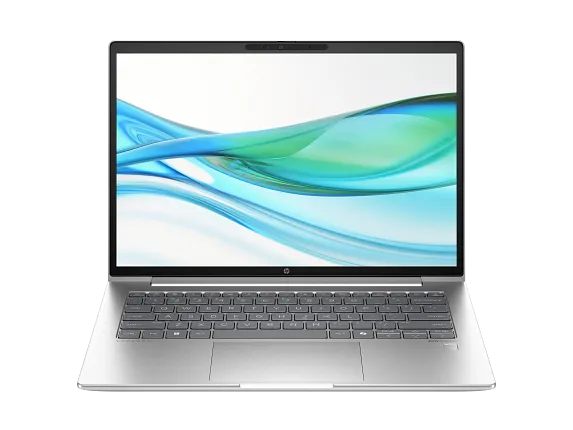
The HP ProBook 440 is a mid-range business laptop designed by HP. It’s often updated with the latest processor generations, offering various configurations to meet different user requirements. Unlike some of HP’s more premium lines like the Spectre or EliteBook, the ProBook 440 focuses on providing a solid performance for everyday tasks at a competitive price point. It aims to offer a blend of features that appeal to both corporate and individual users, especially those looking for a dependable machine for work, school, or general productivity. Its design usually includes a focus on durability, security, and a balance of performance and battery life, making it a good choice for professionals who are frequently on the move.
Key Features and Specifications
The specific features and specifications vary depending on the generation and configuration of the HP ProBook 440 you are considering. However, some common components include:
Performance
The performance of the ProBook 440 typically depends on the chosen processor, RAM, and storage. Configurations often include:
- Processors: Intel Core i3, i5, or i7 processors (from recent generations like the 13th or 14th Gen) or equivalent AMD Ryzen processors, impacting the speed and power efficiency.
- RAM: 8GB, 16GB, or sometimes more (up to 32GB) of DDR4 or DDR5 RAM, allowing for smooth multitasking and efficient application use.
- Storage: Solid-state drives (SSDs) are standard, offering fast boot times and overall responsiveness, with options ranging from 256GB to 1TB or more of storage space.
- Graphics: Integrated Intel Iris Xe Graphics or AMD Radeon Graphics usually handle everyday graphics tasks, while some models may offer discrete NVIDIA GeForce MX series graphics for basic content creation or light gaming.
Display and Audio
- Display: 14-inch displays are common, with options including Full HD (1920×1080) or higher resolution panels, often with anti-glare coatings for comfortable viewing in various lighting conditions. Touchscreen options might be available.
- Audio: Integrated stereo speakers and a built-in microphone array are standard, with potential for improved audio quality depending on the specific model and audio enhancements like HP Audio Control.
Design and Portability
- Design: Typically featuring a durable chassis made of plastic or a combination of materials, the ProBook 440 aims for a professional and understated look.
- Portability: The 14-inch form factor strikes a balance between portability and usability, making it easy to carry around in a backpack or briefcase. It generally offers a moderate weight, but specific figures vary based on the specific generation.
Security Features
HP typically incorporates various security features in the ProBook 440:
- TPM 2.0: A Trusted Platform Module that provides hardware-based security for passwords and encryption keys.
- Fingerprint Reader: Often available for biometric login.
- Webcam Privacy Shutter: Protects against unwanted access to the webcam.
- HP Sure Start: A BIOS-level protection to help protect against malware.
- Kensington Lock Slot: Enables physical security for the laptop.
Connectivity
- Ports: USB-A, USB-C (with Thunderbolt support on some models), HDMI, an Ethernet port, and a headphone/microphone combo jack.
- Wireless: Wi-Fi 6 or Wi-Fi 6E support and Bluetooth are standard for wireless connectivity.
- Other: An SD card reader might be present.
Who Should Buy an HP ProBook 440?
The HP ProBook 440 is a good fit for several types of users:
- Business Professionals: Suitable for those who need a reliable and secure laptop for everyday work tasks, including email, office applications, web browsing, and presentations.
- Students: A practical choice for students needing a laptop for research, writing papers, attending online classes, and general academic use.
- Small Business Owners: Offers a cost-effective solution for running a small business, managing finances, and handling client communication.
- General Users: Ideal for individuals seeking a versatile laptop for home use, including online shopping, streaming videos, and general productivity.
Best HP ProBook 440 Alternatives for Business Professionals
Choosing the right laptop can be overwhelming. Here’s a comparison of some viable alternatives, considering different factors such as price, features, and target users:
Comparison Table:
| Feature | HP ProBook 440 (Example) | Dell Latitude 5440 | Lenovo ThinkPad E14 Gen 5 | Apple MacBook Air (M2) |
|---|---|---|---|---|
| Starting Price | \$700 – \$1200 (Varies with config) | \$900 – \$1500+ | \$700 – \$1300+ | \$1000 – \$1400+ |
| Processor | Intel Core i5/i7 (13th/14th Gen) or AMD Ryzen | Intel Core i5/i7 (13th/14th Gen) | Intel Core i5/i7 (13th/14th Gen) or AMD Ryzen | Apple M2 Chip |
| RAM | 8GB – 32GB DDR4/DDR5 | 8GB – 64GB DDR5 | 8GB – 64GB DDR5 | 8GB – 24GB Unified Memory |
| Storage | 256GB – 1TB+ SSD | 256GB – 2TB+ SSD | 256GB – 1TB+ SSD | 256GB – 2TB SSD |
| Display | 14″ FHD (1920×1080) | 14″ FHD+ (1920×1200) or higher | 14″ FHD+ (1920×1200) or higher | 13.6″ Liquid Retina (2560 x 1664) |
| Portability | Good, 14″ form factor | Good, 14″ form factor | Good, 14″ form factor | Excellent, very lightweight |
| Battery Life | 6-10 hours (typical) | 8-12 hours (typical) | 7-10 hours (typical) | 15-18 hours (typical) |
| Security | TPM 2.0, Fingerprint Reader, Webcam Privacy Shutter, BIOS Protection | TPM 2.0, Fingerprint Reader, Webcam Privacy Shutter, Advanced Security Features | TPM 2.0, Fingerprint Reader, Webcam Privacy Shutter, Privacy Guard | Fingerprint (Touch ID), macOS security features |
| Target User | Business professionals, Students, General use | Corporate users, IT Professionals | Business users, Students, Value seekers | Apple ecosystem users, Professionals, Creators |
| Pros | Value for money, Durable design, Good performance | Robust security, Excellent support, Premium feel | Durable, Competitive price, Good keyboard | Excellent battery life, Powerful performance, Stunning display |
| Cons | Can be a bit plain, Display quality varies | Can be expensive, Design can feel outdated | Build quality is not the best, Basic display | Limited ports, macOS ecosystem lock-in, Pricey if spec’d up |
This comparison provides a general overview and may not reflect specific configurations or current prices.
HP ProBook 440: Pros and Cons
Pros:
- Value for Money: The ProBook 440 generally offers a good balance of features and performance for its price point.
- Durability: The build quality is often designed to withstand daily use, making it suitable for professional environments.
- Security Features: Integrated security features like TPM, fingerprint readers, and BIOS protection provide peace of mind.
- Variety of Configurations: Offers a range of configuration options to meet different budgets and performance needs.
- Reliable Performance: Equipped with latest generation processors that ensures that the system is ready to operate quickly and efficiently.
Cons:
- Design: The design may be considered conservative or less stylish compared to some premium laptops.
- Display Quality: The display quality can vary depending on the configuration and can sometimes be a compromise compared to higher-end models.
- Plastic Build: The build material might feel less premium compared to models made from aluminum or other high-end materials.
- Limited Graphics: Graphics capabilities are often sufficient for general tasks but may not be ideal for demanding gaming or content creation.
FAQ
-
Is the HP ProBook 440 a good laptop for students?
Yes, it can be an excellent option for students. It’s often robust, reasonably priced, and offers enough performance for academic tasks. -
Does the HP ProBook 440 have a touchscreen option?
Yes, some configurations may offer a touchscreen display. However, it’s not a standard feature across all models. -
Does the HP ProBook 440 come with a warranty?
Yes, HP usually includes a standard warranty with its laptops. The length of the warranty may vary, so check the specific model details. -
Can I upgrade the RAM and storage on the HP ProBook 440?
Yes, in most cases, you can upgrade the RAM and storage. Check the specifications for the specific model to determine the maximum supported capacity. -
How long does the battery last on the HP ProBook 440?
Battery life varies depending on the specific configuration and usage, but generally, you can expect between 6 to 10 hours for typical tasks.