Gigabyte G5: A Comprehensive Review for Gamers
The Gigabyte G5 series has carved a niche in the competitive gaming laptop market, offering a compelling blend of performance, features, and affordability. This review dives deep into the G5, exploring its strengths, weaknesses, and how it stacks up against the competition, ultimately helping you decide if it’s the right gaming machine for your needs.
Outline
- Introduction
- Design and Build Quality
- Performance: Gaming and Beyond
- Display and Audio Quality
- Ports and Connectivity
- Battery Life
- Price and Value
- Best Gigabyte G5 Alternatives for Gamers
- Conclusion: Is the Gigabyte G5 Worth Buying?
- FAQ
Design and Build Quality
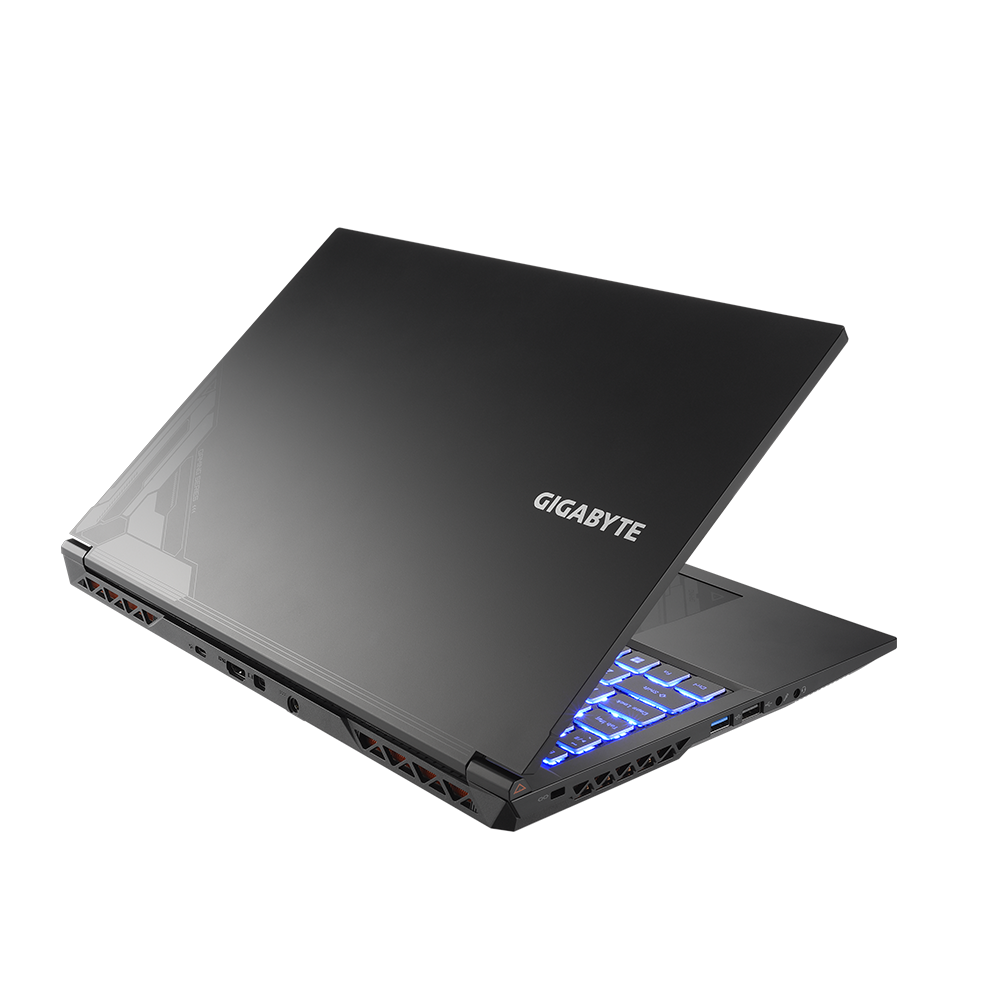
The Gigabyte G5 generally adopts a minimalist aesthetic, often featuring a black chassis with subtle branding. While the design isn’t necessarily flashy, it’s typically clean and professional-looking. Build quality, however, can be a mixed bag. While the G5 isn’t known for premium materials, it generally feels sturdy enough for everyday use. Plastic construction is common, which helps keep the price down. The keyboard, while potentially featuring customizable RGB backlighting on some models, can feel a bit mushy to some users, and the trackpad is often adequate but not exceptional. Expect some flex in the chassis, especially around the keyboard area, which is typical for laptops in this price range.
Performance: Gaming and Beyond
The Gigabyte G5’s performance hinges heavily on the specific configuration. It usually comes equipped with a combination of an Intel Core i5 or i7 processor and an NVIDIA GeForce RTX 3050, 3050 Ti, or 3060 graphics card. Some newer models now offer RTX 40 series GPUs. The inclusion of an SSD (Solid State Drive) is standard, providing fast boot times and application loading. Memory configurations usually start at 8GB of RAM, with options for 16GB or more, which is crucial for demanding games and multitasking. The cooling system, often featuring multiple heat pipes and fans, attempts to keep temperatures under control during intense gaming sessions. Frame rates in games can vary significantly depending on the GPU and game settings, but the G5, when configured with a higher-end GPU, can handle modern titles at medium to high settings at 1080p resolution. Performance in everyday tasks like web browsing, video editing, and office productivity is generally smooth and responsive.
Display and Audio Quality
The display on the Gigabyte G5 is typically a 15.6-inch IPS (In-Plane Switching) panel, often with a 144Hz refresh rate for smoother gameplay. The image quality is generally good, with decent color accuracy and wide viewing angles. However, the display’s brightness and color gamut may not be as vibrant as those found on higher-end gaming laptops. The bezels surrounding the screen are often relatively thin. Audio quality is generally adequate for casual gaming and media consumption, but the built-in speakers might lack bass and overall audio fidelity. Using headphones or external speakers is recommended for a more immersive audio experience.
Ports and Connectivity
The Gigabyte G5 usually offers a good selection of ports for connectivity. This typically includes multiple USB-A ports, a USB-C port (with or without Thunderbolt 4 support depending on the configuration), an HDMI port, an Ethernet port for wired internet, and a headphone/microphone combo jack. The inclusion of a dedicated SD card reader can vary between models. Wireless connectivity usually comprises Wi-Fi 6 or Wi-Fi 6E for fast wireless internet speeds, and Bluetooth for connecting peripherals. The ports placement is generally well-thought-out, providing easy access to frequently used connections.
Battery Life
Battery life on the Gigabyte G5 is generally a weakness. Due to the high-performance components, the battery often drains relatively quickly, especially when gaming or running demanding applications. Expect battery life to be around 4-6 hours for light use like web browsing or document editing, and significantly less when gaming. Users should anticipate needing to plug in the laptop frequently, making it less ideal for on-the-go gaming.
Price and Value
The Gigabyte G5 is positioned in the mid-range gaming laptop market, offering a competitive price-to-performance ratio. Its price point typically makes it an attractive option for budget-conscious gamers looking for a machine that can handle modern games without breaking the bank. The value is highly dependent on the chosen configuration, with higher-end GPUs and more RAM naturally increasing the cost. Comparison shopping is essential to ensure you’re getting the best possible value for your budget.
Best Gigabyte G5 Alternatives for Gamers
When searching for the perfect gaming laptop, several competitors to the Gigabyte G5 should be considered. Here’s how it stacks up against a few popular models:
Dell G15: The Dell G15 often provides a robust build quality and sometimes offers more powerful configurations for a comparable price. It’s often considered a strong alternative.
| Feature | Gigabyte G5 | Dell G15 |
|---|---|---|
| Build Quality | Plastic, generally sturdy | Generally more robust, sometimes metal chassis |
| Performance | Dependent on configuration, good mid-range performance | Often more powerful configurations available |
| Display | Good, 144Hz refresh rate common | Usually very good, offers higher refresh rates |
| Battery Life | Relatively short | Varies, often slightly better than G5 |
| Price | Competitive | Competitive |
| Cooling | Adequate | Often good cooling systems |
Acer Nitro 5: The Acer Nitro 5 is another popular contender in the mid-range gaming laptop market, frequently offering similar performance and features at a similar price.
Lenovo Legion Series: Lenovo’s Legion series is often considered a premium option, offering a higher level of build quality, performance, and features.
Conclusion: Is the Gigabyte G5 Worth Buying?
The Gigabyte G5 is a solid mid-range gaming laptop that provides a good balance of performance, features, and affordability. It’s an excellent choice for gamers who are budget-conscious but still want to enjoy modern games at reasonable settings. However, its build quality isn’t the best, and the battery life is a significant drawback. If you prioritize performance per dollar and are comfortable with potentially plugging in frequently, the G5 is a viable option. Before making a purchase, compare the available configurations and consider the alternatives, such as the Dell G15 or Acer Nitro 5, to ensure you’re getting the best laptop for your specific needs.
FAQ
- What is the typical screen resolution of the Gigabyte G5? Typically, 1920×1080 (Full HD).
- Does the Gigabyte G5 support ray tracing? Yes, models with NVIDIA RTX GPUs support ray tracing.
- What operating system does the Gigabyte G5 come with? Typically, Windows 11.
- Can I upgrade the RAM and storage? Yes, both RAM and storage are usually upgradeable.
- Does the Gigabyte G5 have a webcam? Yes, it usually includes a built-in webcam.
- Is the Gigabyte G5 good for VR gaming? Performance depends on the GPU, but models with more powerful GPUs like the RTX 3060 or better are capable of handling VR gaming.