Gigabyte Aorus 15: A Comprehensive Review for Gamers
The Gigabyte Aorus 15 series has consistently aimed to deliver high-performance gaming experiences in a sleek and portable package. This review delves into the latest iterations, examining their design, performance, features, and overall value proposition to help potential buyers determine if it’s the right gaming laptop for their needs.
Outline
- Design and Build Quality
- Display and Audio
- Performance: Gaming and Productivity
- Keyboard and Trackpad
- Ports and Connectivity
- Battery Life
- Price and Value
- Best Gigabyte Aorus 15 Alternatives for Gamers
- Frequently Asked Questions (FAQ)
Design and Build Quality
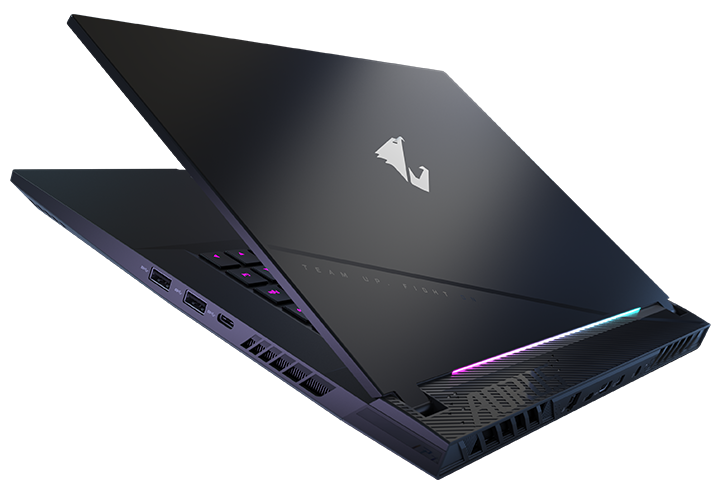
The Aorus 15 laptops typically sport a modern and angular design language, often featuring a matte black finish and subtle RGB lighting accents. The build quality generally feels robust, utilizing a combination of metal and plastic to balance durability and weight. The chassis often incorporates strategically placed vents to optimize airflow and cooling performance. While the specific design aesthetics may vary slightly between generations, Gigabyte generally maintains a premium feel, avoiding excessive flashy elements. The overall footprint of the Aorus 15 is relatively compact, making it reasonably portable for a gaming laptop. The hinge mechanism is typically sturdy and allows for a comfortable typing angle. The surface, though sleek can be prone to fingerprints.
Display and Audio
The Aorus 15 laptops usually come equipped with high refresh rate displays, ranging from 144Hz to 240Hz, catering to the needs of competitive gamers. Panel technologies include IPS for wide viewing angles and accurate color reproduction. Resolution typically starts at Full HD (1920×1080) with options for higher resolutions like QHD (2560×1440) for sharper visuals. The displays are often bright enough for comfortable use in various lighting conditions.
Audio quality varies depending on the specific model. Gigabyte usually integrates stereo speakers, often positioned on the bottom or sides of the laptop. While the sound output can be clear and loud enough for general use and gaming, it might not compete with the quality of dedicated external speakers or headphones. A good pair of headphones is recommended for the best audio experience.
Performance: Gaming and Productivity
The Aorus 15 laptops are built for gaming and are consistently equipped with powerful components. They typically feature the latest Intel Core i7 or i9 processors, coupled with high-end NVIDIA GeForce RTX series GPUs (e.g., RTX 3070, RTX 3080, RTX 4070, RTX 4080). This combination allows for smooth frame rates in demanding games at high settings, even at QHD resolution depending on the specific configuration. The availability of ample RAM (16GB or 32GB) and fast NVMe SSD storage (512GB or 1TB+) further enhances performance by ensuring quick load times and smooth multitasking. The thermal design, including advanced cooling solutions, is crucial for maintaining performance under heavy loads. A well-designed cooling system prevents throttling, allowing the components to run at their intended clock speeds for extended gaming sessions.
Keyboard and Trackpad
The keyboard on the Aorus 15 series often features per-key RGB backlighting, allowing for extensive customization. The keys usually have a comfortable travel distance and provide a responsive typing experience. However, the specific feel and key layout may vary slightly between different models. Some iterations include features like anti-ghosting technology to prevent missed keystrokes during intense gaming.
The trackpad is generally smooth and responsive, with accurate cursor tracking. It often supports multi-touch gestures for intuitive navigation. The trackpad’s size and positioning are generally well-designed for comfortable use.
Ports and Connectivity
The Aorus 15 laptops typically offer a comprehensive selection of ports to cater to various connectivity needs. These usually include multiple USB-A and USB-C ports (with Thunderbolt 4 support on some models), HDMI output for connecting to external displays, a headphone jack, an Ethernet port for wired network connections, and a card reader. The specific port arrangement may vary depending on the model and generation.
For wireless connectivity, the Aorus 15 usually includes Wi-Fi 6 or Wi-Fi 6E for fast and reliable wireless internet access, as well as Bluetooth for connecting to peripherals like headphones and mice.
Battery Life
Battery life on gaming laptops is often a compromise due to the power-hungry components. The Aorus 15 models offer moderate battery life, typically ranging from 4 to 6 hours for general productivity tasks like web browsing and office work. Gaming will significantly drain the battery, lasting only a couple of hours or less. Using power-saving modes and optimizing display settings can help extend battery life, but connecting to a power outlet is generally recommended for optimal performance during gaming sessions.
Price and Value
The Aorus 15 laptops generally fall within the premium price range for gaming laptops. The price varies depending on the configuration, with higher-end models equipped with more powerful processors, GPUs, and larger storage options costing significantly more. Considering the performance, features, and build quality, the Aorus 15 provides good value for its target audience. However, buyers should carefully assess their needs and budget to determine if the specific configuration aligns with their requirements. Exploring other options in the price range, such as models from ASUS, MSI, and Razer is often beneficial.
Best Gigabyte Aorus 15 Alternatives for Gamers
Here’s a comparison table showcasing some of the best alternatives, alongside the Gigabyte Aorus 15, taking into account different factors that a gamer might consider.
| Feature | Gigabyte Aorus 15 | Dell G15 | ASUS ROG Zephyrus G15 | MSI Katana GF Series | Razer Blade 15 |
|---|---|---|---|---|---|
| Processor | Intel Core i7/i9 | AMD Ryzen/ Intel Core i7/i9 | AMD Ryzen | Intel Core i5/i7/i9 | Intel Core i7/i9 |
| GPU | NVIDIA GeForce RTX Series | NVIDIA GeForce RTX Series | NVIDIA GeForce RTX Series | NVIDIA GeForce RTX Series | NVIDIA GeForce RTX Series |
| Display | 144Hz – 240Hz IPS | 165Hz – 360Hz IPS | 165Hz – 240Hz IPS | 144Hz – 240Hz IPS | 165Hz – 240Hz IPS |
| Design | Angular, Modern | Gamer-Focused, Bold | Sleek, Portable | Minimalist, Functional | Premium, Thin |
| Keyboard | Per-Key RGB, Good Travel | Good Feel, Backlit | Comfortable, Backlit | Comfortable, Backlit | Per-Key RGB, Excellent |
| Ports | Comprehensive | Good Variety | Well-Equipped | Standard | Comprehensive |
| Battery Life | Moderate | Moderate | Good | Limited | Moderate |
| Price | Premium | Mid-Range | Premium | Mid-Range | Premium |
| Pros | Powerful, Good Cooling | Affordable, Performance | Portable, Stylish | Budget-Friendly | Premium Build, Powerful |
| Cons | Battery Life, Price | Build Quality (varies) | Pricey | Basic Design, Cooling | Pricey |
| Ideal for | Enthusiast Gamers | Budget-Conscious Gamers | Portable Gamers | Entry-Level Gamers | Premium Gamers, Creators |
Choosing the right alternative depends on the buyer’s priorities. The Dell G15 offers a good balance of performance and affordability. The ASUS ROG Zephyrus G15 is a top choice if portability is a major concern. The MSI Katana is suitable for those on a tighter budget. And finally, the Razer Blade 15 is aimed at consumers seeking a premium build and design.
Frequently Asked Questions (FAQ)
Q: Does the Aorus 15 support ray tracing?
A: Yes, Aorus 15 laptops equipped with NVIDIA GeForce RTX series GPUs fully support ray tracing for enhanced visual fidelity in compatible games.
Q: Is the Aorus 15 good for video editing?
A: Yes, with powerful processors, ample RAM, and dedicated graphics cards, the Aorus 15 is suitable for video editing and other creative tasks.
Q: Can I upgrade the RAM and storage?
A: Yes, the Aorus 15 laptops generally allow for RAM and storage upgrades, offering users the ability to customize and extend the lifespan of their device.
Q: How does the cooling system perform?
A: The Aorus 15 laptops typically feature advanced cooling systems to maintain performance under heavy loads. However, the specific performance may vary depending on the model and the intensity of the tasks being performed.
Q: What is the warranty like?
A: Gigabyte usually offers a standard one-year warranty on its Aorus 15 laptops. The exact warranty details, including coverage and support options, should be confirmed at the point of purchase.