
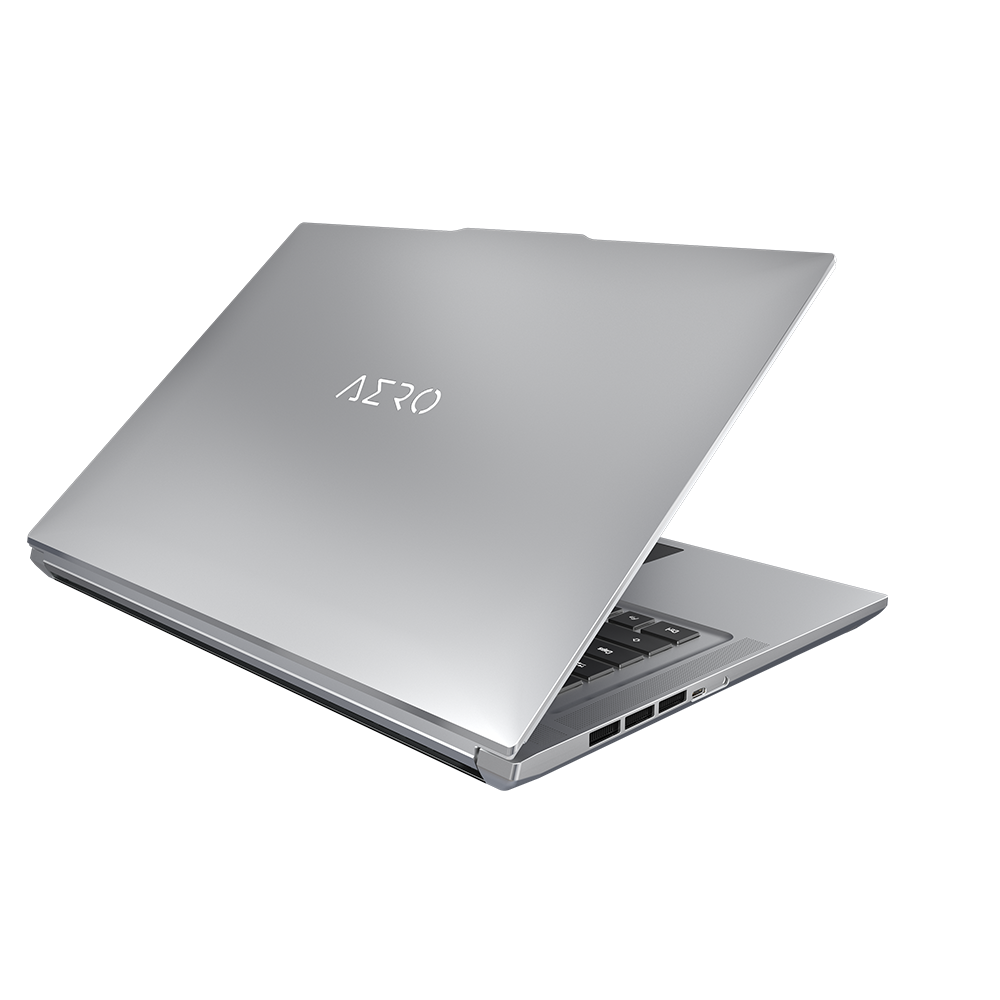
Gigabyte Aero 16: A Deep Dive into Performance, Design, and Target Audience
The Gigabyte Aero 16 aims to be the ultimate creator’s laptop, blending powerful components with a sleek and portable design. This laptop series has garnered attention for its high-performance processors, vibrant displays, and commitment to visual fidelity. We’ll explore its features, capabilities, and target audience to help you determine if it’s the right choice for your needs.
Outline
- Introduction
- Design and Build Quality
- Display and Audio Experience
- Performance and Specifications
- Best Gigabyte Aero 16 Alternatives
- Battery Life and Portability
- Target Audience and Use Cases
- Pricing and Availability
- Frequently Asked Questions (FAQ)
Design and Build Quality
The Gigabyte Aero 16 prioritizes a premium aesthetic. It typically features a CNC-machined aluminum chassis, offering a robust and high-end feel. The design is clean and minimalist, avoiding flashy gaming aesthetics in favor of a professional and sophisticated look. This makes it suitable for both creative professionals and users who appreciate understated elegance. The build quality is generally excellent, with a solid feel and minimal flex. The hinges are often robust, providing smooth opening and closing of the display. However, because it caters to creators, expect a few compromises to make it lighter than its gaming-focused competitors.
Display and Audio Experience
The Aero 16’s display is a key selling point. Gigabyte often equips these laptops with high-resolution, vibrant panels. Expect options like OLED displays with exceptional color accuracy, wide color gamuts (typically covering 100% DCI-P3), and high brightness levels. These displays are crucial for content creators who demand accurate color reproduction for photo and video editing. The display’s response times and refresh rates are designed for general productivity and content creation, although not specifically targeted at high-end gamers.
Audio quality is generally satisfactory, with well-placed speakers that provide clear sound. While the audio system may not rival dedicated audio solutions, it is suitable for media consumption and general use. Users who require more immersive audio experiences may still prefer external speakers or headphones.
Performance and Specifications
The Gigabyte Aero 16 is designed to handle demanding workloads. It typically houses powerful processors, such as Intel Core i7 or i9 series CPUs, offering excellent multi-core performance for video editing, 3D rendering, and other creative tasks. Graphics options usually range from mid-range to high-end NVIDIA GeForce RTX GPUs, providing the necessary horsepower for accelerating content creation workflows and running creative applications smoothly. The laptop is often equipped with ample RAM (16GB or 32GB) and fast NVMe SSD storage, ensuring responsive performance and quick loading times.
Best Gigabyte Aero 16 Alternatives
Choosing the right laptop depends on your specific needs. Here’s how the Aero 16 stacks up against some popular alternatives:
Dell XPS 15
The Dell XPS 15 is another popular choice for creators. It shares many of the same strengths as the Aero 16, including a premium design, excellent display options, and powerful performance. The XPS 15 typically offers slightly better battery life.
| Feature | Gigabyte Aero 16 | Dell XPS 15 |
|---|---|---|
| Processor | Intel Core i7/i9 | Intel Core i7/i9 |
| Graphics | NVIDIA GeForce RTX (varies) | NVIDIA GeForce RTX (varies) |
| Display | High-resolution OLED or IPS | High-resolution OLED or IPS |
| Design | Premium, sleek | Premium, minimalist |
| Battery Life | Good | Slightly better |
| Target Audience | Content creators, professionals | Content creators, professionals |
| Price (Approx.) | $$ (Varies with config) | $$ (Varies with config) |
Apple MacBook Pro 16-inch (M Series)
For users deeply invested in the Apple ecosystem, the MacBook Pro 16-inch with M-series chips is a powerful competitor. It offers exceptional performance, particularly in tasks optimized for the Apple silicon, and delivers outstanding battery life. However, it runs macOS, and the price point is often higher.
| Feature | Gigabyte Aero 16 | Apple MacBook Pro 16-inch |
|---|---|---|
| Processor | Intel Core i7/i9 or Ryzen | Apple M Series chips |
| Graphics | NVIDIA GeForce RTX (varies) | Integrated or dedicated Apple GPU |
| Display | High-resolution OLED or IPS | High-resolution, Retina Display |
| Operating System | Windows | macOS |
| Ecosystem | Windows, broader hardware compatibility | Apple, optimized for Apple services |
| Price (Approx.) | $$ (Varies with config) | $$ |
Razer Blade 15
The Razer Blade 15 is geared towards a more gaming-centric user. While it also offers high-end components suitable for content creation, it prioritizes gaming performance with higher refresh rate displays. Expect a more aggressive, gaming-focused design.
| Feature | Gigabyte Aero 16 | Razer Blade 15 |
|---|---|---|
| Processor | Intel Core i7/i9 | Intel Core i7/i9 |
| Graphics | NVIDIA GeForce RTX (varies) | NVIDIA GeForce RTX (varies) |
| Display | High-resolution, color accurate | High-refresh-rate gaming panels |
| Design | Professional, minimalist | Gaming-focused |
| Cooling | Optimized for content creation | Optimized for gaming |
| Price (Approx.) | $$ (Varies with config) | $$ (Varies with config) |
Battery Life and Portability
Battery life is a critical factor for mobile professionals. The Aero 16 typically offers decent battery life, enabling several hours of use on a single charge. However, its performance-focused components can drain the battery quickly during intensive tasks. The laptop’s slim design contributes to its portability, making it easy to carry around. While not the lightest laptop in its class, it’s generally manageable for daily commutes and travel.
Target Audience and Use Cases
The Gigabyte Aero 16 is primarily targeted at content creators, including video editors, graphic designers, photographers, and 3D artists. Its powerful performance, color-accurate display, and sleek design make it well-suited for these demanding workflows. It’s also a good choice for professionals who need a powerful and portable laptop for everyday tasks and presentations. This device can also be used for a decent gaming experience, although it is not specifically designed for it.
Pricing and Availability
The price of the Gigabyte Aero 16 varies depending on the configuration. Higher-end models with more powerful processors, GPUs, and larger storage options will naturally be more expensive. It is typically available through major electronics retailers and online stores. Keep an eye out for sales and promotions to potentially save on your purchase.
Frequently Asked Questions (FAQ)
- Is the Gigabyte Aero 16 good for gaming? While it can handle gaming, it’s primarily designed for content creation. Gaming performance is good, but you’ll get more value from a gaming-specific laptop if that’s your primary use.
- What kind of display does the Aero 16 have? It often features high-resolution OLED or IPS panels with excellent color accuracy and wide color gamut coverage.
- How’s the battery life? Battery life is decent, but it can vary depending on the usage. Expect several hours of use during general tasks, but less during intensive tasks like video editing.
- What are the main competitors? Dell XPS 15, Apple MacBook Pro 16-inch, and Razer Blade 15 are among the primary competitors.
- Does it have good cooling? Aero 16 includes an advanced cooling system designed to ensure the system doesn’t throttle under sustained load.
- Is it expensive? Yes, the Aero 16 is considered a premium laptop and carries a premium price tag, particularly when configured with high-end components.









