
Avita Liber V14: A Comprehensive Review
The Avita Liber V14, a sleek and stylish laptop, has carved a niche for itself in the competitive market for portable computing. Known for its vibrant color options and slim profile, it aims to attract users who prioritize aesthetics and portability. This review dives deep into the Liber V14, examining its performance, design, features, and overall value proposition.
Outline
- Design and Build Quality
- Display and Audio Quality
- Performance and Specs
- Keyboard and Trackpad
- Ports and Connectivity
- Battery Life
- Best Avita Liber V14 Alternatives
- Verdict: Is the Avita Liber V14 Right for You?
- Frequently Asked Questions (FAQ)
Design and Build Quality
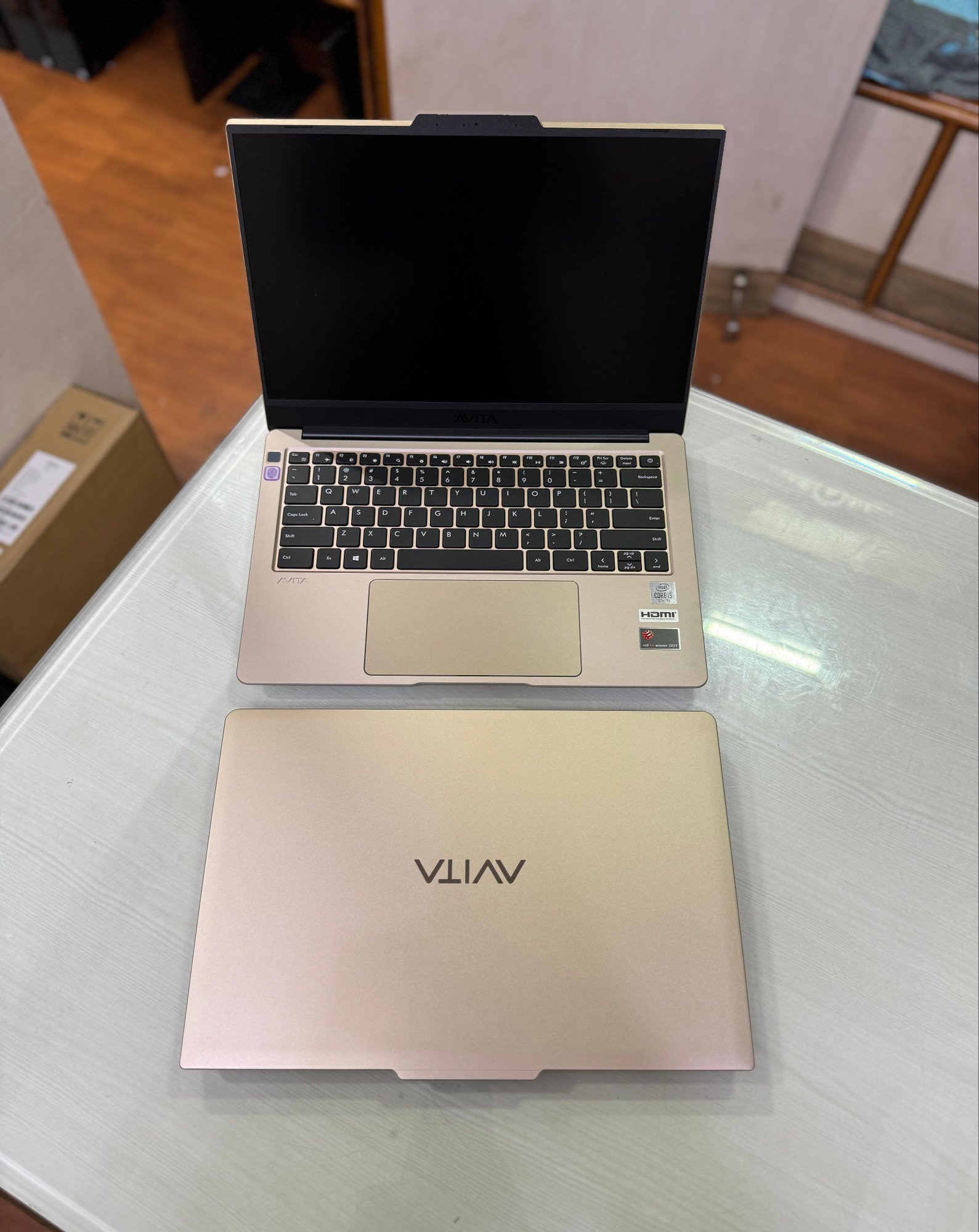
The Avita Liber V14 stands out immediately due to its striking design. Available in a range of eye-catching colors, the laptop exudes a premium feel, largely thanks to its aluminum alloy chassis. The slim profile contributes to its portability, making it easy to slip into a backpack or messenger bag. Build quality generally feels solid, with minimal flex in the chassis, though some reviewers have noted slight creaks around the hinges. The finish is smooth and resistant to fingerprints to a certain extent. The overall aesthetic is minimalist and modern, appealing to users who appreciate a clean and uncluttered design.
Display and Audio Quality
The 14-inch display is a key feature of the Liber V14. The screen offers a Full HD (1920 x 1080) resolution, which delivers crisp and clear visuals suitable for everyday tasks like web browsing, document editing, and streaming videos. The bezels surrounding the display are reasonably slim, enhancing the immersive experience. Color accuracy is generally acceptable, though professional users who require precise color reproduction might find it lacking. The audio quality, delivered through integrated speakers, is adequate for casual listening and video calls but may not satisfy audiophiles. Sound can become tinny at higher volumes, suggesting the necessity of external speakers or headphones for a better audio experience.
Performance and Specs
The performance of the Avita Liber V14 depends heavily on the specific configuration. Available with a range of Intel Core i3, i5, and i7 processors, alongside varying amounts of RAM (usually 8GB or 16GB) and storage (typically SSDs ranging from 256GB to 1TB), the laptop’s capabilities vary accordingly. Models equipped with higher-end processors and more RAM deliver smoother performance, especially when multitasking or running demanding applications. The integrated Intel graphics are sufficient for general use and some light gaming, but serious gamers should look elsewhere. The SSD provides fast boot times and rapid application loading, contributing to a responsive user experience.
Keyboard and Trackpad
The keyboard on the Liber V14 offers a comfortable typing experience, despite the limited key travel. The keys are well-spaced, which minimizes typos. The keyboard layout is generally standard. The trackpad is smooth and responsive, with good palm rejection. It supports multi-finger gestures, enhancing the user’s workflow and navigation. The trackpad is a good size and accurate, offering a seamless and intuitive user experience.
Ports and Connectivity
The Liber V14 provides a decent selection of ports, including USB-A ports, a USB-C port (which also supports charging), a mini-HDMI port, and a headphone jack. The presence of a USB-C port is a welcome addition, providing versatility for connecting peripherals and charging the device. Wireless connectivity is provided via Wi-Fi and Bluetooth, ensuring seamless connectivity to networks and other devices. The arrangement is fairly standard for this size and price point, ensuring users can connect their peripherals.
Battery Life
Battery life is a crucial factor for a portable laptop. The Avita Liber V14 provides a reasonably good battery life, typically lasting around 6-8 hours with moderate use. This can vary depending on usage patterns, brightness settings, and the specific hardware configuration. With light use, such as browsing and word processing, the battery can last longer. However, demanding tasks, like video editing or gaming, will drain the battery faster. The battery life is adequate for a day of work or study, providing good performance on the go.
Best Avita Liber V14 Alternatives
Finding the right laptop can be overwhelming. Let’s consider some compelling alternatives.
Dell G15:
The Dell G15 is a popular choice for gamers and users that need a powerhouse laptop. Below is a comparison table outlining key features:
| Feature | Avita Liber V14 | Dell G15 |
|---|---|---|
| Processor | Intel Core i3/i5/i7 | Intel Core i5/i7/i9 or AMD Ryzen 5/7/9 |
| Graphics | Integrated Intel Graphics | NVIDIA GeForce RTX 30 Series or AMD Radeon RX 6000 Series |
| RAM | 8GB/16GB | 8GB/16GB/32GB/64GB |
| Storage | 256GB – 1TB SSD | 256GB – 2TB SSD |
| Display | 14-inch FHD | 15.6-inch FHD/QHD |
| Battery Life | 6-8 hours | 4-6 hours |
| Price (Approx.) | $600 – $1000 | $800 – $2000+ |
| Primary Use | General purpose, portability, style | Gaming, Performance-intensive tasks |
Other Alternatives:
- MacBook Air (M1/M2): Excellent performance, sleek design, and superior battery life.
- Acer Swift 3: Offers a balance of performance, portability, and affordability.
- HP Envy 13: A stylish laptop with strong performance and a good display.
Verdict: Is the Avita Liber V14 Right for You?
The Avita Liber V14 is a compelling option for users who prioritize style, portability, and value. Its sleek design, vibrant color options, and relatively affordable price make it an attractive choice for students, professionals, and anyone seeking a laptop for everyday tasks. While its performance is not top-tier, it provides adequate power for general use and light productivity. If you are looking for a powerful gaming laptop or workstation, there are better alternatives. However, if you are looking for a stylish and portable laptop for everyday use, the Avita Liber V14 is definitely worth considering.
Frequently Asked Questions (FAQ)
Q: Does the Avita Liber V14 have a touchscreen?
A: No, the Avita Liber V14 does not have a touchscreen.
Q: Can I upgrade the RAM or storage?
A: The RAM is usually soldered onto the motherboard and is not easily upgradable. The storage (SSD) may be upgradable, depending on the specific model. Check the product specifications before purchase.
Q: Is the Avita Liber V14 good for gaming?
A: The Liber V14 is not designed for serious gaming. The integrated Intel graphics are sufficient for light gaming, but it is not recommended for demanding games.
Q: What operating system does it come with?
A: The Avita Liber V14 typically comes with Windows 10 or Windows 11 pre-installed.
Q: How durable is the Avita Liber V14?
A: The aluminum alloy chassis provides a decent level of durability. However, treat the laptop with care to avoid damage from drops or impacts.