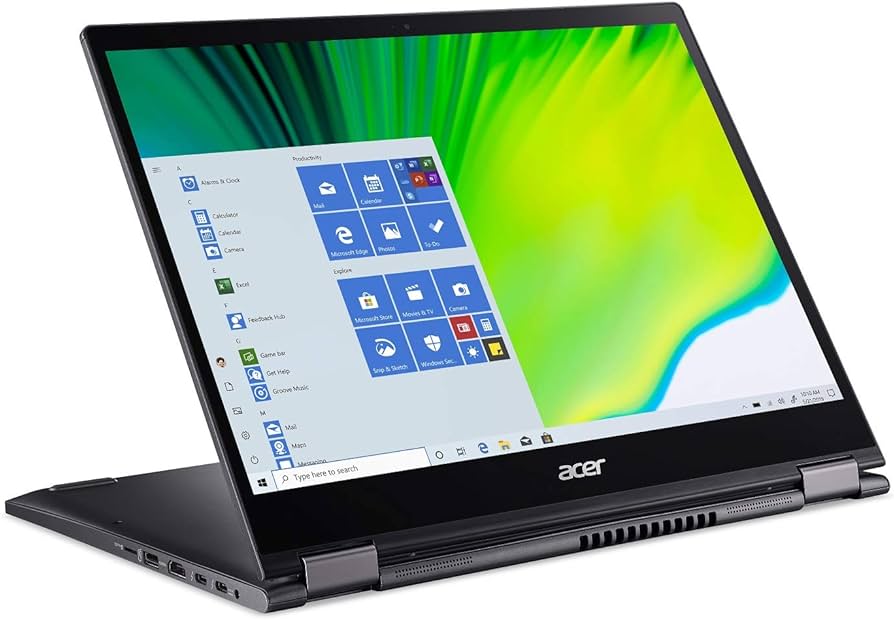

Acer Spin 5: A Comprehensive Review for 2024
The Acer Spin 5 has established itself as a popular choice in the 2-in-1 convertible laptop market, blending portability, versatility, and performance in a sleek design. This article provides an in-depth review of the Acer Spin 5, exploring its key features, performance, potential drawbacks, and its position within the competitive landscape. From its rotating hinge to its vibrant display, we’ll delve into what makes the Spin 5 a compelling option for various users, including students, professionals, and creative individuals.
Outline
- Design and Build Quality
- Display and Audio Performance
- Performance and Specs
- Battery Life
- Keyboard, Touchpad, and Stylus
- Ports and Connectivity
- Best Acer Spin 5 Alternatives
- Pros and Cons
- Verdict: Is the Acer Spin 5 Right for You?
- Frequently Asked Questions (FAQ)
Design and Build Quality
The Acer Spin 5 typically features a premium design, often incorporating an aluminum chassis that contributes to both its aesthetics and durability. The 360-degree hinge allows for various usage modes, including laptop, tablet, tent, and presentation modes. The device is generally known for being lightweight and portable, making it easy to carry around for work, travel, or school. Build quality is generally considered good, providing a solid feel and a robust hinge mechanism. Common design elements include a minimalist aesthetic with clean lines and a professional look. The precise build quality often feels sturdy.
Display and Audio Performance
The Acer Spin 5 boasts a high-resolution display, frequently utilizing an IPS panel for wide viewing angles and vibrant color reproduction. The display is often touchscreen enabled, further enhancing the device’s versatility for use in tablet mode or with a stylus. Brightness levels are typically good, making the screen suitable for use in various lighting conditions. Audio performance, while decent, is often a weaker point compared to some premium laptops. Sound quality is usually adequate for general use, such as video calls and media consumption, but might lack the depth and richness of dedicated audio setups. Expect adequate audio, especially in a quiet setting.
Performance and Specs
Performance of the Acer Spin 5 varies depending on the specific configuration. Newer models often incorporate the latest Intel Core i5 or i7 processors paired with integrated Intel Iris Xe Graphics, delivering smooth performance for everyday tasks, multitasking, and even some light creative work or gaming. RAM capacity usually starts at 8GB, with options for 16GB or more, allowing for handling of more demanding applications. Storage options generally include fast SSDs (Solid State Drives), contributing to the device’s responsiveness and quick boot times. The Spin 5 often runs on Windows. Performance is usually suitable for productivity tasks.
Battery Life
Battery life is a crucial factor for a portable laptop. The Acer Spin 5 generally offers decent battery life, typically providing all-day usage for moderate workloads, such as web browsing, document editing, and email. Battery life estimates are dependent on usage patterns, screen brightness, and other factors. Under heavy usage scenarios, such as running demanding applications or playing games, battery life will be shorter. A reasonable expectation is 8-10 hours under normal use.
Keyboard, Touchpad, and Stylus
The keyboard on the Acer Spin 5 is typically comfortable to type on, providing good key travel and tactile feedback. The touchpad is generally responsive and accurate, offering smooth cursor control and supporting multi-touch gestures. A stylus, often included, enhances the tablet mode experience, allowing for note-taking, sketching, and other creative tasks. The stylus is an excellent accessory.
Ports and Connectivity
The Acer Spin 5 typically offers a range of ports for connectivity, including USB-C ports with Thunderbolt 4 support for fast data transfer, display output, and charging. USB-A ports, an HDMI port, and a headphone jack are also often included. Wireless connectivity usually includes Wi-Fi 6E or the latest Wi-Fi standards for fast and reliable internet access, and Bluetooth for connecting to external devices such as headphones or mice.
Best Acer Spin 5 Alternatives
Several other 2-in-1 laptops compete with the Acer Spin 5. Here’s a comparison table showcasing some popular alternatives and their features:
| Feature | Acer Spin 5 | Dell XPS 13 2-in-1 | HP Spectre x360 | Microsoft Surface Laptop Studio |
|---|---|---|---|---|
| Display | IPS Touchscreen | OLED Touchscreen | OLED/IPS Options | PixelSense Flow Display |
| Processor | Intel Core i5/i7 | Intel Core i5/i7 | Intel Core i5/i7 | Intel Core i5/i7/i9 |
| RAM | 8GB/16GB | 8GB/16GB/32GB | 8GB/16GB | 16GB/32GB/64GB |
| Storage | SSD | SSD | SSD | SSD |
| Portability | Excellent | Excellent | Excellent | Good |
| Stylus Support | Yes (Typically) | Yes (Sold Separately) | Yes | Yes |
| Starting Price | Varies | Varies | Varies | Varies |
| Target User | General/Students | Professionals | Professionals | Creators |
Pros and Cons
Pros:
- Versatile 2-in-1 design with multiple usage modes
- Lightweight and portable for on-the-go use
- High-resolution display with good color accuracy
- Comfortable keyboard and touchpad
- Decent battery life for everyday tasks
- Offers a good balance of performance and price
Cons:
- Audio quality could be better
- Graphics performance may be limited compared to dedicated GPUs
- May not be the best choice for heavy gaming
- Configuration and pricing vary.
Verdict: Is the Acer Spin 5 Right for You?
The Acer Spin 5 is an excellent choice for users seeking a versatile, portable, and well-rounded 2-in-1 laptop. It is well-suited for students, professionals, and anyone who values the flexibility of using a device as both a laptop and a tablet. Its combination of a high-resolution display, decent performance, and all-day battery life makes it a solid option for productivity, content consumption, and light creative tasks. While the audio quality might not be top-tier and it doesn’t offer cutting-edge graphics performance, the Acer Spin 5 delivers great value for its price and is a compelling option in the 2-in-1 laptop market. Consider your specific needs and priorities before making a decision, but the Acer Spin 5 is a strong contender.
Frequently Asked Questions (FAQ)
- Does the Acer Spin 5 come with a stylus?
- Yes, most models typically include a stylus, enhancing the device’s usability in tablet mode.
- What is the battery life of the Acer Spin 5?
- Battery life typically ranges from 8 to 10 hours for moderate usage, but this can vary depending on the workload and settings.
- What processors are available in the Acer Spin 5?
- The Spin 5 usually offers the latest Intel Core i5 and i7 processors.
- What ports does the Acer Spin 5 have?
- It typically includes USB-C (with Thunderbolt 4 support), USB-A, HDMI, and a headphone jack.
- Is the Acer Spin 5 good for gaming?
- It can handle some light gaming due to integrated graphics, but it is not designed for heavy gaming.