Panasonic Toughbook FZ-55: The Rugged Laptop Built to Endure
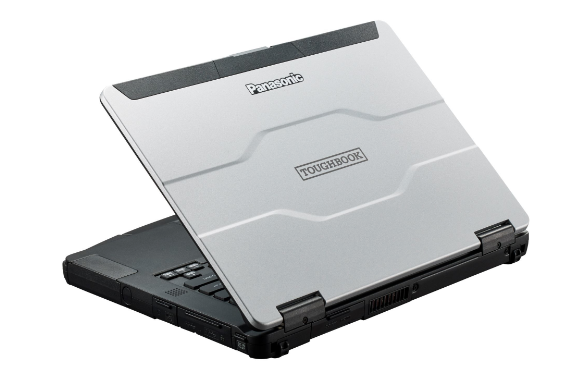
The Panasonic Toughbook FZ-55 is a rugged laptop designed for professionals who work in challenging environments. It’s built to withstand drops, spills, extreme temperatures, and other hazards that would quickly destroy a standard laptop. This makes it a popular choice for industries like law enforcement, field service, construction, and military applications. But beyond its durability, the FZ-55 offers a modular design, customizable features, and respectable performance, making it a versatile tool for demanding users.
Outline
- Overview
- Key Features and Specifications
- Performance and Capabilities
- Design and Build Quality
- Connectivity and Ports
- Modular Design and Customization Options
- Software and Operating System
- Target Audience and Use Cases
- Best Panasonic Toughbook FZ-55 Alternatives
- Pros and Cons
- Conclusion
- FAQ
Key Features and Specifications
The Panasonic Toughbook FZ-55 boasts a range of specifications tailored for its rugged purpose and potential customization:
- Processor: Intel Core i5 or i7 vPro processors (various generations available)
- Operating System: Windows 10 Pro (often upgradable)
- Memory: Up to 64GB DDR4 RAM
- Storage: Options for SSD storage, potentially up to 2TB
- Display: 14-inch touchscreen display with options for daylight-readable screens (up to 1000 nits brightness)
- Graphics: Integrated Intel UHD Graphics (depending on processor) or optional dedicated graphics.
- Connectivity: Wi-Fi 6, Bluetooth 5.1, optional 4G LTE, GPS
- Ports: Various USB ports (including USB 3.0 and USB-C), HDMI, Ethernet, SD card reader, serial port (optional)
- Durability: MIL-STD-810H certified (drop, shock, vibration, temperature), IP53 or IP65 (water and dust resistance)
- Battery Life: Up to 19.5 hours (depending on configuration and battery option) with hot-swappable battery options for extended use.
- Weight: Starting around 4.9 lbs (depending on configuration)
Performance and Capabilities
The FZ-55’s performance varies depending on the chosen processor and configuration. Intel Core i5 and i7 vPro processors offer solid performance for everyday tasks, office applications, and specialized software used in industries like field service. The vPro technology provides enhanced security and manageability features. While not designed for high-end gaming or computationally intensive tasks like video editing, the FZ-55 provides sufficient power for its intended use cases. The ample RAM capacity (up to 64GB) supports multitasking and running demanding applications. The fast SSD storage options contribute to quicker boot times and application loading. The optional dedicated graphics card (if selected) improves performance in some graphical applications.
Design and Build Quality
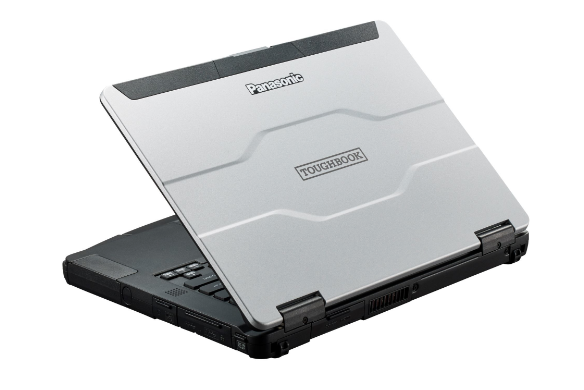
The defining characteristic of the Toughbook FZ-55 is its rugged design. The laptop is built with a magnesium alloy chassis and reinforced corners to absorb impacts. It’s rigorously tested to meet MIL-STD-810H standards, ensuring it can withstand drops from a height, extreme temperatures, vibration, and humidity. The IP53 or IP65 ratings signify a high level of dust and water resistance, protecting the internal components from the elements. The keyboard is spill-resistant, and the touchscreen can be used with gloves, making it suitable for fieldwork. The overall design prioritizes durability and functionality, rather than aesthetics.
Connectivity and Ports
The FZ-55 offers a comprehensive selection of ports to cater to diverse needs. The standard configuration includes USB 3.0 ports, a USB-C port, an HDMI port, an Ethernet port, an SD card reader, and an audio jack. Wireless connectivity options include Wi-Fi 6 and Bluetooth 5.1. Optional features add 4G LTE mobile broadband connectivity for seamless internet access in remote locations. The inclusion of legacy ports, like a serial port in some configurations, caters to the needs of specific industries that still rely on older equipment.
Modular Design and Customization Options
One of the key advantages of the FZ-55 is its modular design, which allows for extensive customization. Panasonic offers a range of expansion slots that can be configured with various options, including:
- Additional storage: An extra SSD or HDD.
- Optical Drive: A DVD-RW drive.
- Serial Port: A legacy port.
- Smart Card Reader: For enhanced security.
- Second LAN Port: Useful for some networking applications.
- Barcode Reader/RFID Reader: For inventory management and data collection.
- Dedicated Graphics Card: Improves graphical performance.
- A second battery: Offers extended runtime.
These modular options allow users to tailor the laptop to their specific needs and workflow requirements.
Software and Operating System
The Panasonic Toughbook FZ-55 typically comes pre-installed with the Windows 10 Pro operating system. However, compatibility with newer operating systems is expected with ongoing software updates. Panasonic also provides its own utilities and software to manage hardware, security, and power settings. The laptop is compatible with a wide array of software applications commonly used in various industries.
Target Audience and Use Cases
The Toughbook FZ-55 is designed for professionals working in demanding environments where durability and reliability are paramount. Primary target audiences include:
- Law Enforcement: For in-vehicle computing, data access, and report generation.
- Field Service Technicians: For diagnostics, repairs, and data collection in the field.
- Military and Defense: For secure communications, data processing, and rugged computing.
- Construction and Engineering: For on-site data analysis, project management, and rugged mobile computing.
- Emergency Services: For incident response, data access, and communication.
- Utility Workers: For inspections, repairs, and data collection.
Best Panasonic Toughbook FZ-55 Alternatives
Choosing the right rugged laptop depends on your budget, specific requirements, and the level of ruggedness needed. Here’s a look at some of the best alternatives:
Comparison Table: Dell G15 vs. Toughbook FZ-55 (Based on General Specifications)
| Feature | Dell G15 (Gaming Laptop – Example for comparison) | Panasonic Toughbook FZ-55 |
|---|---|---|
| Primary Use | Gaming & General Use | Rugged Computing |
| Durability | Limited to standard laptop build | MIL-STD-810H, IP53/IP65 (Rugged) |
| Processor | Intel Core i7/i9 (High performance) | Intel Core i5/i7 vPro (Performance, security) |
| Graphics | NVIDIA GeForce RTX Series (Dedicated, High-performance) | Intel UHD/Optional Dedicated Graphics (Integrated/Modular) |
| Display | 15.6″ or 17.3″ (Higher refresh rates, better for gaming) | 14″ (Daylight-readable options) |
| Memory | Up to 32GB DDR5 | Up to 64GB DDR4 |
| Storage | SSD (Fast storage for gaming and applications) | SSD (Ruggedized, Options for modular SSD/HDD) |
| Portability | Relatively portable, but heavy for daily carry | Portable, but emphasis on ruggedness over lightweight design |
| Price | Lower to Mid-range depending on configuration | Higher, due to rugged build and modular design |
| Battery Life | Moderate to Short (Gaming consumes power) | Up to 19.5 hours (with extended battery options) |
| Special Features | High refresh rate displays, gaming keyboard, powerful cooling systems | Modular Design, hot-swappable batteries, various customization options |
Other Rugged Laptop Alternatives:
- Getac: Another leading manufacturer of rugged laptops and tablets, known for their durable designs and comprehensive features. Consider the Getac B360 or Getac S410.
- Dell Rugged Series: Dell offers a line of rugged laptops, such as the Dell Latitude Rugged series, with various models and specifications catering to different needs.
- HP Rugged Series: Similar to Dell, HP provides rugged laptops designed for field use.
- Durabook: Durabook produces rugged laptops and tablets designed for challenging environments.
Pros and Cons
Pros:
- Exceptional Durability: Built to withstand harsh conditions, including drops, spills, and extreme temperatures.
- Modular Design: Highly customizable to meet specific user needs.
- Long Battery Life: Extended battery life options with hot-swappable batteries.
- Good Performance: Sufficient processing power and memory for professional tasks.
- Comprehensive Connectivity: Wide range of ports and wireless connectivity options.
- Daylight-Readable Display Options: Excellent visibility in bright sunlight.
Cons:
- High Price: Rugged laptops are generally more expensive than standard laptops.
- Weight: Can be heavier than standard laptops.
- Performance is not for gaming: May not be suitable for demanding gaming or video editing.
- Older Designs: New designs are often slower to be released compared to consumer based models.
Conclusion
The Panasonic Toughbook FZ-55 is a reliable and versatile rugged laptop that excels in challenging environments. Its durability, modular design, and customization options make it an ideal choice for professionals who require a robust and reliable computing solution. While the price point is higher than standard laptops, the FZ-55 offers a compelling value proposition for those who need a laptop that can withstand the rigors of their work.
FAQ
Is the Panasonic Toughbook FZ-55 waterproof?
The FZ-55 has an IP53 or IP65 rating, meaning it is protected against dust and water spray. The extent of water resistance depends on the exact configuration (IP rating). It is not designed to be submerged.
Can I upgrade the RAM and storage?
Yes, the FZ-55 offers ample RAM and storage options, with easy access to upgrade internal components as necessary. The modular design is a key feature and supports quick upgrades.
Does the FZ-55 come with a warranty?
Yes, the Toughbook FZ-55 comes with a standard manufacturer’s warranty. The specific terms of the warranty may vary depending on the region and the reseller. Extended warranty options are also available.
Is it suitable for gaming?
While the FZ-55 provides sufficient performance for everyday tasks, it is not primarily designed for gaming. Its focus is on ruggedness and functionality, not high-end graphics performance.