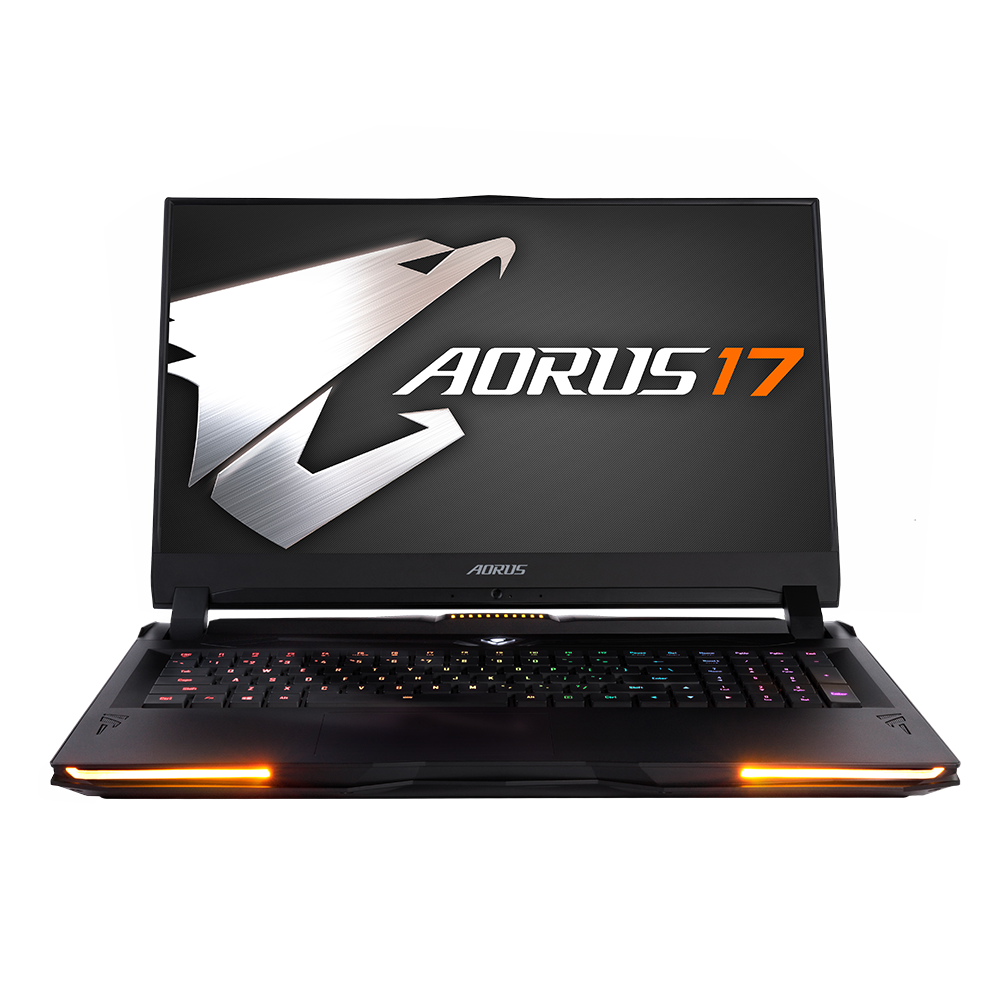
Gigabyte Aorus 17: A Deep Dive into Gaming Performance
The Gigabyte Aorus 17 series has consistently held a strong position in the high-performance gaming laptop market. Known for its powerful components, sleek design, and feature-rich offerings, the Aorus 17 aims to deliver a desktop-class gaming experience in a portable form factor. This detailed review will explore its key features, performance capabilities, and overall value proposition.
Outline
- Design and Build Quality
- Display and Audio Experience
- Performance: Powerhouse for Gaming and Demanding Tasks
- Connectivity and Ports
- Keyboard and Trackpad
- Battery Life
- Value and Pricing
- Best Gigabyte Aorus 17 Alternatives for Gamers
- Verdict: Is the Gigabyte Aorus 17 Right for You?
- FAQ
Design and Build Quality
The Aorus 17 typically features a premium aesthetic, often incorporating an aluminum chassis and a minimalist design approach. The build quality is generally robust, providing a solid feel and minimizing flex. The chassis design often includes aggressive vents and a well-thought-out cooling system to manage the heat generated by the high-performance components. The overall design language is aimed at gamers, but the execution avoids overly flashy elements, creating a look that is both stylish and functional. The display bezels are typically thin, maximizing screen real estate and contributing to a modern aesthetic. Gigabyte often includes customizable RGB lighting, allowing users to personalize their device.
Display and Audio Experience
The display is a crucial aspect of the gaming experience, and the Aorus 17 usually offers high-quality panels. Common features include high refresh rates (144Hz, 240Hz, or higher) for smooth gameplay, wide color gamut coverage for vibrant visuals, and fast response times to minimize motion blur. The screen resolution typically ranges from Full HD (1920×1080) to QHD (2560×1440) or even 4K, providing sharp and detailed images.
The audio experience is also a focus. The Aorus 17 often includes high-quality speakers with support for technologies like DTS:X Ultra, which aims to provide immersive surround sound. The sound quality is typically clear and loud, enhancing the gaming experience and making it suitable for multimedia consumption. The placement and quality of the microphones are also usually well-considered for clear communication during online gaming or video conferencing.
Performance: Powerhouse for Gaming and Demanding Tasks
The Aorus 17 is engineered for high performance. It commonly features the latest Intel Core i7 or i9 processors, paired with high-end NVIDIA GeForce RTX series graphics cards (such as the RTX 3070, RTX 3080, or the latest generation cards like the RTX 4070 or above). This combination provides exceptional gaming performance, capable of running the latest AAA titles at high settings and frame rates.
Furthermore, the Aorus 17 is typically equipped with ample RAM (16GB or 32GB, or more) and fast storage options, typically NVMe SSDs, to ensure smooth multitasking, rapid loading times, and overall responsiveness. The efficient cooling system is crucial for maintaining optimal performance under heavy loads.
Connectivity and Ports
The Aorus 17 usually offers a comprehensive selection of ports to cater to various connectivity needs. These ports often include multiple USB 3.2 Gen 1/2 ports, USB-C ports (with Thunderbolt 3/4 support), HDMI, Mini-DisplayPort, an Ethernet port (for a stable wired internet connection), a headphone jack, and an SD card reader. The inclusion of Thunderbolt ports allows for connecting external displays, high-speed storage devices, and other peripherals. Wireless connectivity typically includes the latest Wi-Fi standards (Wi-Fi 6 or Wi-Fi 6E) for fast and reliable internet access, and Bluetooth for connecting wireless accessories.
Keyboard and Trackpad
The keyboard on the Aorus 17 is often designed with gamers in mind. Features frequently include per-key RGB backlighting for customization, responsive key switches with decent travel, and anti-ghosting technology to prevent missed keystrokes during intense gaming sessions. The key layout is generally well-spaced and comfortable for extended use. The trackpad is typically a precision trackpad with smooth tracking and responsive gestures. While most gamers will prefer using an external mouse, the trackpad is still functional for everyday tasks.
Battery Life
Battery life is generally not a primary focus of high-performance gaming laptops, including the Aorus 17. Due to the power-hungry components, the battery life is often relatively short, typically ranging from a few hours of moderate use to significantly less when gaming. Users should expect to be near a power outlet for extended gaming sessions. However, the battery capacity has improved over the years, and some configurations can offer slightly better battery life for less demanding tasks like web browsing or video playback.
Value and Pricing
The Aorus 17 positions itself in the premium segment of the gaming laptop market. The price reflects the high-end components, build quality, and feature set. While it can be an investment, the overall value proposition is often strong, considering the performance capabilities, especially when comparing similar performance laptops from other brands. The pricing varies depending on the specific configuration, with higher-end models (with top-tier CPUs and GPUs) costing significantly more. Considering the features offered, the price is justifiable for the performance.
Best Gigabyte Aorus 17 Alternatives for Gamers
When choosing a gaming laptop, comparing alternatives is essential. Here’s a comparison table showcasing some of the Aorus 17’s competitors. Note that prices fluctuate constantly, so these are guidelines:
| Feature | Gigabyte Aorus 17 | Dell G15 (Example) | ASUS ROG Strix Scar 17 | MSI GE76 Raider |
|---|---|---|---|---|
| CPU | Intel Core i7/i9 | AMD Ryzen/Intel Core i7 | AMD Ryzen 9 / Intel Core i9 | Intel Core i7/i9 |
| GPU | NVIDIA GeForce RTX | NVIDIA GeForce RTX | NVIDIA GeForce RTX | NVIDIA GeForce RTX |
| Display | 17″ FHD/QHD/4K | 15″ FHD/QHD | 17″ QHD/4K | 17″ FHD/QHD |
| RAM | 16GB-64GB | 8GB-32GB | 16GB-64GB | 16GB-64GB |
| Storage | 512GB-2TB SSD | 256GB-1TB SSD | 1TB-2TB SSD | 512GB-2TB SSD |
| Starting Price | $1,800+ | $800+ | $2,000+ | $1,900+ |
| Cooling | Advanced | Good | Excellent | Excellent |
| Build | Premium | Good | Premium | Premium |
| Key Features | High-end specs, Customizable RGB | Affordable, Good Performance | High-refresh display, High-end components | High-end specs, Excellent cooling |
| Pros | Powerful Performance, Premium Design, Excellent Display | Value for Money, Reliable, Good Performance | High-end components, superior cooling | Strong performance, Excellent thermals |
| Cons | Pricey, Battery Life | Basic design, lower build quality on some models | Can be pricey, potential for loud fans | Pricey, can be bulky |
Other potential competitors include the Razer Blade 17, which offers a premium design and performance but can be even more expensive. The Alienware m17 also offers high performance and unique design elements.
Verdict: Is the Gigabyte Aorus 17 Right for You?
The Gigabyte Aorus 17 is an excellent choice for gamers who prioritize high performance and a premium user experience. If you are looking for top-tier gaming capabilities, a vibrant display, a robust build, and comprehensive connectivity options, the Aorus 17 should be on your list. However, be prepared to pay a premium price. If battery life is a critical factor or if you’re on a tighter budget, you might consider alternatives with slightly less powerful specifications. Overall, the Aorus 17 excels in delivering a desktop-class gaming experience in a portable package.
FAQ
What is the typical battery life of the Aorus 17?
Battery life typically ranges from 2-5 hours with moderate use, and significantly less when gaming. It depends on the specific configuration and usage.
Does the Aorus 17 support ray tracing?
Yes, depending on the GPU configuration, the Aorus 17 supports ray tracing. It typically features NVIDIA GeForce RTX series graphics cards, which are designed to support ray tracing.
Does the Aorus 17 get hot?
Gaming laptops, including the Aorus 17, can get hot under heavy loads. However, the Aorus 17 is designed with an efficient cooling system to manage the heat generated by the high-performance components.
What kind of display refresh rates are available?
The Aorus 17 models usually offer display refresh rates ranging from 144Hz to 240Hz, and sometimes even higher. This depends on the specific configuration.
Is the Aorus 17 upgradeable?
The RAM and storage (SSD) are usually upgradeable, allowing you to increase the memory and storage capacity. CPU and GPU are generally not upgradeable.