Lenovo IdeaPad Slim 7: A Deep Dive into Performance, Features, and Value
The Lenovo IdeaPad Slim 7 series represents a compelling blend of portability, performance, and style, making it a strong contender in the ultraportable laptop market. Offering a range of configurations, including options with both Intel and AMD processors, the Slim 7 caters to a diverse user base, from students and professionals to casual content creators. This detailed analysis explores its key features, performance capabilities, and overall value proposition, helping you determine if it’s the right laptop for you.
Outline
- Design and Build Quality
- Display and Audio Experience
- Performance: Everyday Tasks and Beyond
- Graphics Performance and Gaming Capabilities
- Battery Life and Portability
- Keyboard, Trackpad, and User Experience
- Software and Features
- Price and Value Proposition
- Best Lenovo IdeaPad Slim 7 Alternatives
- FAQ: Frequently Asked Questions
Design and Build Quality
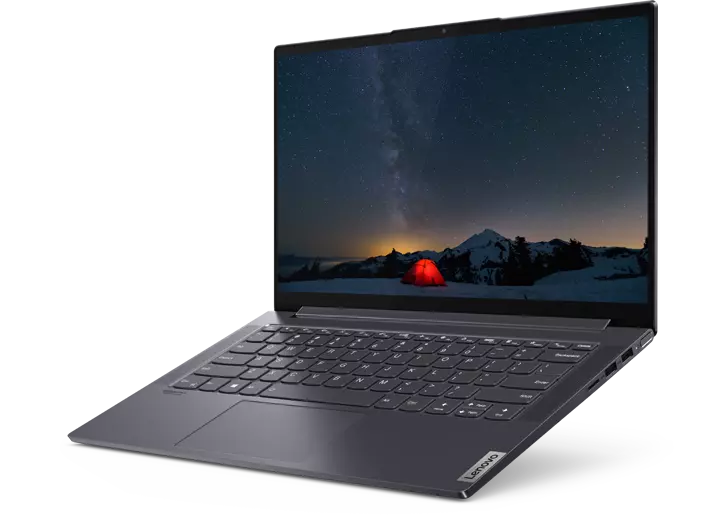
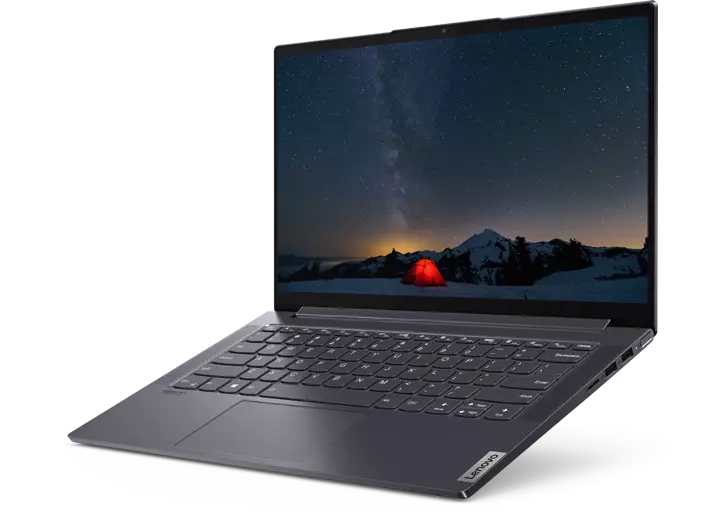
The Lenovo IdeaPad Slim 7 typically boasts a sleek and modern design, characterized by its thin profile and lightweight construction. The chassis often utilizes premium materials like aluminum, contributing to both its aesthetic appeal and durability. The slim bezels surrounding the display further enhance the overall visual experience, creating a more immersive feel. The build quality is generally excellent, with a solid feel and minimal flex, even under pressure. The laptop is designed with portability in mind, making it easy to carry in a backpack or messenger bag. Color options vary depending on the specific model, but they usually include classic choices like grey, silver, and occasionally darker hues like black.
Display and Audio Experience
The IdeaPad Slim 7 typically features a vibrant and crisp display, often with a high resolution like Full HD (1920 x 1080) or even QHD (2560 x 1440) for enhanced clarity. The screen’s color accuracy is often decent, making it suitable for content consumption and light creative work. The panel technology varies, but IPS panels are common, offering wide viewing angles. Brightness levels are generally sufficient for indoor use, and some models may feature anti-glare coatings to reduce reflections.
The audio experience is generally acceptable, with stereo speakers often placed on either side of the keyboard or on the bottom edge. While the speakers are capable of producing clear sound, the bass response might be limited. The presence of Dolby Atmos or similar audio enhancements improves the sound quality, providing a more immersive audio experience, especially when using headphones.
Performance: Everyday Tasks and Beyond
The performance of the IdeaPad Slim 7 depends on the specific configuration. Available with both Intel Core and AMD Ryzen processors, along with varying amounts of RAM (typically 8GB, 16GB, or sometimes 32GB) and fast storage (often NVMe SSDs), the Slim 7 offers a range of performance levels. Models equipped with newer generation processors and ample RAM handle everyday tasks like web browsing, email, and office productivity with ease. More powerful configurations are capable of handling more demanding tasks such as photo editing, video editing, and even light gaming. The fast SSD ensures quick boot times and application loading speeds.
Graphics Performance and Gaming Capabilities
The integrated graphics capabilities of the IdeaPad Slim 7 vary depending on the processor. Intel Iris Xe Graphics, common in Intel-based models, provides improved graphical performance compared to older integrated graphics solutions, making it possible to play some less-demanding games at reasonable frame rates. AMD Ryzen-based models often include integrated Radeon Graphics, which generally offer comparable or slightly better performance than Iris Xe.
While not designed as a dedicated gaming laptop, the Slim 7 can handle light gaming and older titles. For more demanding games, frame rates may be low, and graphics settings will need to be adjusted. The availability of discrete graphics cards, such as NVIDIA’s GeForce MX series, is another option, enhancing the gaming experience in certain configurations.
Battery Life and Portability
The IdeaPad Slim 7 is designed with portability in mind, and battery life is a crucial factor. Battery life varies depending on the specific configuration, screen brightness, and usage patterns. Models with energy-efficient processors and larger battery capacities can often achieve several hours of real-world use on a single charge, making them suitable for on-the-go productivity. The inclusion of fast charging technology allows for quick top-ups when needed. The laptop’s slim and lightweight design further enhances its portability, making it easy to carry around all day.
Keyboard, Trackpad, and User Experience
The keyboard on the IdeaPad Slim 7 typically offers a comfortable typing experience, with well-spaced keys and decent travel. The keycaps often have a slightly curved design for a more ergonomic feel. Backlit keyboards are common, allowing for easy typing in low-light environments.
The trackpad is generally smooth and responsive, with accurate tracking and support for multi-finger gestures. The overall user experience is positive, with a focus on ease of use and practicality.
Software and Features
The IdeaPad Slim 7 comes pre-installed with Windows, along with Lenovo’s suite of utility software, which may include applications for system updates, hardware diagnostics, and power management. Lenovo typically tries to keep bloatware to a minimum. Additional features may include a fingerprint reader for secure login, a webcam with a physical privacy shutter, and various connectivity ports, such as USB-C, USB-A, HDMI, and a headphone jack.
Price and Value Proposition
The Lenovo IdeaPad Slim 7 offers a competitive value proposition, balancing performance, features, and design at a reasonable price point. The price varies depending on the configuration, with more powerful models costing more. The Slim 7 often provides better value than some competitors in its class, offering a strong blend of performance and portability for the price. Regularly check for sales and promotions to get the best deal.
Best Lenovo IdeaPad Slim 7 Alternatives
Here’s a comparison of some popular alternatives to the Lenovo IdeaPad Slim 7, highlighting their strengths and weaknesses:
Comparison Table: IdeaPad Slim 7 vs. Competitors
| Feature | Lenovo IdeaPad Slim 7 | Dell XPS 13 | HP Envy 13 | Apple MacBook Air (M1/M2) |
|---|---|---|---|---|
| Processor | Intel Core/AMD Ryzen | Intel Core | Intel Core/AMD Ryzen | Apple M1/M2 |
| Graphics | Integrated (Intel Iris Xe/AMD Radeon) | Integrated (Intel Iris Xe) | Integrated (Intel Iris Xe/AMD Radeon) | Integrated (Apple Silicon) |
| Display | 13.3″ / 14″ / 15.6″ IPS, FHD/QHD | 13.4″ IPS, FHD+/UHD+ | 13.3″ IPS, FHD/QHD | 13.3″ Retina, varies by generation |
| Portability | Excellent, slim and lightweight | Excellent, very slim and lightweight | Excellent, slim and lightweight | Excellent, very slim and lightweight |
| Battery Life | Good, varies by configuration | Excellent | Good | Excellent |
| Price | Mid-range | Premium | Mid-range | Mid-range to Premium |
| Pros | Good performance, value, solid build, comfortable keyboard | Premium design, excellent display, excellent performance | Stylish design, good performance, decent value | Excellent performance, long battery life, optimized macOS |
| Cons | Integrated graphics limitations, may lack premium features | Pricey, limited ports | Display brightness can be a limiting factor, less premium build | Limited port selection, macOS ecosystem |
| Best For | General use, productivity, light content creation | Professionals, users prioritizing design and display quality | General use, students, users on a budget | Mac users, users prioritizing performance and battery life |
The Dell XPS 13 is a premium alternative, offering a stunning display and excellent performance, but at a higher price point. The HP Envy 13 provides a stylish design and good performance at a more affordable price. The Apple MacBook Air (M1/M2) stands out with its exceptional performance, long battery life, and optimized macOS experience, suitable for those in the Apple ecosystem. The ideal choice depends on individual needs and budget.
FAQ: Frequently Asked Questions
-
What processors are available in the Lenovo IdeaPad Slim 7? The IdeaPad Slim 7 typically offers configurations with both Intel Core and AMD Ryzen processors.
-
Does the IdeaPad Slim 7 have a good display? Yes, it typically features a vibrant and crisp display, often with a high resolution and decent color accuracy.
-
Is the IdeaPad Slim 7 good for gaming? While not a dedicated gaming laptop, it can handle light gaming and older titles. The performance depends on the processor and graphics configuration.
-
How long does the battery last? Battery life varies depending on the configuration and usage, but it often provides several hours of real-world use.
-
What ports does the IdeaPad Slim 7 have? It typically includes USB-C, USB-A, HDMI, and a headphone jack.
-
Is the IdeaPad Slim 7 a good value? Yes, it offers a competitive value proposition, balancing performance, features, and design at a reasonable price point.