
MSI WS75: A Deep Dive into Power and Performance for Professionals
The MSI WS75 represents a potent blend of workstation-class performance and sleek, portable design. Aimed at professionals who demand both power and mobility, this laptop packs high-end components into a chassis that’s surprisingly thin and light. It’s a machine designed to handle demanding tasks such as video editing, 3D modeling, and scientific computing while still remaining practical for travel and on-site work. However, its premium price point and targeted functionality place it squarely in the realm of specialized use cases. This article provides a comprehensive overview of the MSI WS75, exploring its features, performance, and suitability for various user profiles.
Outline
- Introduction
- Design and Build Quality
- Display and Audio
- Performance and Specifications
- Keyboard, Touchpad, and Ports
- Battery Life and Portability
- MSI WS75: Best Uses Cases
- MSI WS75 Alternatives: Competition in the Workstation Market
- Comparison Table: MSI WS75 vs. Dell G15 & Alternatives
- Pricing and Availability
- Conclusion
- FAQ
Design and Build Quality
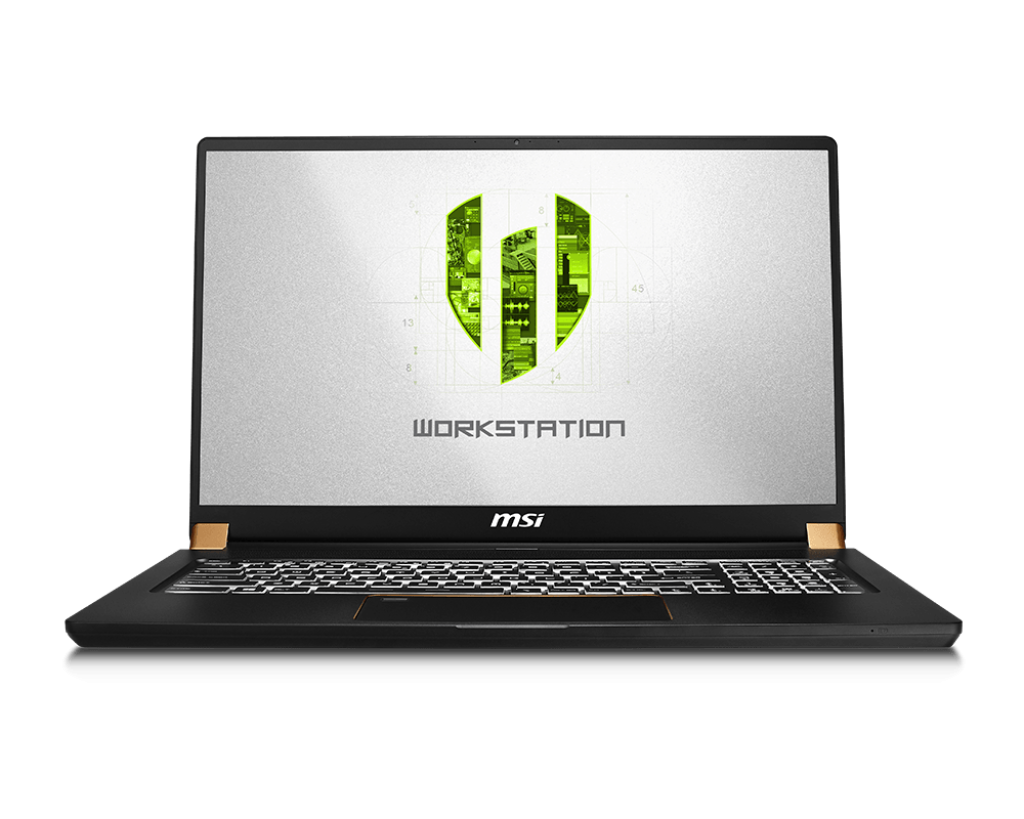
The MSI WS75 prioritizes a professional aesthetic, eschewing the gamer-centric design often found in performance-focused laptops. The chassis is crafted from a sleek, dark aluminum alloy that feels premium to the touch. The overall design is clean and minimalist, with a prominent MSI logo on the lid. The thin bezels around the display contribute to a modern look and feel, maximizing screen real estate. The build quality is excellent, with minimal flex in the chassis and a robust hinge mechanism. This construction allows it to withstand the rigors of daily use and travel. However, its thin profile does necessitate compromises, particularly concerning cooling, which can impact sustained performance under heavy loads.
Display and Audio
The display on the MSI WS75 is a key selling point, offering high resolution and accurate color reproduction. The typical configuration features a 17.3-inch display with a Full HD (1920×1080) or Ultra HD (3840×2160) resolution, depending on the chosen configuration. The panel quality is excellent, with high brightness, wide viewing angles, and good color accuracy, making it ideal for content creation and multimedia consumption. Some configurations also offer a higher refresh rate, a feature more commonly found in gaming laptops, which can benefit some professional workflows that involve motion graphics or video editing.
The audio system, while adequate, isn’t a standout feature. The speakers are located on the bottom of the chassis and produce decent sound quality, but they lack the depth and bass of more dedicated audio solutions. Users will likely want to invest in external speakers or headphones for a more immersive audio experience, particularly during professional use cases.
Performance and Specifications
The MSI WS75 is designed to deliver serious performance. It typically features high-end components, including:
- Processors: Intel Core i7 or i9 processors from the latest generations, providing ample processing power for demanding tasks.
- Graphics Cards: Professional-grade NVIDIA Quadro or GeForce RTX series GPUs. The choice between Quadro and GeForce RTX depends on the user’s specific needs, with Quadro cards typically optimized for workstation applications and certified for professional workflows.
- Memory: Up to 64GB or more of DDR4 or DDR5 RAM, ensuring smooth multitasking and the ability to handle large datasets.
- Storage: Fast NVMe PCIe SSDs offer quick boot times and rapid application loading. Multiple SSD slots allow for substantial storage capacity.
The combination of these components results in exceptional performance for tasks such as video editing, 3D rendering, CAD design, and data analysis. Sustained performance is a critical factor, and the WS75’s cooling system struggles slightly to prevent thermal throttling under heavy, continuous loads, potentially reducing performance over extended periods.
Keyboard, Touchpad, and Ports
The keyboard on the MSI WS75 provides a comfortable typing experience, despite the thin chassis. The keys have a reasonable amount of travel, offering good tactile feedback. The keyboard often incorporates per-key RGB backlighting, allowing users to customize the aesthetics.
The touchpad is large and responsive, with smooth tracking and accurate gesture support. The integrated click buttons feel sturdy and provide a satisfying click.
The port selection is robust, providing connectivity for a wide range of peripherals:
- USB-C ports, including Thunderbolt 3 or 4, for high-speed data transfer and display output.
- USB-A ports for legacy devices.
- HDMI output for connecting to external displays.
- SD card reader for easy transfer of media files.
- Ethernet port for a wired network connection.
- Headphone/microphone combo jack.
This comprehensive port selection ensures users can connect to all necessary devices and accessories without needing a plethora of adapters.
Battery Life and Portability
The MSI WS75 is designed with portability in mind, but the battery life is a compromise. Despite its thin and light design, the laptop can provide several hours of battery life under normal use, such as web browsing and document editing. However, when performing demanding tasks, such as video editing or 3D rendering, the battery drains quickly. The power brick is also relatively large, which adds to the overall weight when travelling. While it’s portable, users should plan on having access to a power outlet for extended periods of use.
MSI WS75: Best Uses Cases
The MSI WS75 is best suited for professionals who need a powerful and portable workstation for the following applications:
- Video Editors: Its high-performance components and high-resolution display make it ideal for editing 4K or even 8K video footage.
- 3D Modelers and Animators: The powerful GPU and ample RAM allow for smooth rendering and complex model creation.
- CAD Designers and Engineers: The workstation-class graphics cards provide certified performance for CAD applications.
- Data Scientists and Researchers: The processing power and storage capacity make it suitable for handling large datasets and complex calculations.
- Professionals on the Go: Its portability allows it to handle intensive tasks while traveling.
MSI WS75 Alternatives: Competition in the Workstation Market
The workstation laptop market is competitive, with several alternatives offering similar levels of performance and features. Some of the most notable competitors include:
- Dell Precision Series: Dell’s Precision laptops are a direct competitor to the MSI WS75, offering similar performance and features. They often boast robust build quality and excellent support options.
- HP ZBook Series: HP’s ZBook laptops are also strong contenders, with a reputation for reliability and performance. They offer a range of configurations to suit various needs.
- Apple MacBook Pro (with powerful specs): While Apple’s MacBook Pro line is not a direct workstation, the most recent models feature the Apple silicon chips, which offer excellent performance for professional workloads. It is important to note compatibility considerations when choosing this type of device.
Comparison Table: MSI WS75 vs. Dell G15 & Alternatives
| Feature | MSI WS75 (Example Configuration) | Dell G15 (Example Configuration) | HP ZBook (Example Configuration) | Apple MacBook Pro 16″ (Example Configuration) |
|---|---|---|---|---|
| Processor | Intel Core i9-13900HX | AMD Ryzen 9 6900HX | Intel Core i9-13900HX | Apple M2 Max |
| GPU | NVIDIA RTX A5000 (Workstation) | NVIDIA GeForce RTX 3070 | NVIDIA RTX A5000 (Workstation) | Integrated 38-Core GPU |
| RAM | 64GB DDR5 | 16GB DDR5 | 32GB DDR5 | 64GB Unified Memory |
| Storage | 2TB NVMe SSD | 1TB NVMe SSD | 1TB NVMe SSD | 1TB SSD |
| Display | 17.3″ UHD (3840×2160) | 15.6″ QHD (2560×1440) | 17.3″ UHD (3840×2160) | 16.2″ Liquid Retina XDR (3456 x 2234) |
| Ports | Thunderbolt 4, USB-A, HDMI, SD Card | USB-C, USB-A, HDMI, Ethernet | Thunderbolt 4, USB-A, HDMI, SD Card | Thunderbolt 4, HDMI, SD Card, MagSafe |
| Battery Life | Up to 5-6 hours | Up to 6-8 hours | Up to 5-7 hours | Up to 15-20 hours (Apple estimates) |
| Weight | ~2.4 kg | ~2.8 kg | ~2.6 kg | ~2.2 kg |
| Target User | Professionals | Gamers | Professionals | Creative Professionals |
| Price (approx.) | $3,500+ | $1,500+ | $3,000+ | $3,500+ |
This table provides a general comparison; specific configurations and features will vary. The Dell G15 is listed as a counterpoint, representing a gaming laptop that offers a cheaper alternative with similar performance in certain areas. It’s not a direct competitor as it’s targeted toward a different market.
Pricing and Availability
The MSI WS75 falls into the premium category of laptops, and the price reflects its high-end components and build quality. Prices typically start at around $3,000 and can easily exceed $5,000, depending on the configuration. The availability of specific configurations may vary depending on the region and the retailer. It’s a significant investment, making thorough research and comparing specifications essential before making a purchase.
Conclusion
The MSI WS75 is a powerful and portable workstation that is well-suited for professionals who need high performance on the go. Its sleek design, excellent display, and robust port selection are major advantages. However, its high price, the cooling performance, and battery life will deter some buyers. For those who prioritize power and portability above all else, the MSI WS75 is a compelling option. Prospective buyers should carefully consider their specific needs and budget before making a purchase decision, comparing it with other alternatives within the workstation laptop market.
FAQ
- Is the MSI WS75 good for gaming? While the MSI WS75 can run games, it is not primarily designed for gaming. Its focus is on professional applications. Some configurations feature powerful GPUs that can handle gaming, but the price is too high for casual gamers. The G15 is a much better value gaming option.
- Does the MSI WS75 come with a warranty? Yes, it comes with a standard manufacturer’s warranty, which typically covers defects in materials and workmanship for a period of one or two years.
- Can I upgrade the RAM and storage? In most configurations, the RAM and storage are upgradeable. Check the specific model’s specifications before purchasing.
- How good is the cooling system? The cooling system is adequate for its thin design, but it can struggle to maintain peak performance under sustained heavy loads.
- Is the screen color accurate? The display is color accurate, making it suitable for content creation.
- What operating system does it come with? It typically comes pre-installed with Windows 11 Pro.










