Lenovo Yoga 7i: A Comprehensive Guide for Buyers
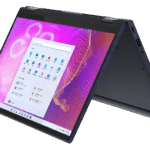
The Lenovo Yoga 7i is a versatile 2-in-1 convertible laptop designed to cater to a wide range of users, from students and professionals to casual users seeking a blend of performance, portability, and flexibility. Its ability to transform into tent, stand, or tablet modes makes it suitable for various tasks, including presentations, media consumption, and creative work. This detailed guide explores its features, performance, and value proposition, helping potential buyers make an informed decision.
Outline
- Overview of Lenovo Yoga 7i
- Key Features and Specifications
- Performance and User Experience
- Who is the Lenovo Yoga 7i For?
- Best Lenovo Yoga 7i Alternatives
- Pros and Cons
- Lenovo Yoga 7i: Value and Pricing
- Frequently Asked Questions (FAQ)
Overview of Lenovo 7i
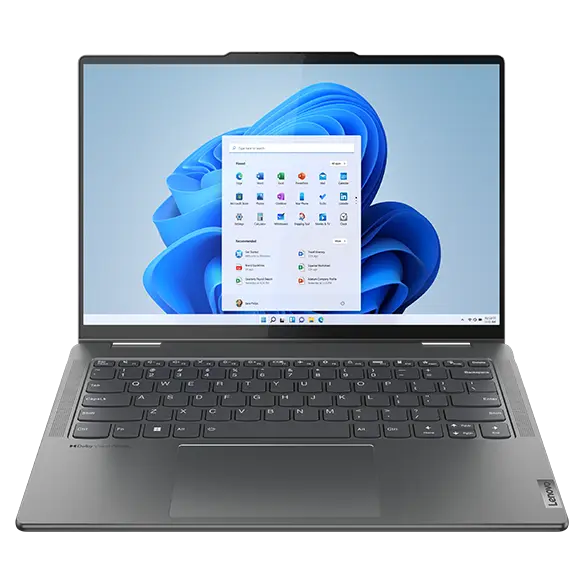
The Lenovo Yoga 7i typically features a sleek and modern design with a premium feel. Its 360-degree hinge allows it to transform seamlessly between laptop, tablet, tent, and stand modes. This flexibility is a major selling point, providing users with the adaptability to work, create, or consume content in various scenarios. The build quality generally emphasizes durability and portability, making it suitable for on-the-go use.
Key Features and Specifications
The Lenovo Yoga 7i boasts several key features, including:
- Display: Often features vibrant IPS touchscreens with resolutions ranging from Full HD (1920×1080) to QHD (2560×1440). Some models may offer OLED displays.
- Processor: Typically powered by Intel Core i5 or i7 processors, offering solid performance for everyday tasks and moderate workloads.
- RAM: Available with various RAM options, usually starting at 8GB and going up to 16GB, ensuring smooth multitasking capabilities.
- Storage: Typically includes fast solid-state drives (SSDs) ranging from 256GB to 1TB or more, providing ample storage and quick boot times.
- Graphics: Integrated Intel Iris Xe Graphics are standard, suitable for light gaming and content creation.
- Connectivity: Features a comprehensive set of ports, including Thunderbolt 4 (on select models), USB-C, USB-A, HDMI, and a headphone jack.
- Battery Life: Offers decent battery life, typically providing several hours of use on a single charge, depending on the configuration and usage patterns.
- Audio: Equipped with stereo speakers often enhanced with Dolby Atmos, providing an immersive audio experience.
- Other features: Backlit keyboard, fingerprint reader (on some models), and a webcam with a privacy shutter.
Performance and User Experience
The Yoga 7i’s performance is generally commendable for its class. The Intel Core processors and ample RAM handle everyday tasks like web browsing, email, and office productivity with ease. The integrated graphics are suitable for light gaming and basic photo or video editing. The fast SSD ensures quick boot times and application loading. The touchscreen and convertible design enhance the user experience, making it intuitive and versatile for different usage scenarios. While it isn’t designed for heavy gaming or demanding professional applications, it offers a balanced performance profile suitable for many users. The keyboard typically provides a comfortable typing experience, and the trackpad is responsive and accurate.
Who is the Lenovo Yoga 7i For?
The Lenovo Yoga 7i is best suited for:
- Students: Its portability, long battery life, and 2-in-1 design make it ideal for note-taking, research, and presentations.
- Professionals: It’s a great choice for those who need a versatile laptop for work, meetings, and travel. Its performance handles office tasks smoothly.
- Casual Users: Anyone who wants a laptop for browsing, media consumption, and light productivity will find the Yoga 7i a good fit.
- Content Creators (Light): While not a powerhouse, the Yoga 7i can handle basic photo and video editing tasks.
Best Lenovo Yoga 7i Alternatives
While the Yoga 7i offers many advantages, it’s worth considering alternatives:
Comparison Table: Lenovo Yoga 7i vs. Competing 2-in-1s
| Feature | Lenovo Yoga 7i | Dell XPS 13 2-in-1 | HP Spectre x360 | Microsoft Surface Laptop Studio |
|---|---|---|---|---|
| Price (Starting) | \$800 – \$1200+ | \$1000 – \$1500+ | \$1100 – \$1800+ | \$1600 – \$3000+ |
| Display | IPS Touch (often OLED) | IPS Touch (OLED Options) | OLED (Usually) | PixelSense Flow (Various) |
| Processor | Intel Core i5/i7 | Intel Core i5/i7 | Intel Core i5/i7 | Intel Core i5/i7/i9 (Powerful) |
| RAM | 8GB – 16GB | 8GB – 32GB | 8GB – 32GB | 16GB – 64GB |
| Storage | 256GB – 1TB+ SSD | 256GB – 2TB+ SSD | 256GB – 2TB+ SSD | 256GB – 2TB+ SSD |
| Graphics | Intel Iris Xe | Intel Iris Xe | Intel Iris Xe | NVIDIA GeForce RTX (higher tiers) |
| Battery Life | Good (6-12 hours) | Good (6-10 hours) | Excellent (8-14 hours) | Decent (5-8 hours) |
| Design | Convertible (360 Hinge) | Convertible (360 Hinge) | Convertible (360 Hinge) | Studio (Hybrid Laptop/Tablet) |
| Key Advantage | Versatile and Value | Premium Design | Premium Features | High Performance, Unique Design |
Best [Device] Alternatives for Content Creators
- HP Spectre x360: Offers a great balance of performance, design, and features, often with vibrant OLED displays.
- Apple MacBook Air (M1 or M2): While not a 2-in-1, its performance and efficiency are excellent for content creation tasks.
Pros and Cons
Pros:
- Versatile 2-in-1 Design: Adaptable to various usage modes.
- Good Performance: Handles everyday tasks and moderate workloads efficiently.
- Attractive Design: Sleek and modern appearance.
- Decent Battery Life: Provides a reasonable amount of use on a single charge.
- Competitive Price: Offers good value for its features.
- Often includes a touchscreen: enhances usability.
Cons:
- Graphics Limitations: Not suitable for demanding gaming or professional applications.
- Build Quality Can Vary: Depending on the specific configuration and model year.
- May not include all premium features: Compared to higher-end 2-in-1 competitors.
Lenovo Yoga 7i: Value and Pricing
The Lenovo Yoga 7i generally offers good value for its price. It provides a versatile 2-in-1 experience with a solid balance of performance and portability. Pricing typically starts in a mid-range category, making it an accessible option for students, professionals, and general users. The cost is highly dependent on the specifications, with higher-end configurations (e.g., with more RAM, larger storage, or higher-resolution displays) commanding a premium. Regular sales and promotions often make it even more attractive.
Frequently Asked Questions (FAQ)
- What is the battery life of the Lenovo Yoga 7i?
- Battery life typically ranges from 6 to 12 hours depending on the configuration, usage, and power settings.
- Does the Lenovo Yoga 7i support a stylus?
- Yes, many models are compatible with Lenovo’s active pens, providing additional functionality for drawing, note-taking, and creative tasks.
- Can I upgrade the RAM or storage?
- In many cases, the RAM is soldered onto the motherboard and cannot be upgraded. The storage (SSD) may be replaceable in some models, but check the specifications before purchase.
- Is the Lenovo Yoga 7i good for gaming?
- It can handle light gaming with its integrated Intel Iris Xe graphics, but it is not designed for demanding gaming or high frame rates.
- Does the Yoga 7i come with a warranty?
- Yes, Lenovo provides a standard warranty on its laptops. The specifics of the warranty (duration and coverage) will depend on the region and the purchase agreement.
- What operating system does it use?
- It runs on Windows, typically the latest version available at the time of purchase.