Lenovo ThinkPad P1: The Ultimate Mobile Workstation Reviewed
The Lenovo ThinkPad P1 series stands as a stalwart in the mobile workstation market, catering to professionals who demand uncompromising performance, reliability, and security. This powerhouse laptop is designed for demanding tasks like 3D modeling, video editing, data analysis, and software development, all while maintaining a sleek and portable form factor. This comprehensive review dives deep into the ThinkPad P1’s features, performance, and suitability for various user needs, helping you determine if it’s the right choice for your professional demands.
Outline:
- Design and Build Quality
- Display and Audio
- Performance and Specifications
- Keyboard, Trackpad, and Ports
- Battery Life
- Security Features
- Best Lenovo ThinkPad P1 Alternatives
- Who is the Lenovo ThinkPad P1 For?
- Frequently Asked Questions (FAQ)
Design and Build Quality
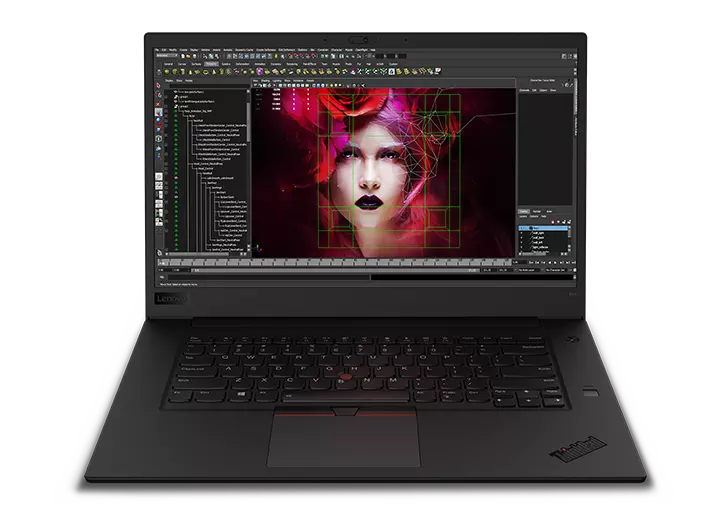
The Lenovo ThinkPad P1 embraces the iconic ThinkPad design language: a minimalist aesthetic with a black, matte finish. Constructed with a blend of carbon fiber and aluminum, the chassis exudes durability and a premium feel. This robust build quality is a hallmark of the ThinkPad line, designed to withstand the rigors of daily use and travel. The laptop has undergone rigorous testing against extreme conditions, including drops, shocks, and vibrations, making it a reliable companion for professionals on the go. The slim profile and relatively lightweight design, especially considering the powerful components, contribute to its portability.
Display and Audio
The ThinkPad P1 typically features high-quality displays, often offering various resolution options from Full HD (1920×1080) to UHD+ (3840×2400) or even OLED panels. These panels are calibrated for color accuracy, making them ideal for professionals working with visual content. The displays often cover a wide color gamut, ensuring accurate color representation for tasks like photo and video editing. Brightness levels are typically sufficient for both indoor and outdoor use. Audio quality on the ThinkPad P1 is generally decent, with stereo speakers offering clear sound reproduction. While not the primary focus, the audio system is adequate for video conferencing and media consumption. The inclusion of a webcam, often with a privacy shutter, adds to the laptop’s professional-grade features.
Performance and Specifications
The ThinkPad P1 is a performance beast, equipped with top-tier components. It typically packs high-end Intel Core i7 or i9 processors and professional-grade NVIDIA RTX A-series (or previous generation Quadro) graphics cards. These powerful combinations ensure smooth performance even with the most demanding applications. RAM configurations can go up to 64GB or even 128GB of DDR5 or DDR4 memory, enabling effortless multitasking and handling large datasets. Storage options usually include fast NVMe PCIe SSDs, offering ample space and quick boot and application loading times. The specific configuration of these components can vary based on the generation and model chosen.
Keyboard, Trackpad, and Ports
The ThinkPad P1 boasts the renowned ThinkPad keyboard, celebrated for its comfortable key travel, precise feedback, and ergonomic design. The keyboard is spill-resistant and backlit, enhancing usability in low-light environments. The TrackPoint (red pointing stick) and the physical mouse buttons above the trackpad provide an alternative navigation method for those who prefer it. The trackpad itself is smooth, accurate, and responsive. The ThinkPad P1 offers a comprehensive selection of ports, including Thunderbolt 4 (or previous generations), USB-A ports, HDMI, an SD card reader, and an Ethernet port. This extensive port selection ensures seamless connectivity with a wide range of peripherals and accessories.
Battery Life
Battery life on the ThinkPad P1 can vary depending on the specific configuration and usage. The powerful components typically drain the battery faster compared to less demanding laptops. However, the ThinkPad P1 often features a large battery capacity, allowing for several hours of use on a single charge. Users can expect moderate battery life when performing demanding tasks. Battery life can be extended by optimizing power settings and reducing screen brightness.
Security Features
Security is a crucial aspect of the ThinkPad P1. It includes a range of security features, such as a fingerprint reader, an IR camera for facial recognition, a webcam privacy shutter, and a Kensington lock slot. Trusted Platform Module (TPM) chips encrypt sensitive data and safeguard against unauthorized access. Lenovo’s ThinkShield security solutions further enhance the laptop’s security posture, providing advanced protection against threats.
Best Lenovo ThinkPad P1 Alternatives
While the Lenovo ThinkPad P1 is a top-tier mobile workstation, alternative options may better suit certain needs or budgets. Here’s a comparison table and some alternatives to consider:
Comparison Table: Lenovo ThinkPad P1 vs. Dell Precision 5000 Series vs. Apple MacBook Pro (16-inch)
| Feature | Lenovo ThinkPad P1 | Dell Precision 5000 Series | Apple MacBook Pro (16-inch) |
|---|---|---|---|
| Target Audience | Professionals, Designers, Engineers | Professionals, Designers, Engineers | Creative Professionals, Developers |
| Processor | Intel Core i7/i9 (up to 13th Gen) | Intel Core i7/i9 (up to 13th Gen) | Apple M2 Pro/M2 Max |
| Graphics | NVIDIA RTX A-series, previous Quadro | NVIDIA RTX A-series, previous Quadro | Integrated GPU (M2 Pro) / Dedicated GPU (M2 Max) |
| Display | Up to UHD+ (3840×2400) or OLED, calibrated | Up to UHD+, calibrated | Liquid Retina XDR display, True Tone |
| Memory | Up to 64GB/128GB DDR5/DDR4 | Up to 64GB/128GB DDR5 | Up to 96GB Unified Memory |
| Storage | Up to 8TB NVMe PCIe SSD | Up to 8TB NVMe PCIe SSD | Up to 8TB SSD |
| Operating System | Windows 11 Pro | Windows 11 Pro | macOS |
| Keyboard | Excellent ThinkPad keyboard, TrackPoint | Good keyboard, optional TrackPoint | Magic Keyboard, Touch Bar |
| Port Selection | Comprehensive (Thunderbolt, USB-A, HDMI, SD Card) | Comprehensive (Thunderbolt, USB-A, HDMI, SD Card) | Limited (Thunderbolt, HDMI, SD Card) |
| Price | $$ | $$ | $$ |
| Pros | Powerful, durable, excellent keyboard, extensive ports | Strong performance, good display options, robust design | Powerful, beautiful display, efficient, macOS ecosystem |
| Cons | Can be expensive, battery life can vary | Can be expensive | Limited ports, macOS ecosystem dependent |
Other Alternatives:
- Dell Precision: Dell’s Precision series offers similar performance and features to the ThinkPad P1, providing a competitive alternative.
- HP ZBook: HP’s ZBook lineup is another direct competitor, offering powerful workstations with varying configurations.
Who is the Lenovo ThinkPad P1 For?
The Lenovo ThinkPad P1 is ideally suited for:
- Engineers and Architects: For running CAD software, 3D modeling, and simulations.
- Video Editors and Animators: For video editing, motion graphics, and rendering tasks.
- Data Scientists and Researchers: For data analysis, machine learning, and scientific computing.
- Software Developers: For compiling code, running virtual machines, and software testing.
- Creative Professionals: For graphic design, photo editing, and other creative workflows.
- Anyone needing a powerful, reliable, and secure workstation in a portable form factor.
Frequently Asked Questions (FAQ)
- What is the difference between the ThinkPad P1 and other ThinkPad series laptops? The ThinkPad P1 is specifically designed as a mobile workstation, offering more powerful components (professional-grade graphics cards) and certifications for professional applications compared to other ThinkPad series.
- What is the battery life like on the ThinkPad P1? Battery life varies depending on the configuration and usage, but you can expect several hours of use on a single charge. Demanding tasks will naturally drain the battery more quickly.
- Does the ThinkPad P1 have a good keyboard? Yes, it has the renowned ThinkPad keyboard, known for its comfortable key travel, precise feedback, and ergonomic design.
- What are the security features of the ThinkPad P1? It includes a fingerprint reader, an IR camera for facial recognition, a webcam privacy shutter, a TPM chip, and a Kensington lock slot.
- Can the ThinkPad P1 be upgraded? RAM and storage are often upgradeable, but it depends on the specific model and configuration.
- Is the ThinkPad P1 a good laptop for gaming? While the ThinkPad P1 can handle gaming, it is primarily designed as a workstation. Other laptops, like those in the Legion or Razer lineups, are often better suited for gaming. However, it can handle gaming if desired.
- How much does the ThinkPad P1 cost? The price varies depending on the configuration. Expect the price to be at the higher end of the laptop market.