System76 Lemur Pro: The Linux Laptop for Productivity and Portability
The System76 Lemur Pro has carved a niche for itself in the Linux laptop market, focusing on lightweight design, strong battery life, and seamless integration with the company’s Pop!_OS operating system. Unlike many gaming-focused laptops, the Lemur Pro prioritizes portability and efficiency, making it an excellent choice for students, professionals, and anyone seeking a powerful yet unobtrusive mobile computing experience. This article delves deep into the Lemur Pro, examining its strengths, weaknesses, and how it stacks up against the competition.
Outline
- Introduction
- Design and Build Quality
- Performance
- Display and Audio
- Battery Life
- Software: Pop!_OS and Linux Experience
- Ports and Connectivity
- Pricing and Configurations
- Is the System76 Lemur Pro Right for You?
- Best Alternatives to the Lemur Pro
- FAQ
Design and Build Quality
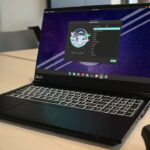
The Lemur Pro’s design emphasizes portability. It’s remarkably thin and light, typically weighing around 2.2 pounds and measuring under 0.6 inches thick. This makes it incredibly easy to carry around, perfect for commuting, travel, and working from various locations. The chassis is constructed from an aluminum alloy, offering a sturdy feel while keeping the weight down. The minimalist aesthetic is another defining characteristic. It features a clean, professional look without flashy logos or excessive branding, making it suitable for both casual and professional environments. While the build quality is generally good, some users may find the keyboard deck exhibiting some flex.
Performance
The Lemur Pro offers a range of configuration options to suit different needs and budgets. It typically features Intel Core i5 or i7 processors from the latest generations, providing ample processing power for everyday tasks such as web browsing, document editing, and multimedia consumption. Integrated Intel Iris Xe Graphics handle graphics processing, making it adequate for light gaming and video editing, though it’s not designed for demanding games. RAM options are generous, usually ranging from 8GB to 40GB, allowing for smooth multitasking. Storage is handled by fast NVMe SSDs, ensuring quick boot times and application loading. While not a powerhouse, the Lemur Pro’s performance is well-balanced for its intended use case – productivity and portability.
Display and Audio
The Lemur Pro typically features a 14-inch display with a Full HD (1920×1080) resolution. The display quality is generally good, with decent color accuracy and viewing angles. The matte finish helps reduce glare, making the laptop comfortable to use in various lighting conditions. While not boasting a high refresh rate like some gaming laptops, the display is perfectly suitable for everyday use. Audio quality is acceptable, but not exceptional. The built-in speakers provide sufficient sound for video calls and casual listening, but external speakers or headphones are recommended for a richer audio experience.
Battery Life
One of the Lemur Pro’s standout features is its impressive battery life. System76 has optimized the system for power efficiency, allowing it to achieve extended usage on a single charge. Users can expect up to 10 hours of real-world use for general productivity tasks. This long battery life is a significant advantage for those who need to work on the go without constantly searching for a power outlet. The combination of efficient components and software optimization contributes to this excellent battery performance.
Software: Pop!_OS and Linux Experience
The Lemur Pro is pre-installed with System76’s own Pop!OS, a Linux distribution based on Ubuntu. Pop!OS is known for its user-friendly interface, focus on developer tools, and excellent hardware support. It comes with a customized desktop environment, including a tiling window manager and a streamlined user experience, making it an excellent choice for those new to Linux. System76 provides its own drivers and firmware updates, ensuring a seamless and optimized experience. The pre-installed operating system eliminates the hassle of installation and configuration, providing a ready-to-use Linux experience. The Lemur Pro’s compatibility with Linux makes it an excellent choice for software developers, programmers, and those seeking an open-source alternative to Windows or macOS.
Ports and Connectivity
The Lemur Pro provides a good selection of ports and connectivity options. It typically includes:
- USB-C ports (with Thunderbolt 4 support)
- USB-A ports
- HDMI port
- microSD card reader
- Headphone/microphone combo jack
This comprehensive selection allows for easy connection to external peripherals, displays, and storage devices. Wireless connectivity includes Wi-Fi 6 and Bluetooth 5.0, providing fast and reliable network and device connections.
Pricing and Configurations
The pricing of the System76 Lemur Pro varies depending on the chosen configuration, but it generally falls into the mid-range price bracket. The price is competitive when compared to other high-end ultrabooks with similar specifications. Customers can customize the RAM, storage, and other components to match their specific needs and budget. System76 frequently offers different configuration bundles with varying processor, RAM and SSD sizes. The company offers clear pricing and configuration details on its website, providing a transparent and straightforward purchasing experience.
Is the System76 Lemur Pro Right for You?
The System76 Lemur Pro is an excellent choice for users who:
- Prioritize portability and lightweight design.
- Need long battery life for on-the-go productivity.
- Prefer a Linux operating system and a seamless out-of-the-box experience.
- Value a minimalist aesthetic and a focus on functionality.
- Are looking for a reliable and well-built laptop for everyday tasks.
It’s less suitable for those who:
- Need a laptop for demanding gaming or graphics-intensive tasks.
- Require the most powerful processing performance available.
- Prefer Windows or macOS.
- Are on a very tight budget.
Best Alternatives to the Lemur Pro
While the Lemur Pro excels in its niche, other laptops offer similar features or appeal to different needs. Here are some of the best alternatives:
For Performance and Power:
- Framework Laptop: The Framework Laptop offers a similar Linux-focused experience but with a modular design, enabling users to upgrade or replace components easily. This laptop caters to the DIY user that can swap motherboards, displays, batteries, ports, and more as needed.
- Dell XPS 13 (with Linux): The Dell XPS 13 is a premium ultrabook known for its sleek design, stunning display, and excellent performance. While typically sold with Windows, Dell also offers the XPS 13 with Ubuntu pre-installed, offering an appealing alternative to the Lemur Pro.
- MacBook Air (M1 or M2): While not running Linux out of the box, the MacBook Air offers excellent performance and battery life, and can be used to run Linux through virtualization or dual-booting.
For Gaming and Graphics:
- Lenovo Legion Series: Lenovo’s Legion laptops offer impressive performance, with powerful processors and graphics cards catering to gamers.
- ASUS ROG Series: ASUS’s Republic of Gamers (ROG) line offers some of the most powerful and feature-rich gaming laptops available.
For Budget-Conscious Users:
- Acer Aspire Series: The Acer Aspire series often offers a good balance of performance and affordability.
- Used or Refurbished Laptops: Buying a used or refurbished laptop can be a cost-effective way to get a good-quality device.
Comparison Table: Dell XPS 13 vs System76 Lemur Pro
| Feature | Dell XPS 13 (Ubuntu) | System76 Lemur Pro |
|---|---|---|
| Operating System | Ubuntu | Pop!_OS |
| Processor | Intel Core i5/i7 (Latest Gen) | Intel Core i5/i7 (Latest Gen) |
| Graphics | Intel Iris Xe Graphics | Intel Iris Xe Graphics |
| RAM | Up to 32GB | Up to 40GB |
| Storage | Up to 2TB SSD | Up to 2TB SSD |
| Display | 13.4″ FHD+ or 4K Touch | 14″ FHD |
| Battery Life | Up to 12 hours | Up to 10 hours |
| Weight | ~2.8 lbs | ~2.2 lbs |
| Ports | Thunderbolt 4, USB-C, microSD | Thunderbolt 4, USB-C, USB-A, HDMI, microSD |
| Starting Price | Higher | Competitive |
Comparison Table: Dell G15 vs. System76 Lemur Pro (for gaming)
| Feature | Dell G15 (Gaming) | System76 Lemur Pro |
|---|---|---|
| Operating System | Windows 11 | Pop!_OS |
| Processor | Intel Core i7/i9 (Powerful) | Intel Core i5/i7 (Efficiency) |
| Graphics | NVIDIA RTX Series | Intel Iris Xe Graphics |
| RAM | Up to 32GB | Up to 40GB |
| Storage | Up to 2TB SSD | Up to 2TB SSD |
| Display | 15.6″ High Refresh Rate | 14″ FHD (60Hz) |
| Battery Life | 4-6 hours (gaming) | Up to 10 hours |
| Weight | Heavier (5.7 lbs +) | Lighter (~2.2 lbs) |
| Ports | Multiple USB, HDMI, Ethernet | Thunderbolt 4, USB-C, USB-A, HDMI, microSD |
| Starting Price | Higher | Competitive |
| Best For | Gaming, Graphics-Intensive Tasks | Productivity, Portability |
FAQ
Q: Does the Lemur Pro support Thunderbolt?
A: Yes, the Lemur Pro typically includes Thunderbolt 4 ports, enabling fast data transfer and support for external displays and accessories.
Q: Can I upgrade the RAM or storage?
A: System76 typically allows for RAM and SSD upgrades during the initial configuration. The upgradeability may depend on the specific model.
Q: Is Pop!OS easy to use?
A: Yes, Pop!OS is designed to be user-friendly, with a streamlined interface and excellent hardware support, making it an excellent choice for both new and experienced Linux users.
Q: How is the customer support?
A: System76 is known for its responsive customer support, offering assistance and troubleshooting for its products.
Q: Is the Lemur Pro good for gaming?
A: The Lemur Pro is not designed for demanding gaming. While it can handle some light gaming, it’s primarily optimized for productivity and portability.
Q: Does the Lemur Pro have a webcam?
A: Yes, the Lemur Pro typically includes a built-in webcam.