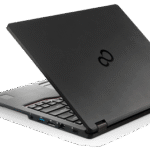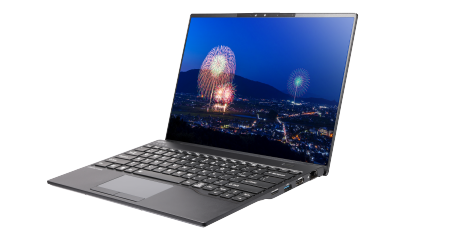
Fujitsu Lifebook U94: A Deep Dive into Ultraportable Productivity
The Fujitsu Lifebook U94 series represents a premium offering in the ultraportable laptop market, designed for professionals who prioritize portability, performance, and security. These laptops typically cater to users who frequently travel or need a lightweight device for on-the-go productivity. The U94 series often incorporates advanced features such as biometric authentication, robust security options, and long battery life, solidifying its position as a reliable companion for demanding workloads. Let’s delve into the details of the Fujitsu Lifebook U94, exploring its features, specifications, and suitability for various user needs.
Outline
- Overview of the Fujitsu Lifebook U94
- Key Features and Specifications
- Performance and User Experience
- Security and Durability Aspects
- Who is the Fujitsu Lifebook U94 For?
- Best Fujitsu Lifebook U94 Alternatives
- Comparison Table: Lifebook U94 vs. Competitors
- Fujitsu Lifebook U94: Pros and Cons
- Frequently Asked Questions (FAQ)
Overview of the Fujitsu Lifebook U94
The Fujitsu Lifebook U94 is positioned as a top-tier ultraportable laptop, aimed at business professionals and frequent travelers. It emphasizes a sleek, lightweight design that doesn’t compromise on performance or security. The U94 series generally features Intel Core i5 or i7 processors, ample RAM, and fast storage options like NVMe SSDs, ensuring smooth multitasking and quick application loading. The display often utilizes a high-resolution panel for crisp visuals, and connectivity options are well-considered for modern workflows. Built-in security features, such as a fingerprint sensor and TPM 2.0, are standard inclusions.
Key Features and Specifications
The Fujitsu Lifebook U94 series typically boasts the following key features and specifications:
- Processor: Intel Core i5 or i7 processors (varying generations depending on the specific model)
- RAM: 8GB, 16GB, or 32GB LPDDR4x or LPDDR5 RAM
- Storage: 256GB, 512GB, or 1TB NVMe PCIe SSD
- Display: 14-inch display, often with Full HD (1920×1080) or higher resolution, IPS panel for wide viewing angles
- Graphics: Integrated Intel Iris Xe Graphics
- Connectivity: Wi-Fi 6E, Bluetooth 5.2, Thunderbolt 4, USB-A, HDMI, audio jack, optional cellular connectivity (e.g., 5G/4G LTE)
- Security: Fingerprint sensor, TPM 2.0, Kensington lock slot
- Battery: Long battery life (depending on the model and usage)
- Operating System: Windows 11 Pro or other options
- Weight: Generally around 1 kg (2.2 lbs)
- Design: Sleek and lightweight, often featuring a magnesium alloy chassis
Performance and User Experience
The Lifebook U94 is designed to provide a smooth and efficient user experience. With powerful Intel processors and ample RAM, the laptop can handle demanding tasks such as running multiple applications simultaneously, video conferencing, and editing documents without significant lag. The fast NVMe SSD ensures quick boot times and rapid file access. The display quality is generally excellent, providing crisp visuals suitable for work and entertainment. The keyboard is designed for comfortable typing, even during extended use, and the trackpad is responsive and accurate. Battery life is typically a strong point, allowing users to work unplugged for a significant portion of the day.
Security and Durability Aspects
Fujitsu prioritizes security in its Lifebook U94 series. The inclusion of a fingerprint sensor allows for secure and convenient biometric login. A Trusted Platform Module (TPM) 2.0 chip provides hardware-level encryption and security features. The laptop’s design often incorporates durable materials like a magnesium alloy chassis, making it resistant to minor bumps and drops. Optional features such as a privacy screen for the display can further protect sensitive information from prying eyes. These features contribute to a secure and reliable experience, making the Lifebook U94 suitable for users who handle confidential data.
Who is the Fujitsu Lifebook U94 For?
The Fujitsu Lifebook U94 is ideally suited for:
- Business Professionals: Executives, consultants, and other professionals who require a lightweight and powerful laptop for work on the go.
- Frequent Travelers: Individuals who need a portable device for use on planes, trains, and in hotels.
- Users who Prioritize Security: Those who handle sensitive data and require robust security features.
- Students: Students can use it for taking notes, writing papers, and accessing online resources.
Best Fujitsu Lifebook U94 Alternatives
While the Fujitsu Lifebook U94 is an excellent choice, several compelling alternatives exist in the ultraportable laptop market. Here are some of the best competitors, tailored to different needs:
- Dell XPS 13: Known for its stunning InfinityEdge display, premium design, and powerful performance. It’s a top choice for users seeking a balance of style and functionality.
- Apple MacBook Air (M2 or M3 Chip): Offers exceptional performance and battery life thanks to the M-series chips, a sleek design, and a user-friendly macOS operating system. Excellent for creative professionals.
- HP Spectre x360: A 2-in-1 convertible laptop with a premium design, powerful performance, and versatile functionality, suitable for both work and entertainment.
- Lenovo ThinkPad X1 Carbon: A durable and reliable business laptop known for its excellent keyboard, security features, and long battery life.
- Microsoft Surface Laptop: Offers a sleek design, great performance, and a premium user experience, integrating seamlessly with Microsoft services.
Comparison Table: Lifebook U94 vs. Competitors
| Feature | Fujitsu Lifebook U94 (Example Configuration) | Dell XPS 13 (Latest Gen) | Apple MacBook Air (M2) | HP Spectre x360 (Latest Gen) | Lenovo ThinkPad X1 Carbon (Latest Gen) |
|---|---|---|---|---|---|
| Processor | Intel Core i7-1260P | Intel Core i7-1360P | Apple M2 | Intel Core i7-1355U | Intel Core i7-1365U |
| RAM | 16GB LPDDR5 | 16GB LPDDR5 | 8GB or 16GB | 16GB LPDDR4x | 16GB LPDDR5x |
| Storage | 512GB NVMe SSD | 512GB NVMe SSD | 256GB or 512GB SSD | 512GB NVMe SSD | 512GB NVMe SSD |
| Display | 14-inch FHD IPS | 13.4-inch OLED (various options) | 13.6-inch Liquid Retina | 13.5-inch/14-inch OLED or IPS | 14-inch WUXGA/WQXGA IPS |
| Graphics | Intel Iris Xe | Intel Iris Xe | Integrated | Intel Iris Xe | Intel Iris Xe |
| Connectivity | Wi-Fi 6E, Thunderbolt 4, USB-A, HDMI | Wi-Fi 6E, Thunderbolt 4 | Wi-Fi 6, Thunderbolt/USB4 | Wi-Fi 6E, Thunderbolt 4 | Wi-Fi 6E, Thunderbolt 4, USB-A, HDMI |
| Security | Fingerprint, TPM 2.0 | Fingerprint, Facial Recognition | Touch ID | Fingerprint, Facial Recognition | Fingerprint, TPM 2.0 |
| Battery Life | Up to 10 hours | Up to 12 hours | Up to 18 hours | Up to 12 hours | Up to 15 hours |
| Weight | ~1 kg (2.2 lbs) | ~1.17 kg (2.58 lbs) | ~1.24 kg (2.7 lbs) | ~1.34 kg (2.95 lbs) | ~1.12 kg (2.47 lbs) |
| Operating System | Windows 11 Pro | Windows 11 Home/Pro | macOS | Windows 11 Home/Pro | Windows 11 Pro |
| Starting Price (Approximate) | Varies, typically starting around $1500+ | Starts around $1300+ | Starts around $1000+ | Starts around $1200+ | Starts around $1700+ |
Fujitsu Lifebook U94: Pros and Cons
Pros:
- Lightweight and Portable: Ideal for users on the move.
- Strong Performance: Powerful processors and ample RAM for demanding tasks.
- Excellent Security Features: Fingerprint sensor, TPM 2.0, and often other security options.
- Long Battery Life: Keeps you productive for extended periods.
- Durable Design: Magnesium alloy chassis typically offers good durability.
- Good Connectivity: Offers a range of ports, including Thunderbolt 4.
Cons:
- Price: Generally a premium-priced laptop.
- Design: While sleek, the design may not be as visually striking as some competitors.
- Availability: May have limited availability in certain regions.
- Integrated Graphics: Graphics performance may be limited compared to dedicated GPUs.
Frequently Asked Questions (FAQ)
- What is the battery life of the Fujitsu Lifebook U94? Battery life varies depending on the specific model and usage, but typically ranges from 8 to 12 hours or more on a single charge.
- Does the Fujitsu Lifebook U94 support Thunderbolt 4? Yes, many recent models of the Lifebook U94 include Thunderbolt 4 ports for fast data transfer, display output, and power delivery.
- Does the Lifebook U94 have a fingerprint sensor? Yes, a fingerprint sensor is a standard feature on most Lifebook U94 models, providing secure and convenient biometric authentication.
- What operating system does the Lifebook U94 typically come with? Most Lifebook U94 laptops ship with Windows 11 Pro, offering enhanced security and management features.
- Is the Fujitsu Lifebook U94 a good choice for gaming? While the Lifebook U94 can handle some light gaming due to its integrated graphics, it is not primarily designed for gaming. Users looking for a gaming laptop should consider dedicated gaming laptops with powerful discrete graphics cards.
- Where can I buy the Fujitsu Lifebook U94? The Fujitsu Lifebook U94 can be purchased from authorized Fujitsu resellers, online retailers, and sometimes directly from Fujitsu depending on your region.