Lenovo ThinkBook 14: A Comprehensive Guide for Buyers
The Lenovo ThinkBook 14 is a business-oriented laptop designed to provide a blend of performance, style, and security, catering to professionals and small to medium-sized businesses. It sits in a space that balances productivity and portability, making it a versatile option for various user needs. This guide delves deep into the ThinkBook 14, covering its features, specifications, performance, and more to help potential buyers make an informed decision.
Outline
- Overview and Target Audience
- Design and Build Quality
- Display and Audio
- Performance and Specifications
- Connectivity and Ports
- Battery Life
- Security Features
- Keyboard and Trackpad
- Pros and Cons
- Alternatives & Competitive Analysis
- Who Should Buy the Lenovo ThinkBook 14?
- Frequently Asked Questions
Overview and Target Audience
The Lenovo ThinkBook 14 is aimed at professionals and business users who require a reliable and portable laptop for everyday tasks, including document creation, presentations, web browsing, and light content creation. It’s particularly appealing to users who prioritize a professional aesthetic, strong security features, and decent performance without necessarily needing the power of a high-end workstation. The target audience includes small business owners, freelancers, and employees working in hybrid or remote environments. It positions itself as a more stylish alternative to the traditional ThinkPad line, while still retaining some of its robust business features.
Design and Build Quality
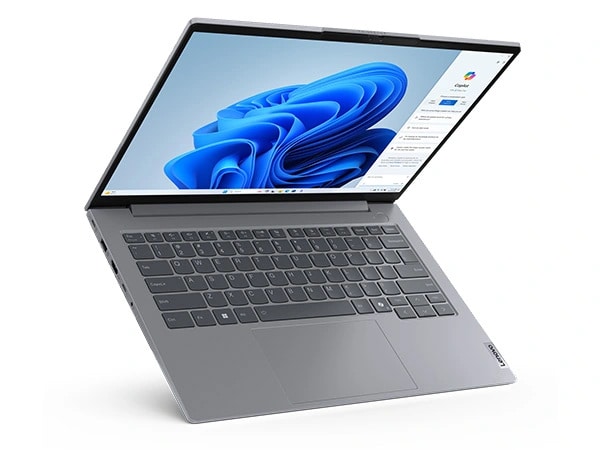
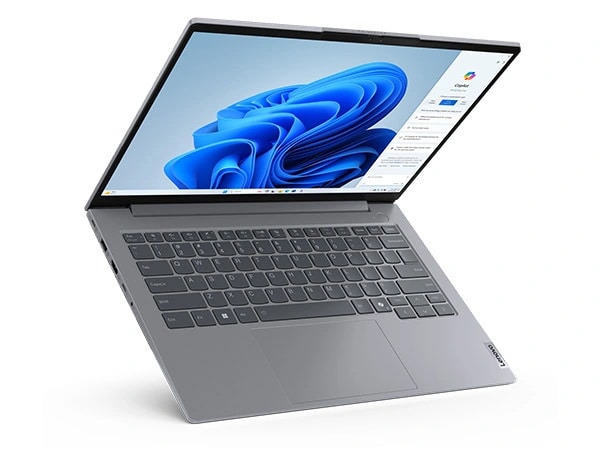
The ThinkBook 14 generally features a sleek and modern design. It often incorporates an aluminum chassis, or a blend of aluminum and plastic, providing a premium feel and enhanced durability. The build quality is typically solid, able to withstand the rigors of daily use and travel. The laptop’s design often emphasizes thin bezels around the display, maximizing screen real estate. The overall aesthetic leans towards professionalism, making it suitable for both office and client-facing environments. The hinge mechanism is usually sturdy and allows for smooth opening and closing of the lid. The finish is designed to resist fingerprints and smudges to maintain a clean appearance.
Display and Audio
The display on the Lenovo ThinkBook 14 typically ranges from 14 inches with resolutions that start at Full HD (1920 x 1080) and can extend to higher resolutions in certain configurations. The display quality is generally good, with decent color accuracy and brightness for everyday tasks. Some models may offer brighter panels with improved color gamut coverage, making them suitable for content creators. The display often features an anti-glare coating to reduce reflections and improve visibility in various lighting conditions.
The audio experience is generally adequate for video conferencing and media consumption. The speakers are often located on the bottom or sides of the chassis, and the audio quality is often clear enough for general use, but it may lack the depth and bass found in more premium laptops. Some models may offer enhancements like Dolby Audio for improved sound quality.
Performance and Specifications
The performance of the Lenovo ThinkBook 14 varies depending on the configuration. It typically offers a range of processors from Intel Core i5 or i7, or AMD Ryzen 5 or 7. These processors provide sufficient power for multitasking, running office applications, and handling light content creation tasks. Memory options typically range from 8GB to 16GB of RAM, offering smooth performance for most users. Storage options usually include fast NVMe SSDs, providing quick boot times and application loading. Some configurations may include discrete graphics cards (such as NVIDIA GeForce MX series or AMD Radeon GPUs) for improved graphics performance, making them suitable for light gaming or basic content creation tasks.
Connectivity and Ports
The ThinkBook 14 usually provides a comprehensive selection of ports to cater to various connectivity needs. These typically include USB-C ports (which may support Thunderbolt 4 for faster data transfer, display output, and charging), USB-A ports, HDMI ports, an Ethernet port (on some models), an audio jack, and a card reader. The availability of USB-C ports enables versatile connectivity options, allowing for docking stations and external monitors. Wireless connectivity often includes Wi-Fi 6 or Wi-Fi 6E for fast and reliable internet access, and Bluetooth for connecting wireless peripherals.
Battery Life
Battery life on the ThinkBook 14 generally offers all-day performance for typical office use. The actual battery life varies depending on the configuration, usage patterns, and screen brightness. Users can typically expect around 8-10 hours of battery life with moderate use. Models with more energy-efficient processors and larger batteries may offer even longer battery life. Fast charging capabilities are often included, allowing for quick replenishment of the battery when needed.
Security Features
Lenovo ThinkBooks typically come with robust security features designed to protect user data and privacy. These features may include a fingerprint reader for secure login, a webcam privacy shutter to physically block the camera, and a TPM (Trusted Platform Module) chip for hardware-based security. Some models also offer optional features like a Kensington lock slot for physical security. These security features make the ThinkBook 14 a suitable choice for users who prioritize data security and privacy.
Keyboard and Trackpad
The keyboard on the ThinkBook 14 typically offers a comfortable and responsive typing experience. The keys are well-spaced and provide good tactile feedback, making it easy to type for extended periods. The keyboard layout often includes a dedicated number pad, which can be useful for data entry tasks. The trackpad is generally smooth and responsive, with accurate cursor tracking and support for multi-finger gestures. The trackpad buttons are integrated into the trackpad surface.
Pros and Cons
Pros:
- Stylish and professional design
- Good performance for everyday tasks
- Strong security features
- Comfortable keyboard and trackpad
- Good selection of ports
- Decent battery life
Cons:
- Display quality may vary depending on the configuration
- Audio quality could be better
- Discrete graphics options may be limited in some models
- Can be pricier than some competitors
Alternatives & Competitive Analysis
Several laptops compete with the Lenovo ThinkBook 14 in the business laptop market. These include:
| Feature | Lenovo ThinkBook 14 | Dell Latitude 5440 | HP EliteBook 840 G10 | Apple MacBook Air 13-inch (M2) |
|---|---|---|---|---|
| Target Audience | Business professionals, SMBs | Business professionals, Enterprise | Business professionals, Enterprise | Students, professionals seeking macOS |
| Design | Sleek, professional, modern | Professional, durable | Premium, professional | Sleek, minimalist |
| Performance | Intel/AMD processors, good for everyday tasks | Intel processors, good for productivity | Intel processors, good performance | Apple M2 chip, excellent performance |
| Display | Full HD or higher, anti-glare | Full HD or higher, anti-glare | Full HD or higher, optional Privacy screen | Retina display, excellent color accuracy |
| Battery Life | Good, all-day battery life | Excellent battery life | Excellent battery life | Excellent battery life |
| Ports | Wide range of ports (USB-C, USB-A, HDMI) | Wide range of ports (USB-C, USB-A, HDMI, Ethernet) | Wide range of ports (USB-C, USB-A, HDMI) | Limited ports (Thunderbolt/USB 4) |
| Price | Mid-range | Mid-range | Higher end | Higher end |
| Operating System | Windows | Windows | Windows | macOS |
| Security | Fingerprint reader, TPM, webcam privacy shutter | Fingerprint reader, TPM, webcam privacy shutter | Fingerprint reader, TPM, webcam privacy shutter, optional Sure View Privacy | Fingerprint reader, TPM (Secure Enclave), webcam privacy shutter |
| Keyboard | Comfortable, good key travel | Comfortable, durable | Comfortable, responsive | Excellent, refined |
Best Lenovo ThinkBook 14 Alternatives for Business Users
- Dell Latitude 5440: Dell Latitude laptops are known for their reliability, durability, and robust security features, making them excellent choices for business users. The Latitude 5440 generally offers longer battery life and a similar range of performance options, but may lack the more stylish design of the ThinkBook.
- HP EliteBook 840 G10: HP EliteBooks also target the business market, offering premium build quality, strong security features, and excellent performance. The EliteBook often features a brighter display and a more refined design compared to the ThinkBook, but it can be more expensive.
- Apple MacBook Air (M2): While operating on macOS, the MacBook Air offers exceptional performance, long battery life, and a sleek design that can be appealing to many business users. Its primary limitations are the lack of direct Windows compatibility and the limited port selection.
Who Should Buy the Lenovo ThinkBook 14?
The Lenovo ThinkBook 14 is a great choice for:
- Small business owners: Who need a reliable and stylish laptop to run their businesses.
- Freelancers: Looking for a portable laptop with good performance and security features.
- Professionals: Who work in hybrid or remote environments and require a laptop for everyday tasks, video conferencing, and presentations.
- Anyone needing a balance of style, performance, and security: And prefers a laptop with a professional aesthetic.
Frequently Asked Questions
- Does the ThinkBook 14 have a touchscreen option?
- Yes, some configurations of the ThinkBook 14 may offer a touchscreen display.
- Does the ThinkBook 14 support Thunderbolt?
- Yes, some models include Thunderbolt 4 support via the USB-C port, which enables faster data transfer, external display output, and charging.
- What is the battery life like on the ThinkBook 14?
- Battery life typically offers all-day performance for average office use, around 8-10 hours, but can vary depending on the configuration and usage.
- Does the ThinkBook 14 come with a warranty?
- Yes, the Lenovo ThinkBook 14 usually comes with a standard manufacturer’s warranty, which may vary depending on the region and specific model. Extended warranty options are typically available.
- Is the ThinkBook 14 good for gaming?
- While not specifically designed for gaming, some configurations with discrete graphics cards (like an NVIDIA GeForce MX series) can handle light gaming or older titles at lower settings.