
Razer Blade Stealth 13: A Comprehensive Review (2024)
The Razer Blade Stealth 13, a name synonymous with sleek design and gaming prowess, has consistently carved a niche in the ultraportable gaming laptop market. This review delves deep into the latest iteration, examining its performance, design, features, and overall value proposition to help potential buyers make an informed decision. While it might be considered discontinued, the used market and previous generations still provide options to consider.
Outline
- Design and Build Quality
- Display and Audio
- Performance and Gaming
- Keyboard and Trackpad
- Ports and Connectivity
- Battery Life
- Best Razer Blade Stealth 13 Alternatives for Gamers
- Value and Verdict
- FAQ
Design and Build Quality
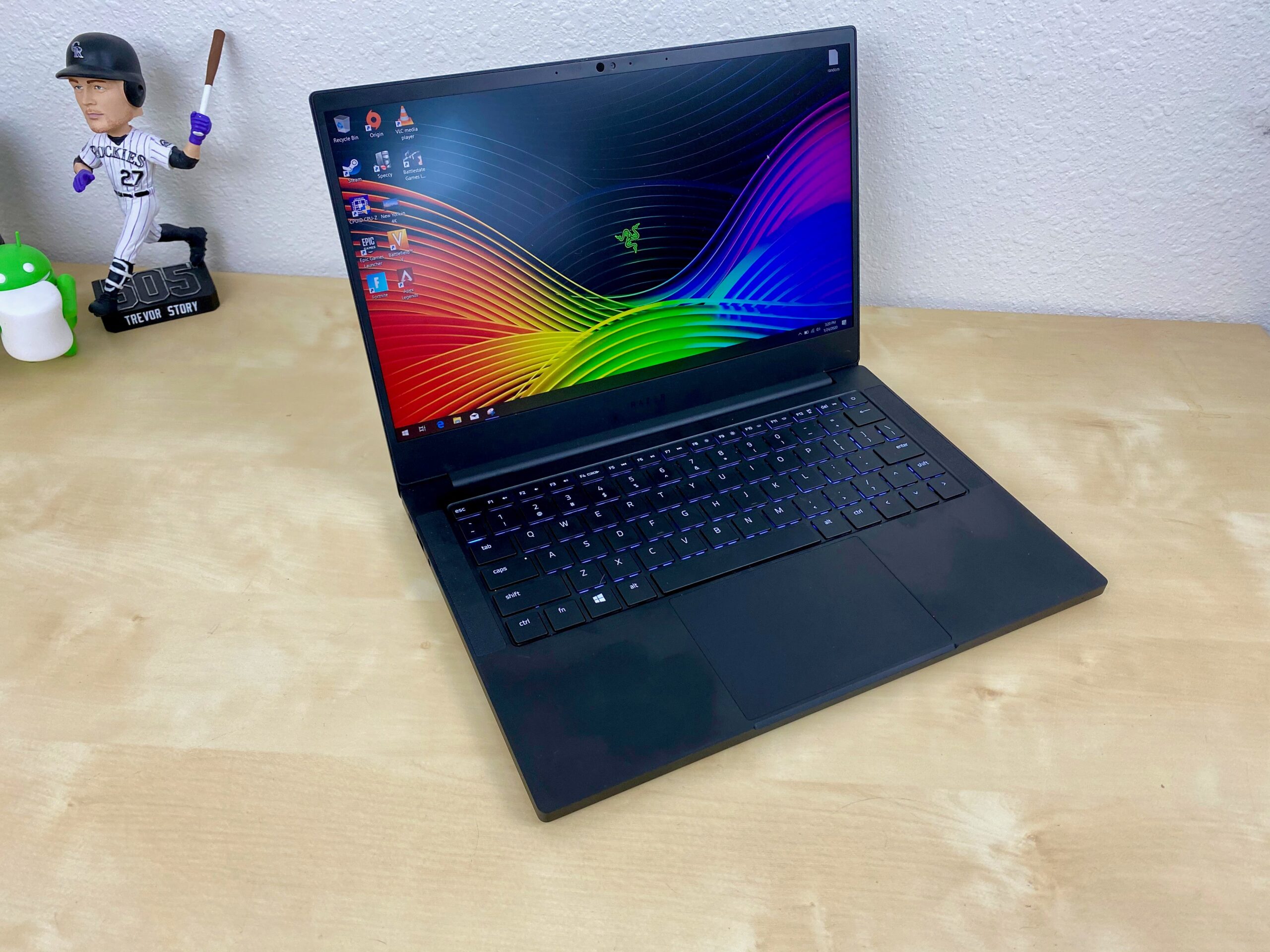
The Razer Blade Stealth 13 typically boasts a premium aesthetic, largely defined by its minimalist design and CNC-machined aluminum chassis. The black anodized finish, accented by the iconic Razer logo on the lid, gives it a sophisticated look. Build quality is generally exceptional, with minimal flex and a solid feel. The slim profile adds to its portability, making it easy to carry around. The design prioritizes portability, making it one of the more compact gaming laptops available, a key selling point for users prioritizing on-the-go gaming. Expect high-quality materials and a feeling of premium construction.
Display and Audio
The display options often include configurations with Full HD (1920×1080) or QHD+ (3200×1800) resolutions, often boasting high refresh rates, particularly in the later models. These high refresh rates are crucial for smooth gaming experiences. The screens generally cover a wide color gamut, offering vibrant and accurate visuals, vital for both gaming and content creation tasks. Audio quality is typically handled by stereo speakers, often tuned with THX Spatial Audio, delivering immersive sound. While the speakers are generally clear and loud enough for casual use, an external headset or speakers are recommended for the best gaming experience.
Performance and Gaming
Performance hinges on the internal components. Previous generations have utilized Intel Core i7 processors and NVIDIA GeForce MX series or GTX/RTX series graphics cards. The inclusion of dedicated GPUs allows for decent gaming performance in a portable form factor. The amount of RAM, typically 16GB, and the storage capacity, often 256GB, 512GB, or 1TB NVMe SSD, contribute significantly to overall system responsiveness. Gaming performance depends on the specific configuration and the games played, but you can expect respectable frame rates at 1080p resolution, with settings adjustments. Be mindful that thermal management can be a challenge in such a compact chassis, leading to potential throttling under heavy loads.
Keyboard and Trackpad
The keyboard typically offers good key travel and tactile feedback, providing a comfortable typing experience. Backlighting is standard, often with customizable RGB lighting controlled through Razer’s Synapse software. The trackpad is usually glass-surfaced, offering smooth and precise tracking. Gestures are well-supported, and the trackpad is responsive and accurate, enhancing usability. While the keyboard is generally well-regarded, some users might find the key layout to be slightly cramped due to the laptop’s compact size.
Ports and Connectivity
The port selection typically includes a good mix of options. This typically involves USB-C ports with Thunderbolt 4 support (allowing for fast data transfer and external display connectivity), USB-A ports, a headphone jack, and potentially a card reader. Connectivity is usually robust, featuring Wi-Fi 6 or Wi-Fi 6E and Bluetooth. The presence of Thunderbolt 4 significantly expands the laptop’s capabilities, allowing for the connection of external GPUs, displays, and other peripherals, broadening the laptop’s use case to professional work and content creation.
Battery Life
Battery life, due to the laptop’s power-hungry components, is usually a mixed bag. Under light use, such as web browsing or document editing, you can expect a few hours of use. However, when gaming or running demanding applications, the battery life will be significantly shorter, often under 2-3 hours. This makes the Blade Stealth 13 ideal for on-the-go gaming if you can manage to stay plugged in during intensive tasks.
Best Razer Blade Stealth 13 Alternatives for Gamers
Choosing an alternative depends heavily on your priorities. Here’s a comparison table showcasing some of the market’s more accessible, though less “stealthy”, options, looking at the Dell G15’s range as examples:
| Feature | Dell G15 (2023) – Entry-Level | Dell G15 (2023) – High-End | Razer Blade Stealth 13 (Similar Class) |
|---|---|---|---|
| CPU | i5-13400H | i9-13900HX | i7-1165G7 (Older Models) |
| GPU | RTX 3050 | RTX 4070 | GeForce MX150/MX250/GTX 1650 Ti |
| RAM | 8GB DDR5 | 32GB DDR5 | 16GB DDR4/DDR5 |
| Storage | 512GB SSD | 1TB SSD | 256GB – 1TB SSD |
| Display | 120Hz 1080p | 240Hz 1440p | 120Hz/144Hz 1080p/4K |
| Battery Life | 6-8 hours | 4-6 hours | 3-5 hours |
| Portability | Heavier, bulkier | Heavier, bulkier | Excellent, Lightweight |
| Price (approx.) | $999 – $1299 | $1799 – $2499 | $1399 – $2000 (used market) |
Other viable alternatives may include laptops from the MSI and ASUS ROG lines. These alternatives generally offer stronger performance for the price at the cost of less portability. The key is to balance the need for on-the-go gaming with the overall budget and target performance.
Value and Verdict
The Razer Blade Stealth 13 offers a compelling package for gamers who prioritize portability and premium design. Its excellent build quality, stylish aesthetic, and decent gaming performance make it an attractive option. However, the higher price point compared to some competitors, and the potential for thermal throttling, are considerations. Buying used might be a great route to consider if looking for value. It’s a great option if you can find one in excellent condition on the used market.
Overall Verdict: A premium ultraportable gaming laptop with excellent build quality, but potentially pricier than alternatives. The right buyer is someone who prioritizes aesthetics and portability without sacrificing gaming performance.
FAQ
- Is the Razer Blade Stealth 13 good for gaming? Yes, especially the later generations with dedicated GPUs, but it’s important to manage expectations, given the smaller form factor.
- What are the common issues with the Razer Blade Stealth 13? Thermal throttling can be a concern, and battery life during gaming isn’t great.
- What is the battery life of the Razer Blade Stealth 13? Expect around 3-5 hours of mixed use, and much less during gaming.
- Can I upgrade the RAM or storage? Typically, the RAM is soldered, but you can usually upgrade the SSD.
- Is the Razer Blade Stealth 13 worth the price? This depends on your needs. Its premium build, compact size, and good gaming performance are assets, but be sure to compare it to alternatives that may offer a better value proposition.