Microsoft Surface Pro 9: A Deep Dive into the 2-in-1 Powerhouse
The Microsoft Surface Pro 9 represents the evolution of a long-standing line of premium 2-in-1 devices. Blending the portability of a tablet with the power and functionality of a laptop, the Surface Pro 9 aims to cater to a diverse audience, from students and professionals to creatives. Its sleek design, vibrant display, and versatile form factor make it a compelling choice for those seeking a flexible and powerful computing experience. This comprehensive review will delve into its key features, performance capabilities, and overall value proposition.
Outline
- Design and Build Quality
- Display and Audio
- Performance and Specifications
- Keyboard and Accessories
- Battery Life
- Software and Features
- Who is the Surface Pro 9 For?
- Best Surface Pro 9 Alternatives
- Surface Pro 9: Pros and Cons
- Frequently Asked Questions
Design and Build Quality
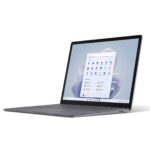
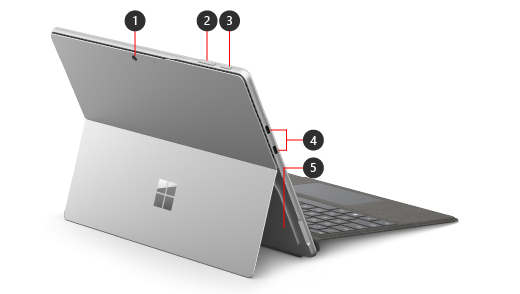
Microsoft maintains its signature minimalist aesthetic with the Surface Pro 9. The device boasts a sleek, aluminum unibody design that’s both durable and stylish. The integrated kickstand, a hallmark of the Surface Pro line, offers seamless adjustment to various angles, allowing for comfortable use in a variety of scenarios. It’s available in several attractive color options, including Platinum, Sapphire, Forest, and Graphite (color availability may vary by region and configuration). Build quality is top-notch; the device feels premium in hand, with minimal flex or creaks. The overall design prioritizes portability and elegance, making it a suitable companion for on-the-go professionals and students. The slim profile and relatively lightweight construction add to its appeal.
Display and Audio
The Surface Pro 9 features a vibrant 13-inch PixelSense Flow display with a 120Hz refresh rate. This higher refresh rate results in smoother animations and a more responsive feel, particularly noticeable when scrolling or gaming. The display boasts a sharp resolution and excellent color accuracy, making it ideal for creative tasks, media consumption, and everyday productivity. The screen is also protected by Corning Gorilla Glass 5, adding an extra layer of durability.
Audio quality is another highlight. The device incorporates Omnisonic speakers with Dolby Atmos support, delivering clear and immersive sound. The speakers are well-placed, projecting sound effectively towards the user, enhancing the overall multimedia experience.
Performance and Specifications
The Surface Pro 9 offers a choice of processors, catering to different performance needs. Configurations are available with either 12th Gen Intel Core i5 or Core i7 processors, paired with integrated Intel Iris Xe Graphics. Storage options range from 256GB to 1TB solid-state drives (SSDs), and RAM options include 8GB, 16GB, or 32GB of LPDDR5 RAM. The inclusion of Thunderbolt 4 ports ensures fast data transfer speeds and the ability to connect to external displays and peripherals. Performance is generally swift and responsive, handling everyday tasks, multitasking, and even light creative workloads with ease. The integrated graphics are suitable for casual gaming and video editing, though more demanding tasks may benefit from an external GPU. The processor options provide a good balance between power and battery efficiency.
Keyboard and Accessories
The Surface Pro 9 relies on optional accessories for a complete laptop experience. The Surface Pro Signature Keyboard (sold separately) magnetically attaches to the device, providing a comfortable typing experience. The keyboard also integrates a touchpad for cursor control. The Surface Slim Pen 2 (also sold separately) offers exceptional precision and responsiveness for drawing, sketching, and note-taking. It magnetically attaches and stores within the Signature Keyboard, allowing it to charge wirelessly. Microsoft has refined the haptic feedback on the Slim Pen 2, providing a more natural and tactile writing experience.
Battery Life
Battery life on the Surface Pro 9 is competitive for its class, but it varies depending on usage. Expect around 10-15 hours of typical use, which includes web browsing, video streaming, and light productivity tasks. However, demanding tasks like video editing or gaming will significantly reduce battery life. The device charges via a proprietary Surface Connect port, and fast charging capabilities are included, allowing for a quicker replenishment of power.
Software and Features
The Surface Pro 9 ships with Windows 11 pre-installed, offering a modern and intuitive user interface. Windows 11 provides access to a vast ecosystem of applications and services. The device also integrates seamlessly with Microsoft’s cloud services, such as OneDrive and Microsoft 365. The inclusion of Windows Hello facial recognition provides a secure and convenient way to log in. Additional features include advanced camera capabilities, with a 1080p front-facing camera for video calls and a rear-facing camera for capturing photos and videos.
Who is the Surface Pro 9 For?
The Surface Pro 9 is ideally suited for:
- Professionals: Those who need a portable and versatile device for on-the-go productivity, presentations, and note-taking.
- Students: Students who require a lightweight and adaptable device for taking notes, creating presentations, and completing assignments.
- Creatives: Designers, artists, and creators who need a tablet with pen support for sketching, drawing, and editing photos and videos.
- Anyone seeking a premium 2-in-1: Users who value design, performance, and flexibility in a single device.
Best Surface Pro 9 Alternatives
Considering alternatives depends on your specific needs. Here’s a comparison table showcasing some top competitors, focusing on performance, features, and price points. Note: Price varies based on configuration and sales.
| Feature | Microsoft Surface Pro 9 | Apple iPad Air (5th Gen) | Samsung Galaxy Tab S8+ | Dell XPS 13 2-in-1 (9315) |
|---|---|---|---|---|
| Operating System | Windows 11 | iPadOS | Android | Windows 11 |
| Processor | Intel Core i5/i7 | Apple M1 | Snapdragon 8 Gen 1 | Intel Core i5/i7 |
| Display | 13″ PixelSense Flow | 10.9″ Liquid Retina | 12.4″ Super AMOLED | 13.4″ FHD+ Touch |
| RAM | 8GB/16GB/32GB | 8GB | 8GB/12GB | 8GB/16GB/32GB |
| Storage | 256GB-1TB SSD | 64GB/256GB | 128GB/256GB | 256GB-1TB SSD |
| Pen Support | Yes (Slim Pen 2 – sold separately) | Yes (Apple Pencil – sold separately) | Yes (S Pen – included) | No (Touchscreen only) |
| Keyboard (Included) | No (Sold separately) | No (Sold separately) | No (Sold separately) | No (Sold separately) |
| Battery Life | 10-15 hours | Up to 10 hours | Up to 10 hours | Up to 8 hours |
| Starting Price | ~$999 | ~$559 | ~$899 | ~$1099 |
| Best For | Versatile Productivity | Tablet Focused | Android Experience | Premium Laptop Experience |
Best [Surface Pro 9] Alternatives for Budget Buyers: The iPad Air (5th Gen) offers excellent value for its performance and feature set, although reliant on iPadOS and requiring the Apple Pencil.
Best [Surface Pro 9] Alternatives for Productivity: The Dell XPS 13 2-in-1 (9315) provides a more traditional laptop experience, though at a higher price and without detachable functionality.
Surface Pro 9: Pros and Cons
Pros:
- Sleek and premium design
- Excellent display with 120Hz refresh rate
- Powerful performance with Intel Core i5/i7 processors
- Versatile 2-in-1 form factor
- Good audio quality
- Thunderbolt 4 ports
- Optional haptic feedback pen
Cons:
- Keyboard and Pen sold separately (adds to overall cost)
- Battery life can vary significantly
- Can get expensive with accessories
- Integrated Graphics not suited for demanding gaming
Frequently Asked Questions
- Does the Surface Pro 9 come with a keyboard?
No, the Surface Pro Signature Keyboard is sold separately. - Does the Surface Pro 9 come with a pen?
No, the Surface Slim Pen 2 is sold separately. - What is the battery life of the Surface Pro 9?
Expect around 10-15 hours of typical use, but it varies based on usage. - Can I connect external displays to the Surface Pro 9?
Yes, thanks to the Thunderbolt 4 ports, you can connect to external displays. - What are the available color options?
Platinum, Sapphire, Forest, and Graphite (color availability may vary by region and configuration). - Does the Surface Pro 9 support cellular connectivity?
Yes, certain configurations are available with 5G cellular connectivity.