
Lenovo IdeaPad Flex 5: A Comprehensive Review and Buyer’s Guide
The Lenovo IdeaPad Flex 5 series has solidified its place as a popular choice for users seeking a versatile 2-in-1 convertible laptop. Combining the functionality of a tablet with the power of a traditional laptop, the Flex 5 offers a compelling package for students, professionals, and casual users alike. This review delves into the key features, performance, and overall value of the IdeaPad Flex 5, helping you determine if it’s the right fit for your needs.
Outline
- Design and Build Quality
- Display and Audio
- Performance and Specs
- Battery Life
- Connectivity and Ports
- Software and Features
- Pricing and Value
- Best Lenovo IdeaPad Flex 5 Alternatives
- Conclusion
- Frequently Asked Questions (FAQ)
Design and Build Quality
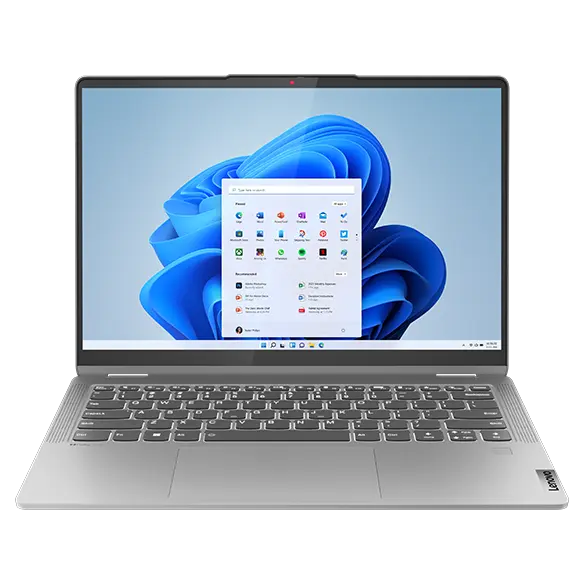
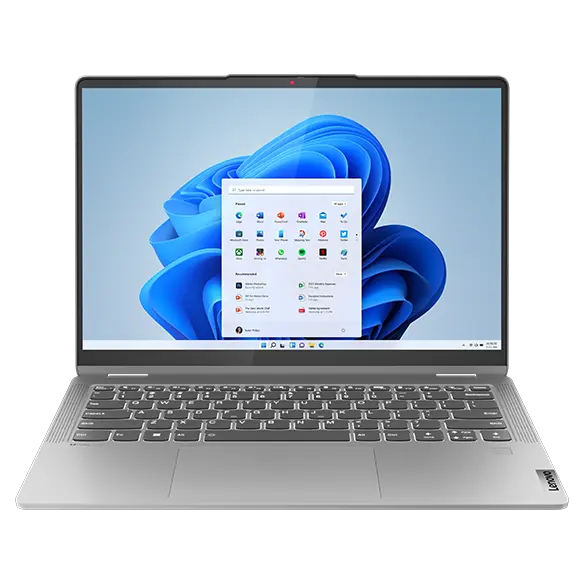
The Lenovo IdeaPad Flex 5 typically sports a sleek and modern design. It often features an aluminum chassis, lending it a premium feel and adding to its durability. The 360-degree hinge allows for various usage modes, including laptop, tent, stand, and tablet. This flexibility is a key selling point, making it suitable for a wide range of tasks, from typing documents to watching videos or drawing with a compatible stylus (often sold separately). The overall build quality is generally good for its price point, with a solid feel and minimal flex. However, some users have noted that the hinge mechanism might feel less robust than those found on higher-end 2-in-1 devices.
Display and Audio
The display is a crucial aspect of any laptop, and the IdeaPad Flex 5 typically offers a vibrant and responsive touchscreen. Common features include Full HD (1920 x 1080) resolution, offering sharp visuals and comfortable viewing. Brightness levels are usually adequate for indoor use, but may struggle in direct sunlight. The display often supports touch input and stylus support, enhancing its versatility for creative tasks or note-taking. Audio quality is generally decent, with stereo speakers often delivering clear sound for everyday use, but may lack the depth and bass of more premium laptops.
Performance and Specs
The IdeaPad Flex 5 series offers a range of configurations to cater to different budgets and performance requirements. Processors range from Intel Core i3, i5, or i7 models (or AMD Ryzen equivalents), providing varying levels of processing power. RAM options typically start at 8GB and go up to 16GB, allowing for smooth multitasking. Storage is usually provided by fast SSDs, ranging from 256GB to 1TB, ensuring quick boot times and application loading. Integrated graphics, such as Intel Iris Xe Graphics or AMD Radeon Graphics, are sufficient for everyday tasks and light gaming, but not suitable for demanding games or professional video editing.
Battery Life
Battery life is an important consideration for a portable device. The IdeaPad Flex 5 typically offers decent battery life, often lasting for around 8-10 hours of typical use, such as web browsing, document editing, and video streaming. However, battery life can vary depending on the specific configuration, screen brightness, and the intensity of the tasks being performed.
Connectivity and Ports
The IdeaPad Flex 5 usually provides a good selection of ports for connectivity. Common ports include:
- USB-A ports (for connecting peripherals)
- USB-C ports (for charging, data transfer, and display output)
- HDMI port (for connecting to external displays)
- Headphone/microphone jack
- SD card reader (useful for photographers and videographers)
- Wi-Fi 6 and Bluetooth for wireless connectivity.
Software and Features
The IdeaPad Flex 5 typically runs on Windows 11 Home, providing a familiar and user-friendly operating system. Lenovo often pre-installs some of its own software, such as Lenovo Vantage, which allows users to manage system settings, update drivers, and access support. Other features may include a webcam with a physical privacy shutter and a fingerprint reader for secure login.
Pricing and Value
The Lenovo IdeaPad Flex 5 offers excellent value for money. It is competitively priced, making it an attractive option for budget-conscious buyers seeking a versatile 2-in-1 laptop. The combination of features, performance, and portability makes it a compelling choice for students, professionals, and everyday users. Price points can vary based on the configuration you choose.
Best Lenovo IdeaPad Flex 5 Alternatives
Here are some alternatives to consider, along with their key strengths:
- HP Envy x360: A direct competitor to the Flex 5, often offering a similar feature set and competitive pricing. Known for its sleek design and reliable performance.
- Dell Inspiron 2-in-1: Another solid option with various configurations, typically offering good performance and build quality.
- Microsoft Surface Laptop Go: For those prioritizing portability and a premium feel, the Surface Laptop Go offers a smaller form factor and a sleek design, though performance might be slightly lower.
- Acer Chromebook Spin: If your needs are primarily web-based and you want to save money, a Chromebook Spin is an excellent choice.
Conclusion
The Lenovo IdeaPad Flex 5 is a well-rounded 2-in-1 laptop that offers excellent value for its price. Its versatile design, decent performance, and solid features make it a great choice for a wide range of users. While there are other options available, the Flex 5 remains a strong contender in the convertible laptop market.
Frequently Asked Questions (FAQ)
-
Does the Lenovo IdeaPad Flex 5 come with a stylus?
- No, a stylus is typically sold separately.
-
Is the display touchscreen?
- Yes, the display is a touchscreen.
-
What are the different modes of the Lenovo IdeaPad Flex 5?
- Laptop, Tent, Stand, and Tablet modes.
-
What operating system does the Flex 5 run?
- Windows 11 Home.
-
What are the common processor options?
- Intel Core i3, i5, i7 (or AMD Ryzen equivalents).
-
Is it good for gaming?
- It can handle light gaming, but it’s not designed for demanding games.










