
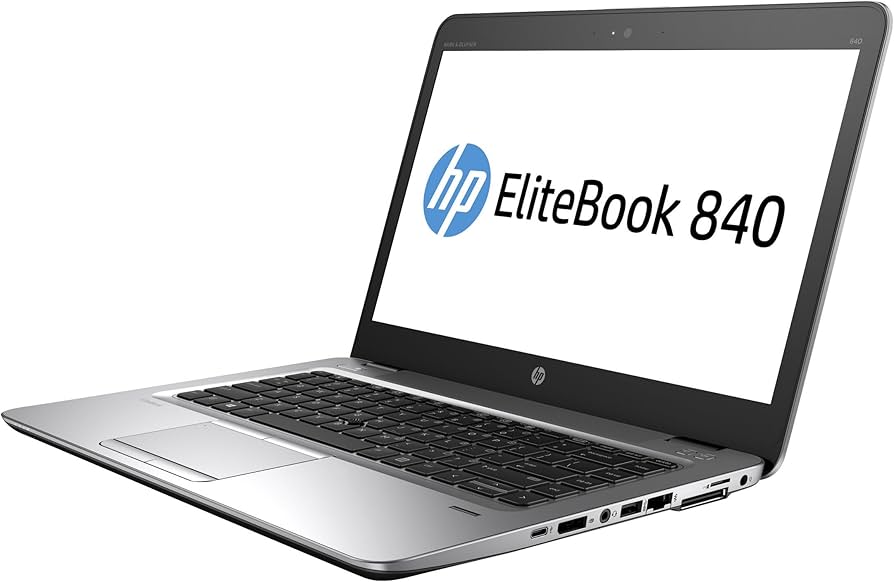

HP EliteBook 840: A Comprehensive Guide for Professionals
The HP EliteBook 840 series represents a line of business-class laptops designed for professionals who demand performance, security, and durability. These notebooks typically balance power and portability, making them suitable for a wide range of tasks, from office work to travel. The EliteBook 840 often features a sleek design, robust security features, and a focus on long-term reliability. This comprehensive guide will explore the various aspects of the HP EliteBook 840, providing potential buyers with the information they need to make an informed decision.
Outline
- Overview: What is the HP EliteBook 840?
- Key Features and Specifications
- Performance and Productivity
- Security and Privacy Features
- Design, Build Quality, and Portability
- Display and Audio Quality
- Battery Life and Power Management
- Target Audience and Use Cases
- Best HP EliteBook 840 Alternatives
- Pros and Cons of the HP EliteBook 840
- Where to Buy the HP EliteBook 840
- Frequently Asked Questions (FAQ)
Overview: What is the HP EliteBook 840?
The HP EliteBook 840 is a premium business laptop designed and manufactured by Hewlett-Packard. It’s part of the broader EliteBook family, which is known for its focus on security, durability, and performance. The “840” designation generally indicates a 14-inch form factor, offering a balance between screen size and portability. The EliteBook 840 series has been updated over several generations, with each iteration incorporating the latest Intel or AMD processors, updated graphics, and enhanced features. These laptops are targeted toward professionals, executives, and organizations requiring a reliable and secure computing solution.
Key Features and Specifications
The specifications of the HP EliteBook 840 can vary depending on the specific generation and configuration. However, some common features include:
- Processors: Intel Core i5 or i7 processors (often with vPro technology) or AMD Ryzen Pro processors.
- Memory: Typically 8GB, 16GB, or 32GB of DDR4 or DDR5 RAM.
- Storage: SSD storage, often ranging from 256GB to 2TB.
- Graphics: Integrated Intel Iris Xe Graphics or AMD Radeon Graphics; sometimes optional dedicated graphics cards are available.
- Display: 14-inch display, with options for Full HD (1920×1080) or Quad HD (2560×1440) resolution, and sometimes touchscreens and privacy screens.
- Ports: USB-C (with Thunderbolt support), USB-A, HDMI, audio jack, and a microSD card reader.
- Connectivity: Wi-Fi 6E, Bluetooth 5.0 or later, and optional 4G LTE or 5G cellular connectivity.
- Security Features: TPM 2.0, fingerprint reader, IR webcam for Windows Hello, and optional HP Sure Start, HP Sure View, and HP Wolf Security.
- Operating System: Windows 10 Pro or Windows 11 Pro.
Performance and Productivity
The HP EliteBook 840 is designed to deliver excellent performance for professional use. The choice of Intel Core or AMD Ryzen processors, coupled with ample RAM and fast SSD storage, ensures smooth multitasking, responsiveness, and quick application loading times. The integrated graphics are generally sufficient for common business tasks, such as video conferencing, presentations, and light content creation. Some configurations may include dedicated graphics for more demanding workloads. The vPro technology (available with Intel processors) offers enhanced security, remote management capabilities, and improved performance optimization for enterprise environments. The laptop’s keyboard is usually comfortable for extended typing, and the trackpad is responsive.
Security and Privacy Features
Security is a primary focus of the HP EliteBook 840. Several features help protect sensitive data and prevent unauthorized access:
- TPM 2.0: A Trusted Platform Module (TPM) 2.0 chip provides hardware-based encryption for data protection.
- Fingerprint Reader: Biometric authentication provides secure login.
- IR Webcam: Windows Hello allows for facial recognition login.
- HP Sure Start: A self-healing BIOS that can automatically recover from malware attacks.
- HP Sure View: An integrated privacy screen that limits the viewing angle, preventing visual hacking.
- HP Wolf Security: A comprehensive security suite that protects against threats.
- Kensington Lock Slot: A physical security option for preventing theft.
Design, Build Quality, and Portability
The HP EliteBook 840 typically features a professional and understated design with a durable build. The chassis is often made from premium materials such as aluminum, making it resistant to scratches and bumps. Its build quality is robust, meeting military-grade (MIL-STD 810G or 810H) testing for durability against drops, vibrations, and extreme temperatures. The 14-inch form factor makes the EliteBook 840 portable and easy to carry, and it is usually thin and relatively lightweight. The design is intended to be stylish without being flashy, appealing to business users who value professionalism.
Display and Audio Quality
The display quality of the HP EliteBook 840 can vary based on the specific configuration. However, it often features sharp displays with good color accuracy and brightness. The displays are usually anti-glare, making them easier to use in various lighting conditions. Options for Full HD (1920×1080) and Quad HD (2560×1440) resolutions are common. Some models include touchscreen capabilities and integrated privacy screens. The audio quality is typically acceptable, often featuring dual stereo speakers tuned for conferencing and media consumption. The built-in microphones are usually of good quality, allowing for clear communication during video calls.
Battery Life and Power Management
The battery life of the HP EliteBook 840 is generally good, often providing all-day performance for typical business use. The specific battery life varies depending on the processor, display, and usage patterns. HP often optimizes the EliteBook 840 for power efficiency, and the laptops include power-saving features to extend battery life. The laptop also often supports fast charging, allowing users to quickly recharge the battery.
Target Audience and Use Cases
The HP EliteBook 840 is primarily targeted at:
- Business Professionals: Executives, managers, and employees in various industries.
- Corporate Users: Businesses and organizations looking for reliable and secure laptops for their workforce.
- Travelers: Users who require a portable and durable laptop for on-the-go productivity.
- Government and Education: Those requiring high levels of security and reliability.
The EliteBook 840 is well-suited for a variety of tasks, including:
- Office Productivity: Word processing, spreadsheets, presentations, and email.
- Video Conferencing: Conducting meetings and collaborating with colleagues.
- Content Creation: Light photo and video editing.
- Web Browsing and Communication: Staying connected with colleagues and clients.
- Remote Work: Working from home or on the road.
Best HP EliteBook 840 Alternatives
While the HP EliteBook 840 is a strong contender in the business laptop market, several alternatives offer comparable features and performance. Here’s a look at some of the best alternatives:
Comparison Table: Business Laptop Alternatives
| Feature | HP EliteBook 840 | Dell Latitude 7400/7440 | Lenovo ThinkPad X1 Carbon | Apple MacBook Air (M2) | Microsoft Surface Laptop 5 |
|---|---|---|---|---|---|
| Processor | Intel Core or AMD Ryzen Pro | Intel Core | Intel Core | Apple M2 Chip | Intel Core |
| Screen Size | 14-inch | 14-inch | 14-inch | 13.6-inch | 13.5-inch / 15-inch |
| Memory | Up to 32GB | Up to 32GB | Up to 32GB | Up to 24GB | Up to 32GB |
| Storage | Up to 2TB SSD | Up to 1TB or 2TB SSD | Up to 2TB SSD | Up to 2TB SSD | Up to 1TB SSD |
| Security | TPM 2.0, Fingerprint Reader, IR Webcam, Sure Start | TPM 2.0, Fingerprint Reader, IR Webcam | TPM 2.0, Fingerprint Reader, IR Webcam | Touch ID | Windows Hello, TPM 2.0 |
| Build | Aluminum | Aluminum | Carbon Fiber | Aluminum | Aluminum |
| Operating System | Windows 10 Pro or Windows 11 Pro | Windows 10 Pro or Windows 11 Pro | Windows 10 Pro or Windows 11 Pro | macOS | Windows 11 Home/Pro |
| Portability | Excellent | Excellent | Excellent | Excellent | Excellent |
| Price | Mid-range to High-end | Mid-range to High-end | High-end | Mid-range to High-end | Mid-range to High-end |
Pros and Cons of the HP EliteBook 840
Pros:
- Excellent Performance: Powerful processors and ample RAM for demanding tasks.
- Robust Security Features: Comprehensive security features for data protection.
- Durable Build Quality: Meets military-grade standards for reliability.
- Good Portability: Compact and lightweight design for easy transport.
- Comfortable Keyboard: Keyboard suitable for extended typing sessions.
- Long Battery Life: Excellent battery life for all-day productivity.
- VPro Availability: Offers advanced management and security features for businesses.
Cons:
- Price: Can be expensive, especially with high-end configurations.
- Graphics Performance: Integrated graphics might not be ideal for demanding gaming or graphics-intensive applications.
- Display Options: While the displays are generally good, the best options are sometimes only available in more expensive configurations.
- Some Bloatware: May include some pre-installed software, which can be removed.
- Repairability: Repairing some components can sometimes be difficult.
Where to Buy the HP EliteBook 840
The HP EliteBook 840 can be purchased from various retailers, including:
- HP’s Official Website: This is the most reliable source for the latest models and configurations.
- Major Electronics Retailers: Best Buy, Amazon, and other retailers often carry various EliteBook 840 models.
- Authorized Resellers: Many business IT suppliers and resellers stock the EliteBook 840.
- Online Marketplaces: eBay and other marketplaces may offer refurbished or used EliteBook 840 laptops. (Buyer beware)
Frequently Asked Questions (FAQ)
-
What is the difference between the HP EliteBook 840 and the HP ProBook?
The EliteBook series is the higher-end business line, known for its premium build quality, advanced security features, and generally greater performance. The ProBook series is a more budget-friendly option, offering a balance between features and cost.
-
Does the HP EliteBook 840 have a touchscreen?
Yes, some configurations of the HP EliteBook 840 include a touchscreen display. This is usually an option and not a standard feature.
-
Does the HP EliteBook 840 come with a warranty?
Yes, HP offers a standard warranty on the EliteBook 840, typically one year. Extended warranties and support plans are often available for purchase.
-
Is the HP EliteBook 840 suitable for gaming?
While the EliteBook 840 can handle some light gaming, it’s not primarily designed for gaming. The integrated graphics are generally not powerful enough for demanding games.
-
Can I upgrade the RAM or storage in the HP EliteBook 840?
The RAM and storage of the EliteBook 840 are sometimes upgradeable, depending on the specific model. Accessing the components may require disassembling the laptop.










