HP ZBook Firefly 16: A Deep Dive into Performance and Portability
The HP ZBook Firefly 16 is a mobile workstation designed for professionals who demand power and performance in a portable package. Offering a blend of high-end components, including powerful processors and professional-grade graphics cards, this laptop is aimed at creative professionals, engineers, and anyone who needs to run demanding applications on the go. Its sleek design and focus on durability make it a compelling choice for users who travel frequently or work in diverse environments.
Outline
- Overview
- Design and Build Quality
- Display and Audio
- Performance and Specifications
- Connectivity and Ports
- Battery Life
- Best Alternatives and Competitors
- Who Should Buy the HP ZBook Firefly 16?
- Conclusion
- Frequently Asked Questions (FAQ)
Design and Build Quality
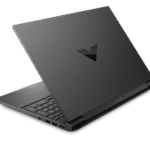
The HP ZBook Firefly 16 boasts a premium design with a focus on durability. Typically constructed from a robust metal chassis, it feels solid and well-built. The design often features a minimalist aesthetic with clean lines and a professional look. The keyboard is generally comfortable for extended use, with good key travel and responsiveness. HP often emphasizes the device’s adherence to military-grade (MIL-STD 810G) testing standards, ensuring it can withstand drops, shocks, and extreme temperatures, making it a reliable companion for demanding work environments. The overall build quality inspires confidence and reflects the workstation’s premium positioning.
Display and Audio
The display on the HP ZBook Firefly 16 is a key selling point, often featuring high-resolution options like FHD+ (1920×1200) or UHD+ (3840×2400). The panels used are typically bright and offer excellent color accuracy, crucial for tasks like photo and video editing. Anti-glare coatings are usually standard, allowing for comfortable use in various lighting conditions.
Audio quality is generally good, with the inclusion of stereo speakers often tuned by Bang & Olufsen. While the audio is not designed to replace external speakers, the integrated speakers provide clear and balanced sound for video conferencing and media consumption. The inclusion of a built-in microphone array often provides excellent noise cancellation for clear communication.
Performance and Specifications
The HP ZBook Firefly 16 comes equipped with powerful internal components designed to handle demanding workloads. It often features Intel Core i5 or i7 processors from the latest generations, providing ample processing power for a wide range of tasks. For graphics, options often include integrated Intel Iris Xe Graphics or dedicated NVIDIA RTX A-series or T-series GPUs (depending on the configuration), delivering professional-grade performance for CAD, 3D modeling, and video editing. Memory options typically range from 16GB to 64GB of RAM, ensuring smooth multitasking and handling large datasets. Storage is provided by fast NVMe SSDs, often up to 2TB, providing ample space for files and fast boot times. The Firefly 16 is engineered to offer a seamless and responsive user experience even with resource-intensive applications.
Connectivity and Ports
The ZBook Firefly 16 offers a comprehensive selection of ports to meet the needs of professional users. Standard connectivity usually includes:
- USB Ports: USB-A ports for connecting external devices.
- Thunderbolt Ports: Thunderbolt 4 ports for high-speed data transfer, video output, and power delivery.
- HDMI Port: HDMI port for connecting to external displays.
- SD Card Reader: SD card reader for easy transfer of photos and videos.
- Audio Jack: A 3.5mm headphone/microphone combo jack.
- Ethernet Port: Some models may include a physical Ethernet port or require a dongle for wired network connections.
- Wireless Connectivity: Wi-Fi 6E and Bluetooth 5.2 or later for wireless networking and peripheral connections.
This wide range of ports ensures that users can easily connect to various peripherals, displays, and networks without needing numerous adapters.
Battery Life
Battery life is a crucial consideration for any portable workstation. The HP ZBook Firefly 16 typically offers a battery life that is adequate for a full day of work, depending on the configuration and usage patterns. The battery capacity varies based on the specific model, but it is often sufficient for 8-10 hours of general productivity tasks. More demanding workloads, such as video editing or running intensive simulations, will naturally drain the battery more quickly. The inclusion of fast-charging technology allows users to quickly replenish the battery when needed.
Best Alternatives and Competitors
The mobile workstation market offers several compelling alternatives to the HP ZBook Firefly 16. These competitors provide varying features, performance levels, and price points. Careful consideration of individual needs and budget is essential when choosing the right workstation.
Dell G15 and its Advantages
The Dell G15 is a gaming laptop that often presents a strong value proposition, even when compared to high-end workstations. While designed primarily for gaming, the G15’s powerful processors and graphics cards (from AMD or NVIDIA) often rival or even surpass the performance of some ZBook configurations, especially in tasks like video editing and 3D rendering. Its advantages include:
- Higher Graphics Performance: The G15 often features more powerful dedicated graphics cards at similar price points.
- Competitive Pricing: Generally, the Dell G15 can be more affordable.
- Gaming Features: Designed with gaming-specific features, such as high refresh rate displays and advanced cooling systems.
The disadvantages are:
- Not a true workstation: The G15 is not certified for professional applications.
- Design and Build: Typically has a gaming-centric design, which may not be suitable for all professional environments.
- Display Limitations: Might not offer the same color accuracy as professional-grade displays.
Other Laptop Comparison Table
| Feature | HP ZBook Firefly 16 | Dell XPS 15 | Apple MacBook Pro 16″ | Lenovo ThinkPad P Series |
|---|---|---|---|---|
| Target Audience | Professionals, Mobile Workers | Creative Professionals, General Use | Creative Professionals, Developers | Professionals, Engineers |
| Processor | Intel Core i5/i7 | Intel Core i5/i7/i9 | Apple M1 Pro/Max | Intel Xeon/Core i7/i9 |
| Graphics | Intel Iris Xe/NVIDIA RTX/T Series | NVIDIA GeForce RTX | Apple Integrated GPU | NVIDIA RTX/Quadro |
| Display | FHD+/UHD+, Color Accurate | OLED/IPS, Color Accurate | Liquid Retina XDR, Color Accurate | UHD/FHD+, Color Accurate |
| Build Quality | Rugged, Premium | Premium | Premium | Robust, Business-Focused |
| Portability | Excellent | Good | Good | Moderate |
| Price (Starting) | Varies, mid to high-end | Mid to High-end | High-end | High-end |
Who Should Buy the HP ZBook Firefly 16?
The HP ZBook Firefly 16 is an ideal choice for:
- Creative Professionals: Photo and video editors, graphic designers, and animators who need a powerful and portable workstation.
- Engineers and Architects: Individuals who work with CAD software, 3D modeling, and simulations.
- Mobile Workers: Anyone who needs a reliable and high-performance laptop for on-the-go productivity.
- Users needing ISV Certifications: Those whose workflow requires ISV certified applications.
Conclusion
The HP ZBook Firefly 16 is a well-rounded mobile workstation that delivers a compelling blend of performance, portability, and durability. Its powerful components, high-quality display, and robust build make it a strong contender for professionals who require a reliable and efficient laptop for demanding tasks. While the price point may be higher than some consumer laptops, the ZBook Firefly 16 offers excellent value for those who need a professional-grade device.
Frequently Asked Questions (FAQ)
Q: What is the primary difference between the Firefly 16 and other ZBook models?
A: The Firefly series is designed to offer a balance of power and portability. It generally sits between the ultraportable ZBook Power and the more powerful ZBook Studio or ZBook Fury models, offering a good compromise for users who value both performance and a manageable form factor.
Q: Can the Firefly 16 handle gaming?
A: While not specifically designed as a gaming laptop, the Firefly 16 can handle some gaming depending on the graphics card configuration. Models equipped with NVIDIA RTX or T-series GPUs can provide a decent gaming experience, although they are not the primary focus of this laptop.
Q: Does the Firefly 16 have a touchscreen option?
A: Yes, some configurations may offer a touchscreen option, allowing for touch input. However, this feature is not available in all models.
Q: What is the warranty on the HP ZBook Firefly 16?
A: The standard warranty typically includes a limited hardware warranty, which can vary depending on the region and the specific configuration. Extended warranty options, including accidental damage protection, are often available.
Q: How does the Firefly 16 compare to the MacBook Pro?
A: The Firefly 16 competes with the MacBook Pro in the professional workstation market. The MacBook Pro, particularly those with Apple’s M-series chips, excels in performance and battery life. However, the Firefly offers a wider range of configuration options and typically runs on Windows, making it a better choice for users who need access to specific software or prefer the Windows operating system.